
Join us at FabCon Atlanta from March 16 - 20, 2026, for the ultimate Fabric, Power BI, AI and SQL community-led event. Save $200 with code FABCOMM.
Register now!The Power BI Data Visualization World Championships is back! Get ahead of the game and start preparing now! Learn more
Hey,
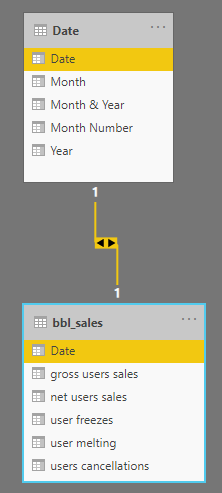
I Created a date table and related the table to my Sales table, which contains a sales per day (date).
Now i Created a "Line and clustered column chart", at the shared axis i put the month from the date table, and at the values i put the sales from my sales table. the visualization shows me the sales sorted from the biggest to the smallest, instead a chronological order (January - June). How i sort the axis chronological?
Thanks!
Solved! Go to Solution.
Hi @Anonymous
see a docs here
https://docs.microsoft.com/en-us/power-bi/consumer/end-user-change-sort
Hi @Anonymous
see a docs here
https://docs.microsoft.com/en-us/power-bi/consumer/end-user-change-sort
Hey thanks!
Another question - now at the total number there is no comma, how can I add a comma seperator?
@Anonymous
pick your formatted column at the right pane, then set decimal numbers in Column/Measure tools ribbon
Thanks! Other issue (instead opening new discussion..):
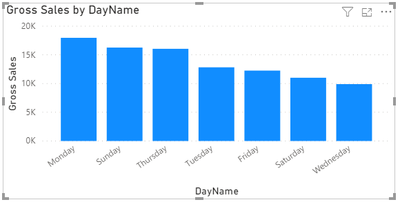
I Have a graph that orderd in alphabetical order:
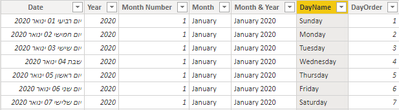
In my Date table i created a new column with the number of the day at the week (The full date is in hebrew language):
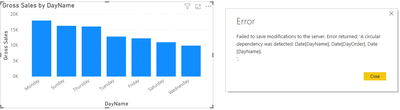
Now I'm trying the solution you gave me before (Sort the X axis by DayOrder at the "Sort By Column" button), and i get this error message:
What can be wrong? Thanks!
@Anonymous
try to remove new column from bar chart and use this technique https://docs.microsoft.com/en-us/power-bi/create-reports/desktop-sort-by-column instead
The Power BI Data Visualization World Championships is back! Get ahead of the game and start preparing now!
Check out the November 2025 Power BI update to learn about new features.
| User | Count |
|---|---|
| 59 | |
| 43 | |
| 42 | |
| 23 | |
| 17 |
| User | Count |
|---|---|
| 190 | |
| 122 | |
| 96 | |
| 66 | |
| 47 |