Get certified for free when you join Fabric Data Days 2026 and dive into Fabric, Power BI, SQL, AI, and other essential data skills.
Join nowJuly 7 - July 17 | Round 2 of the Power BI Dataviz World Championships. Don't miss your chance! Learn more
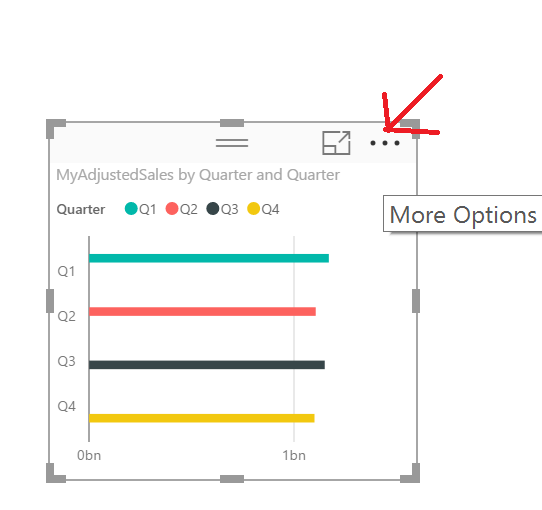
I am not able to change the data in my bar charts according to the legend. It is sorted alphabetical but that is confusing for the viewers as it is exactly the other way around than the data in the bar charts.
Solved! Go to Solution.
If your Axis and your Legend are the same in a bar/column chart you should be able to click the ellipses and sort by that column and your legend and axis should change correspondingly. I'm on the August update.
Hi,
thanks for the answer. Unfortunately I cannot find an ellipses.
Thank you very much! Updated and sorted!
Join us in Barcelona for FabCon and SQLCon, the Fabric, Power BI, SQL, and AI community event. Save €200 with code FABCMTY200.
Check out the July 2026 Power BI update to learn about new features.
Join Data Days 2026: 60 days of free live/on-demand sessions, challenges, study groups, and certification opportunities.
| User | Count |
|---|---|
| 30 | |
| 25 | |
| 23 | |
| 22 | |
| 13 |
| User | Count |
|---|---|
| 50 | |
| 32 | |
| 19 | |
| 19 | |
| 17 |