This time we’re going bigger than ever. Fabric, Power BI, SQL, AI and more. We're covering it all. You won't want to miss it.
Learn moreDid you hear? There's a new SQL AI Developer certification (DP-800). Start preparing now and be one of the first to get certified. Register now
Hello everyone!
I want to create a slicer for days that will have a default value ("Current Day") and numbers 1-31.
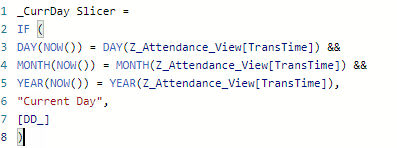
I've created a calculated column like the image below:
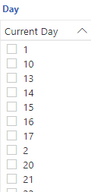
The problem with this code is I can't set [DD_] column data type to Whole Number because otherwise the type won't match with "Current Day" (Text data type), but if I change [DD_] column type to Text data type, the Day slicer won't sort nicely (example in image below):
If you have any idea, advice or better ways to approach this issue, I'm all ears! Thanks in advance for your help.
Solved! Go to Solution.
@NZ0090 ,
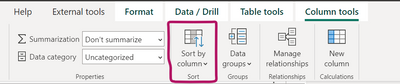
try to use Sort by column option, follow the below steps,
1. Select _CurrDay Slicer calculated column.
2. Then click Sort by column option from the Column tools menu.
3. Then sort the column using [DD_] column from the list. (this column data type should be in whole number)
Thanks,
Arul
@NZ0090 ,
try to use Sort by column option, follow the below steps,
1. Select _CurrDay Slicer calculated column.
2. Then click Sort by column option from the Column tools menu.
3. Then sort the column using [DD_] column from the list. (this column data type should be in whole number)
Thanks,
Arul
That works! Thanks for your help
Check out the April 2026 Power BI update to learn about new features.
Sign up to receive a private message when registration opens and key events begin.
If you have recently started exploring Fabric, we'd love to hear how it's going. Your feedback can help with product improvements.
| User | Count |
|---|---|
| 34 | |
| 31 | |
| 30 | |
| 21 | |
| 16 |
| User | Count |
|---|---|
| 63 | |
| 53 | |
| 31 | |
| 23 | |
| 23 |