Get Fabric or SQL Certified for Free.
Get certified for free when you join Fabric Data Days 2026 and dive into Fabric, Power BI, SQL, AI, and other essential data skills.
Join now- Power BI forums
- Get Help with Power BI
- Desktop
- Service
- Report Server
- Power Query
- Mobile Apps
- Developer
- DAX Commands and Tips
- Custom Visuals Development Discussion
- Health and Life Sciences
- Power BI Spanish forums
- Translated Spanish Desktop
- Training and Consulting
- Instructor Led Training
- Dashboard in a Day for Women, by Women
- Galleries
- Data Stories Gallery
- Themes Gallery
- Contests Gallery
- QuickViz Gallery
- Quick Measures Gallery
- Visual Calculations Gallery
- Fabric Apps Gallery
- Notebook Gallery
- Translytical Task Flow Gallery
- TMDL Gallery
- R Script Showcase
- Webinars and Video Gallery
- Ideas
- Custom Visuals Ideas (read-only)
- Issues
- Issues
- Events
- Upcoming Events
July 7 - July 17 | Round 2 of the Power BI Dataviz World Championships. Don't miss your chance! Learn more
- Power BI forums
- Forums
- Get Help with Power BI
- Desktop
- Re: Sort by value
- Subscribe to RSS Feed
- Mark Topic as New
- Mark Topic as Read
- Float this Topic for Current User
- Bookmark
- Subscribe
- Printer Friendly Page


- Mark as New
- Bookmark
- Subscribe
- Mute
- Subscribe to RSS Feed
- Permalink
- Report Inappropriate Content
Sort by value
Hi all,
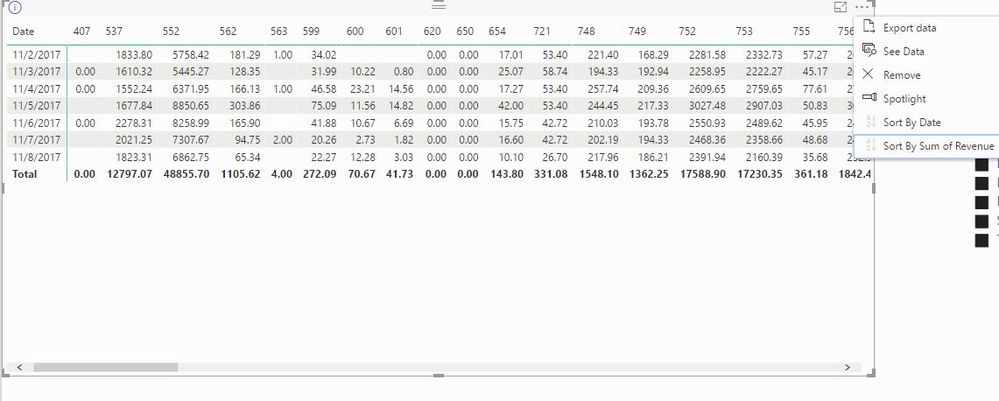
I am trying to sort these table columns by values (column revenue), so the higher total value will be the first from the left and so on.
I clicked on the sort by column but nothing happened.

Thanks
Solved! Go to Solution.
- Mark as New
- Bookmark
- Subscribe
- Mute
- Subscribe to RSS Feed
- Permalink
- Report Inappropriate Content
Hi All,
I found a workaround solution.
After I changed between Rows and Columns parameter (ID will be Rows instead of Date) and apply column subtotal, I was able to sort by Sum of revenue values.
So the final result wasn't exactly like I wanted to but we will have to adjust it.

- Mark as New
- Bookmark
- Subscribe
- Mute
- Subscribe to RSS Feed
- Permalink
- Report Inappropriate Content
Hi All,
I found a workaround solution.
After I changed between Rows and Columns parameter (ID will be Rows instead of Date) and apply column subtotal, I was able to sort by Sum of revenue values.
So the final result wasn't exactly like I wanted to but we will have to adjust it.

- Mark as New
- Bookmark
- Subscribe
- Mute
- Subscribe to RSS Feed
- Permalink
- Report Inappropriate Content
Hi @barlevitzky,
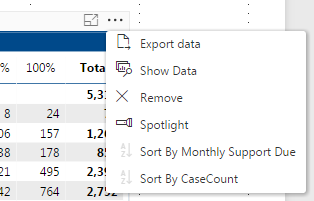
I'm not sure the Matrix visual can do what you're asking, but give this a shot:
In your matrix, click on the elipses at the top right. In the dialogue box that appears, see if there is a "sort by 'x'" section that will do what you're looking for.
- Mark as New
- Bookmark
- Subscribe
- Mute
- Subscribe to RSS Feed
- Permalink
- Report Inappropriate Content
- Mark as New
- Bookmark
- Subscribe
- Mute
- Subscribe to RSS Feed
- Permalink
- Report Inappropriate Content
Alright, I think I may have it. You'll want to create a new table that can handle the totaling for you, by doing the following:
1. create a new table that houses the values you're looking to use:
Table2 = SUMMARIZE( 'table' , 'table'[ID] )
2. calculate the totals in a new column that show up at the bottom of the Matrix:
Sum of Revenue= CALCULATE ( SUM( 'table'[revenue] ) , FILTER( 'table' , 'Table2'[ID] = 'table'[ID] ))
3. Create a rank column of these values:
Rank = RANKX( ALL( 'Table2' , 'Table2'[Sum of Revenue] , , DESC )
Then connect the 'Table2'[ID] column to your original data (the "one" side will be the new table), replace the columns in the Matrix visual with the new 'Table2'[ID], and Sort by Column on the Rank you just created.
EDIT: I realized that the Sort by Column feature won't let you sort based on the Rank, due to the FILTER being applied to get it. So as a workaround, you could concatenate the Rank and ID columns and use it as the column heading in your Matrix:
RankID = 'Table2'[Rank] & ". " & 'Table2'[ID]
- Mark as New
- Bookmark
- Subscribe
- Mute
- Subscribe to RSS Feed
- Permalink
- Report Inappropriate Content
@barlevitzky Are the columns being created from a single data source? i.e. 407, 537, 552, etc. are all loaded into the matrix through one data source?


- Mark as New
- Bookmark
- Subscribe
- Mute
- Subscribe to RSS Feed
- Permalink
- Report Inappropriate Content
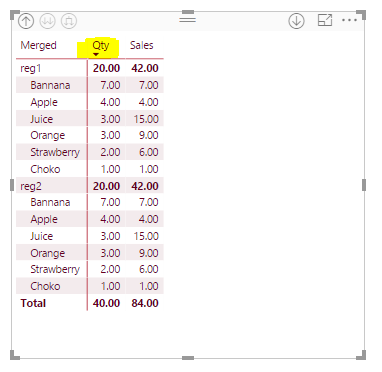
I got his point:
- He is using Sales Qty in Columns field in the actual Matrix and would like to see Qty's in a Desc order not sure if it's actually possible.
- Mark as New
- Bookmark
- Subscribe
- Mute
- Subscribe to RSS Feed
- Permalink
- Report Inappropriate Content
@Abduvali, yes. these numbers are coming from "ID" column.
we can relate that to store id and revenue per store. So i want to see first the store with the highest revenue.
- Mark as New
- Bookmark
- Subscribe
- Mute
- Subscribe to RSS Feed
- Permalink
- Report Inappropriate Content
- Mark as New
- Bookmark
- Subscribe
- Mute
- Subscribe to RSS Feed
- Permalink
- Report Inappropriate Content
- Mark as New
- Bookmark
- Subscribe
- Mute
- Subscribe to RSS Feed
- Permalink
- Report Inappropriate Content
My screenshot is on Matrix as well.
- Mark as New
- Bookmark
- Subscribe
- Mute
- Subscribe to RSS Feed
- Permalink
- Report Inappropriate Content
1. The total in your sales column is higher, so sales column should be the left column.
2. I don't know what is the difference between our matrixes, but when I point with the mouse on the column title I don't have sort option. only on the date column i have it.
- Mark as New
- Bookmark
- Subscribe
- Mute
- Subscribe to RSS Feed
- Permalink
- Report Inappropriate Content
You can download this file from my library:
Here is the link Power BI User Group Dublin:
Regards
Abduvali

Helpful resources

FabCon & SQLCon – Barcelona 2026
Join us in Barcelona for FabCon and SQLCon, the Fabric, Power BI, SQL, and AI community event. Save €200 with code FABCMTY200.

Power BI Monthly Update - July 2026
Check out the July 2026 Power BI update to learn about new features.

Data Days 2026
Join Data Days 2026: 60 days of free live/on-demand sessions, challenges, study groups, and certification opportunities.

Power BI DataViz World Championships - June 2026
A new Power BI DataViz World Championship is coming this June! Don't miss out on submitting your entry.

| User | Count |
|---|---|
| 30 | |
| 25 | |
| 23 | |
| 22 | |
| 13 |


| User | Count |
|---|---|
| 50 | |
| 33 | |
| 21 | |
| 20 | |
| 17 |


