Join us at FabCon Atlanta from March 16 - 20, 2026, for the ultimate Fabric, Power BI, AI and SQL community-led event. Save $200 with code FABCOMM.
Register now!The Power BI Data Visualization World Championships is back! It's time to submit your entry. Live now!
Hi all,
We bumbed into a following issue few weeks back: when you use column that has mofied sort order both the original column and the sorting column affects the filter context.
Simple example to illustrate:
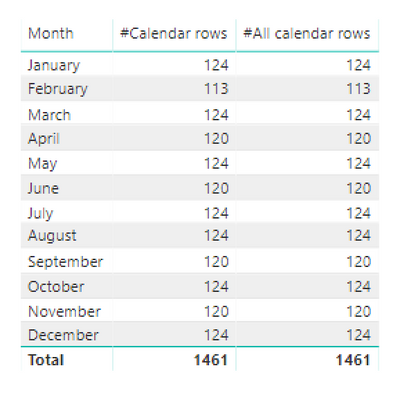
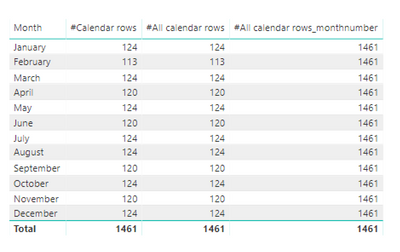
I'm calculating the number of rows (days) in Calendar-table by month. When 'Calendar'[Month] is not sorted, #All calendar rows -measure gives the expected result (all rows in a table). But when 'Calendar'[Month] is sorted by 'Calendar'[MonthNumber] both columns affect the filter context.
Therefore when [Month] -column is sorted I need to use #All calendar rows_monthnumber -measure to get all the rows in the table.
Measures:
#Calendar rows = COUNTROWS('Calendar')
#All calendar rows = CALCULATE(COUNTROWS('Calendar'), ALL('Calendar'[Month]))
#All calendar rows_monthnumber = CALCULATE(COUNTROWS('Calendar'), ALL('Calendar'[Month], 'Calendar'[Month Number]))
When [Month] is not sorted:
When [month] is sorted by [MonthNumber]:
I'm not sure to treat this as a bug or a feature. I haven't seen any documentation about this kind of behaviour and it came across as a surprise. Any thoughts on this?
hi, @Anonymous
look well
With the FEB / 2018 version some strange behavior appeared.
I believe Microsoft should send a fix for this the other items.
Best Regards,
Rfranca
Hi,
This issue was present already for earlier versions of PBI Desktop.
Hi BI for the people
Is this still happening for you? Have you found another way around it?
I think I am getting the same thing, when I add a sort column then my stacked area chart which calculates a % of sales for a particular category only uses the first item in the sort when I calculate sales/allselected(sales) which is resulting in stacked area chart with only the first selected item at 100%.
Any ideas would be great!
The Power BI Data Visualization World Championships is back! It's time to submit your entry.
Check out the January 2026 Power BI update to learn about new features.
| User | Count |
|---|---|
| 56 | |
| 42 | |
| 40 | |
| 21 | |
| 20 |
| User | Count |
|---|---|
| 142 | |
| 105 | |
| 63 | |
| 36 | |
| 35 |