Get certified for free when you join Fabric Data Days 2026 and dive into Fabric, Power BI, SQL, AI, and other essential data skills.
Join nowJuly 7 - July 17 | Round 2 of the Power BI Dataviz World Championships. Don't miss your chance! Learn more
Good Morning All,
I have a Matrix table sort issue that I attempted a work around from a previous thread but it still isn't working. I have a set of invoice increments that I would like sorted in a particular order, however even though I have designated/added a "index" by column and selected to sort by that column-it is not.
See attached images:
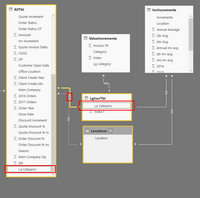
Relationship (both)
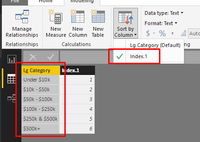
Index'd column
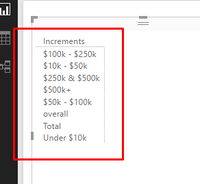
Added to new table
Hi @Miskondukt,
From your screenshots, I noticed that you added columnn [Increments] from table 'InvIncrements' into visual, then, you atempted to sort this column by another column [Index.1] from a linked table 'LgIncrTbl'. Unfortunately, it is not available to sort by other column which is stored in other table, even though there existing a relationship between these tables. In your scenario, you have to add a custom column [Index] in table 'InvIncrements' in Query Edit mode (A DAX calculated column is not supported). The same as what you did for 'LgIncrTbl'[Lg Category], please sort 'LgIncrTbl'[InvIncrements] by its own index column.
Best regards,
Yuliana Gu
Join us in Barcelona for FabCon and SQLCon, the Fabric, Power BI, SQL, and AI community event. Save €200 with code FABCMTY200.
Join Data Days 2026: 60 days of free live/on-demand sessions, challenges, study groups, and certification opportunities.
| User | Count |
|---|---|
| 28 | |
| 23 | |
| 18 | |
| 18 | |
| 15 |
| User | Count |
|---|---|
| 47 | |
| 44 | |
| 43 | |
| 35 | |
| 32 |