Join us at FabCon Atlanta from March 16 - 20, 2026, for the ultimate Fabric, Power BI, AI and SQL community-led event. Save $200 with code FABCOMM.
Register now!The Power BI Data Visualization World Championships is back! Get ahead of the game and start preparing now! Learn more
Hi Everyone,
I am having problems sorting out my date variable to fit my graph chronologically.
To give you some context, our financial year runs from July 2020 to June 2021, and the data I have is currently from July 2020 up to end of January 2021. Now, for the past six months I've been creating dashboards which look like below:
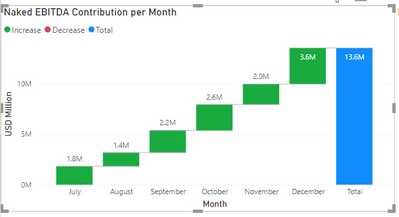
As you can see, the month is what is in the x-axis and is in chronological order from July to December up to 2020. However, now that I want to add January 2021 numbers, the graph comes out below:
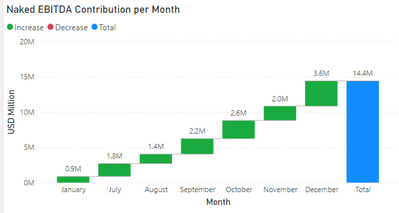
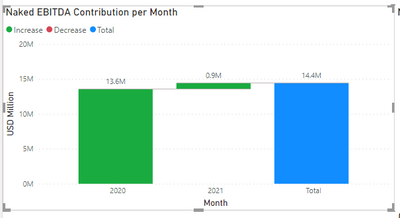
As you can see, this is not a correct chronological order since the figures for January 2021 are ahead of the July-December 2020 numbers. Furthermore, if try add "Year" to my current date hierachy, my graph looks like this:
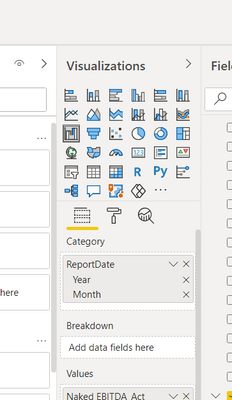
I have seen other solutions stating that if you change the data type to "Date" it will sort chronoligically but this is not the case, as you can see. Hence, I am coming to ask for assistance in re-arranging my graph to be in the correct chronoligcal order of July to December 2020 followed by January 2021 and not have the January figures placed where they currently are.
I hope the context provided here is enough to gain your assistance.
Solved! Go to Solution.
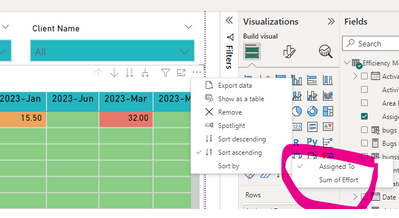
Hi, after further experimentation, I realised the solution was actually quite simple. On your graph, you can simply click those 3 dots at the top of your graph and then select "sort by", then select Month as shown below:
As you can see, it is now in the order I wanted it to be.
Thanks so much for your contributions everyone.
Kind regards,
Dylan
Hi, after further experimentation, I realised the solution was actually quite simple. On your graph, you can simply click those 3 dots at the top of your graph and then select "sort by", then select Month as shown below:
As you can see, it is now in the order I wanted it to be.
Thanks so much for your contributions everyone.
Kind regards,
Dylan
What if Month is not showing here
@dylanndengu , Create a month -year column with sort column or month and year column with sort for month and use those
Month Year = FORMAT([Date],"mmm-yyyy")
Month Year sort = FORMAT([Date],"yyyymm")
Month Year = FORMAT([Date],"mmm")
Month Year sort = FORMAT([Date],"mm")
https://docs.microsoft.com/en-us/power-bi/desktop-sort-by-column
Hi @amitchandak , thank you for your response. However, I tried the method suggested and it has produced the following:
Which is not necessarily correct. I would like it to go from July 2020 to January 2021 in chronological order.
Kind regards,
The Power BI Data Visualization World Championships is back! Get ahead of the game and start preparing now!
| User | Count |
|---|---|
| 41 | |
| 38 | |
| 36 | |
| 31 | |
| 28 |
| User | Count |
|---|---|
| 129 | |
| 88 | |
| 79 | |
| 68 | |
| 63 |