Join us at FabCon Atlanta from March 16 - 20, 2026, for the ultimate Fabric, Power BI, AI and SQL community-led event. Save $200 with code FABCOMM.
Register now!The Power BI Data Visualization World Championships is back! Get ahead of the game and start preparing now! Learn more
Dear all,
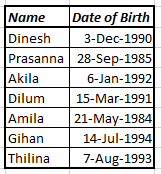
I have a table like below:
I want to sort the above table by "Date of Birth" (without considering the year).
i.e. after sorting, my output should look like below.
How can I do this? Please help.
Thank You!
Solved! Go to Solution.
Create a custom column and use the formula
Birthday = FORMAT([Date of Birth], "MM-DD")
Now sort on the Birthday column
Create a custom column and use the formula
Birthday = FORMAT([Date of Birth], "MM-DD")
Now sort on the Birthday column
Thank you both of you!
So it looks like you are sorting by month number in year is that correct?
To achieve this you will need a column to faciliate the sort.
in this case create a column
Month Num = MONTH(Table1[Date of Birth])
then select the "date of birth" column and use the "Sort By Column" button to select "Month Num" this will sort the months in the correct order as per your screen shot.
The Power BI Data Visualization World Championships is back! Get ahead of the game and start preparing now!
Check out the November 2025 Power BI update to learn about new features.
| User | Count |
|---|---|
| 59 | |
| 46 | |
| 42 | |
| 23 | |
| 17 |
| User | Count |
|---|---|
| 190 | |
| 122 | |
| 96 | |
| 66 | |
| 47 |