cancel
Showing results for 
Search instead for 
Did you mean: 

The Power BI Data Visualization World Championships is back! Get ahead of the game and start preparing now! Learn more

Reply
Anonymous
Not applicable

Sort Top 10 & Others table

Hello everyone,


I have created a table where I have the Top 10 customers by AR amount and all the rest customers' amounts are aggregated in Others.

I want to sort by AR amount descending and have always the Others at the bottom of the table.


Now when I sort by AR amount I get:


Customer                 AR

  Others             12,223,445

  Customer

       Amazon        3,415,788

       Costco          1,265,678

       Staples            674,789

       Walmart          354,897

            ...                      ...

            ...                      ...

       Total                     ...

   Total                         ...


What I want to have is like below:


Customer                 AR

  Customer

       Amazon        3,415,788

       Costco          1,265,678

       Staples            674,789

       Walmart          354,897

            ...                      ...

            ...                      ...

       Total                     ...

  Others             12,223,445

   Total                         ...


Could you please advise me on how I can make this type of sorting?

I would like to mention that the AR amount is a measure. that calculates the AR for Top 10, others and total.

For the Customers there is a table like that:

 Amazon        Customer

 Costco          Customer

 Staples          Customer

 Walmart        Customer

     ...               Customer

Others              Others


Thank you all.


Regards.

2 ACCEPTED SOLUTIONS
v-diye-msft
Community Support
Community Support

Hi @Anonymous 


Seems like you'd wanna get the TOPN based on different category : Customer/Others, and show it in the matrix/table. but the category should be ranked as you wish by Custmer>Others, right?


You might refer to rank by multiple columns:

https://community.powerbi.com/t5/Desktop/How-to-order-by-column-name-and-measure-value/m-p/860531#M412845

I modified the measure as:


Measure 4 = 
VAR t =
    SUMMARIZE (
        ALLSELECTED ( 'Table (4)' ),
        'Table (4)'[Code Group],
        'Table (4)'[Name],
        'Table (4)'[Rank],'Table (4)'[Sales]
    )
RETURN
    COUNTROWS (
        FILTER (
            t,
            ISONORAFTER (
                    'Table (4)'[Code Group], SELECTEDVALUE ( 'Table (4)'[Code Group]), ASC,
'Table (4)'[Sales],SELECTEDVALUE('Table (4)'[Sales]),ASC
            )
        )
    )


That the code group ranks by asc, and sales ranks by desc:
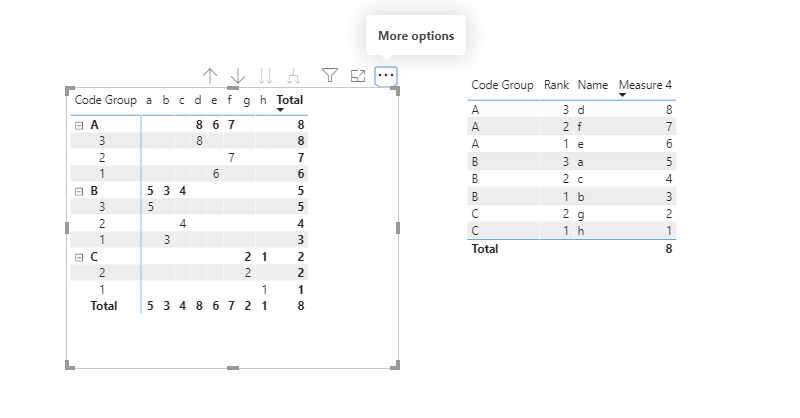
3.PNG


Community Support Team _ Dina Ye
If this post helps, then please consider Accept it as the solution to help the other members find it more
quickly.

View solution in original post

3 REPLIES 3
tschris
Regular Visitor

I am adding as an alternative solution this one. I have added the respective files in github if one would need to download an existing example.

v-diye-msft
Community Support
Community Support

Hi @Anonymous 


Seems like you'd wanna get the TOPN based on different category : Customer/Others, and show it in the matrix/table. but the category should be ranked as you wish by Custmer>Others, right?


You might refer to rank by multiple columns:

https://community.powerbi.com/t5/Desktop/How-to-order-by-column-name-and-measure-value/m-p/860531#M412845

I modified the measure as:


Measure 4 = 
VAR t =
    SUMMARIZE (
        ALLSELECTED ( 'Table (4)' ),
        'Table (4)'[Code Group],
        'Table (4)'[Name],
        'Table (4)'[Rank],'Table (4)'[Sales]
    )
RETURN
    COUNTROWS (
        FILTER (
            t,
            ISONORAFTER (
                    'Table (4)'[Code Group], SELECTEDVALUE ( 'Table (4)'[Code Group]), ASC,
'Table (4)'[Sales],SELECTEDVALUE('Table (4)'[Sales]),ASC
            )
        )
    )


That the code group ranks by asc, and sales ranks by desc:

3.PNG


Community Support Team _ Dina Ye
If this post helps, then please consider Accept it as the solution to help the other members find it more
quickly.

Helpful resources

Announcements
Power BI DataViz World Championships

Power BI Dataviz World Championships

The Power BI Data Visualization World Championships is back! Get ahead of the game and start preparing now!

December 2025 Power BI Update Carousel

Power BI Monthly Update - December 2025

Check out the December 2025 Power BI Holiday Recap!

FabCon Atlanta 2026 carousel

FabCon Atlanta 2026

Join us at FabCon Atlanta, March 16-20, for the ultimate Fabric, Power BI, AI and SQL community-led event. Save $200 with code FABCOMM.