cancel
Showing results for 
Search instead for 
Did you mean: 

Get Fabric certified for FREE! Don't miss your chance! Learn more

Reply
Anonymous
Not applicable

Sort Stacked area chart

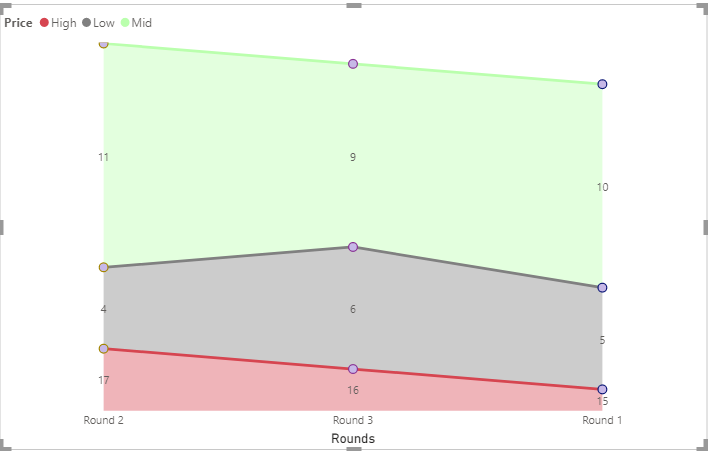
Hi, I have a data for price monitoring done by 3 rounds, in each round we took the low, mid, and high price for an item, like this: 

Annotation 2020-08-06 161121.png

and I want to use the Stacked area chart:

Capture.PNG

How can I sort the Axis(rounds: round 1, round 2, round 3) and the Legends (Prices: low at the bottom then mid then high)?

2 ACCEPTED SOLUTIONS
Pragati11
Super User
Super User

Hi @Anonymous ,


On your area chart, on the top right, click on the 3 dots and you can see options to sort your axis as below:

Pragati11_0-1596723565177.png

Use this to sort your x-axis with values - Round1, Round2, Round3.


To sort your Legend, refer following article:

https://www.seerinteractive.com/blog/reorder-powerbi-legend/


Thanks,

Pragati

Best Regards,

Pragati Jain


MVP logo


LinkedIn | Twitter | Blog YouTube 

Did I answer your question? Mark my post as a solution! This will help others on the forum!

Appreciate your Kudos!!

Proud to be a Super User!!

View solution in original post

v-zhenbw-msft
Community Support
Community Support

Hello @DiaaDag ,

Also, if you want to put the Bass to the bottom,you can create three measures and sort them under Values.

High = CALCULATE(SUM('Table'[Amount]),FILTER('Table','Table'[Price] = "High"))
Mid = CALCULATE(SUM('Table'[Amount]),FILTER('Table','Table'[Price] = "Mid"))
Low = CALCULATE(SUM('Table'[Amount]),FILTER('Table','Table'[Price] = "Low"))

Sort1.jpg

If you don't meet your requirements, could you show the exact expected result based on the table you shared?

Best regards

Community Support Team _ zhenbw

If this post helps,then consider Accepting it as the solution to help other members find it more quickly.


BTW, pbix as attached.

View solution in original post

3 REPLIES 3
v-zhenbw-msft
Community Support
Community Support

Hello @DiaaDag ,

Also, if you want to put the Bass to the bottom,you can create three measures and sort them under Values.

High = CALCULATE(SUM('Table'[Amount]),FILTER('Table','Table'[Price] = "High"))
Mid = CALCULATE(SUM('Table'[Amount]),FILTER('Table','Table'[Price] = "Mid"))
Low = CALCULATE(SUM('Table'[Amount]),FILTER('Table','Table'[Price] = "Low"))

Sort1.jpg

If you don't meet your requirements, could you show the exact expected result based on the table you shared?

Best regards

Community Support Team _ zhenbw

If this post helps,then consider Accepting it as the solution to help other members find it more quickly.


BTW, pbix as attached.

Pragati11
Super User
Super User

Hi @Anonymous ,


On your area chart, on the top right, click on the 3 dots and you can see options to sort your axis as below:

Pragati11_0-1596723565177.png

Use this to sort your x-axis with values - Round1, Round2, Round3.


To sort your Legend, refer following article:

https://www.seerinteractive.com/blog/reorder-powerbi-legend/


Thanks,

Pragati

Best Regards,

Pragati Jain


MVP logo


LinkedIn | Twitter | Blog YouTube 

Did I answer your question? Mark my post as a solution! This will help others on the forum!

Appreciate your Kudos!!

Proud to be a Super User!!

Anonymous
Not applicable

Thank you very much

Helpful resources

Announcements
Join our Fabric User Panel

Join our Fabric User Panel

Share feedback directly with Fabric product managers, participate in targeted research studies and influence the Fabric roadmap.

FabCon Atlanta 2026 carousel

FabCon Atlanta 2026

Join us at FabCon Atlanta, March 16-20, for the ultimate Fabric, Power BI, AI and SQL community-led event. Save $200 with code FABCOMM.