Join us at FabCon Atlanta from March 16 - 20, 2026, for the ultimate Fabric, Power BI, AI and SQL community-led event. Save $200 with code FABCOMM.
Register now!Vote for your favorite vizzies from the Power BI Dataviz World Championship submissions. Vote now!
I am trying to sort the "Transient Details" column by the "SortOrder" column values but the matrix keeps aggregating the "SortOrder" column preventing the correct order. How do i fix this?
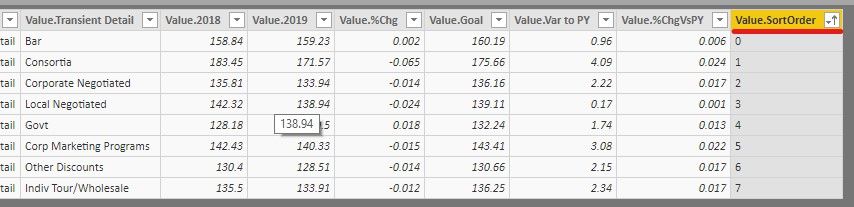
The table view shows the correct order as shown below.
But, the matrix visual continues to aggregate even when i change the "SortOrder" column to numbers or text.
Solved! Go to Solution.
Hi,
To change the sort order you'll have to select the table you want to sort.
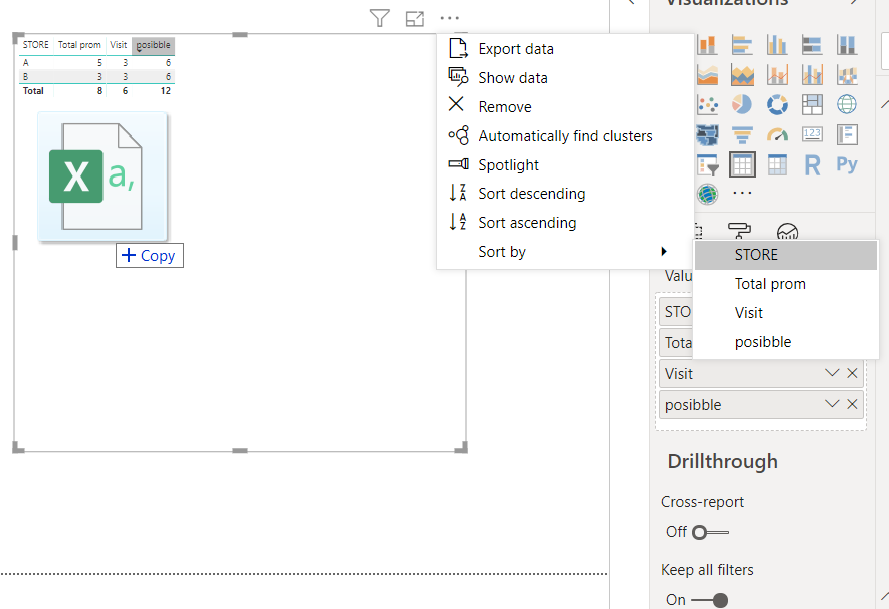
Then click the below button and select your Sort column.
This should do the trick.
The sorting you do in the table is just for informational puposes.
The sort order is correct in table view, but not in the matrix visual.
Do you know how to make the sort order applicable to the matrix?
Vote for your favorite vizzies from the Power BI World Championship submissions!
If you love stickers, then you will definitely want to check out our Community Sticker Challenge!
Check out the January 2026 Power BI update to learn about new features.
| User | Count |
|---|---|
| 63 | |
| 52 | |
| 41 | |
| 23 | |
| 18 |
| User | Count |
|---|---|
| 124 | |
| 108 | |
| 47 | |
| 28 | |
| 27 |