Join us at FabCon Atlanta from March 16 - 20, 2026, for the ultimate Fabric, Power BI, AI and SQL community-led event. Save $200 with code FABCOMM.
Register now!The Power BI Data Visualization World Championships is back! Get ahead of the game and start preparing now! Learn more
Hi all,
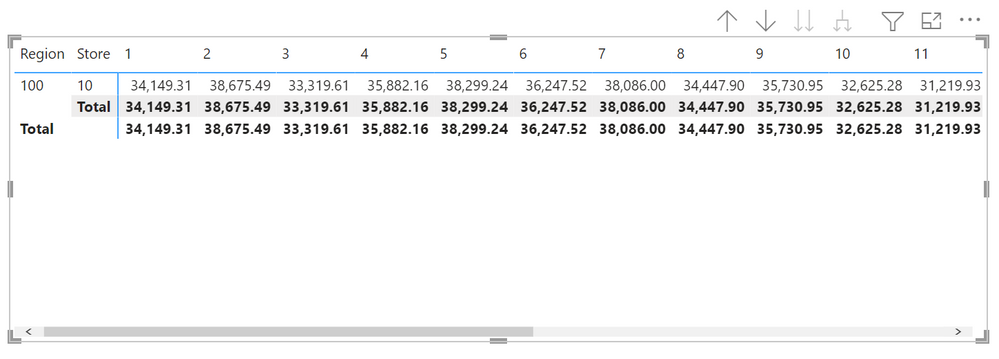
How can I sort columns in descending order?
I tried moving the index to Rows, sorted descending and then moved back to columns but it reverted to Ascending order
Thanks,
-w
Solved! Go to Solution.
Hi UncleLewis
I assume your 1,2,3,4,5 to 12 column headings are months
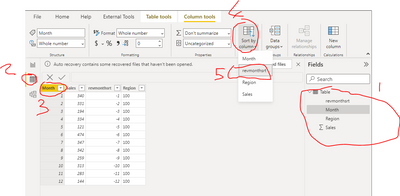
In the query editor add a column called revmonthsrt = [month] * -1
to create -1,-2,-3,-4,-5 to -12
then in modeller sort month by revmonthsrt
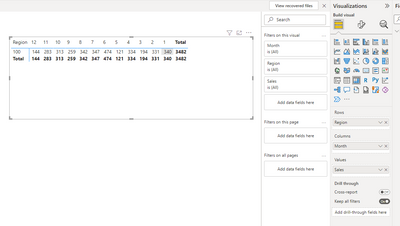
your report will then dislay column headings decsending 12,11,10,9,8 etc
Please click thumbs up and accept as solution buttons. Thanks. 😀
Sorry I meant to press save but hit accept solution by total accident whilst inputting this post, how rude 😮😮
but this solution should work....
Click here to download example
I assume your 1,2,3,4,5 to 12 column headings are months
In the query editor add a column called revmonthsrt = [month] * -1
to create -1,-2,-3,-4,-5 to -12
then in modeller sort month by revmonthsrt
check datatypes ar numbers
your report will then dislay column headings decsending 12,11,10,9,8 etc
Please click thumbs up and accept as solution buttons. Thanks
Thanks @speedramps
I tried the reverse item, didn't change the order on the visual. Tried Asc and Desc.
I tried to remove all columns and added index column from Date Table - Matrix columns are Asc
I went to Data View and sorted the Index Column Desc.
I went back to Report View. Matrix Columns are still in Asc order
What am I doing wrong?
Thanks,
-w
Hi UncleLewis
I assume your 1,2,3,4,5 to 12 column headings are months
In the query editor add a column called revmonthsrt = [month] * -1
to create -1,-2,-3,-4,-5 to -12
then in modeller sort month by revmonthsrt
your report will then dislay column headings decsending 12,11,10,9,8 etc
Please click thumbs up and accept as solution buttons. Thanks. 😀
The Power BI Data Visualization World Championships is back! Get ahead of the game and start preparing now!
| User | Count |
|---|---|
| 57 | |
| 48 | |
| 35 | |
| 34 | |
| 21 |
| User | Count |
|---|---|
| 143 | |
| 122 | |
| 100 | |
| 80 | |
| 57 |