Join us at FabCon Atlanta from March 16 - 20, 2026, for the ultimate Fabric, Power BI, AI and SQL community-led event. Save $200 with code FABCOMM.
Register now!The Power BI Data Visualization World Championships is back! Get ahead of the game and start preparing now! Learn more
Hi Team,
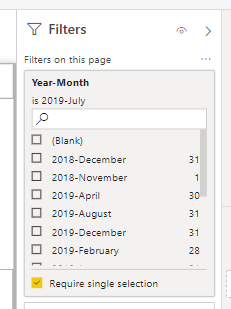
Is there any way to sort the filter by year in Power BI desktop?
Can I sort this by year so 2018 and then 2019 Months in order?
Solved! Go to Solution.
Hello @adityavighne ,
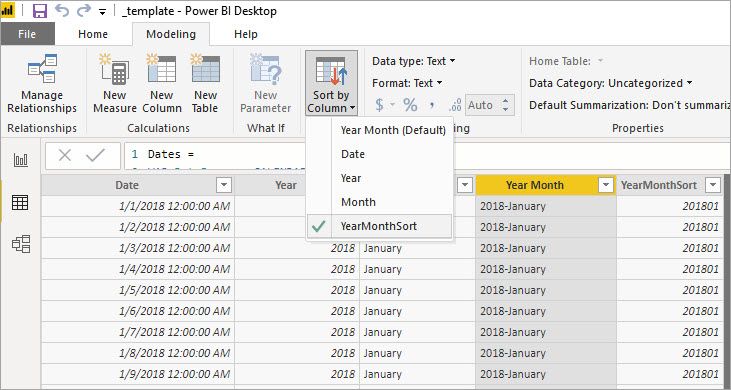
You can, yes. You will need a column on your table that calculates a number to use for sorting the column. Something like this:
YearMonthSort = YEAR([Date])*100 + MONTH([Date])
Then you select your Year Month column in the table view and go to Modeling > Sort by Column and pick YearMonthSort
Hello @adityavighne ,
You can, yes. You will need a column on your table that calculates a number to use for sorting the column. Something like this:
YearMonthSort = YEAR([Date])*100 + MONTH([Date])
Then you select your Year Month column in the table view and go to Modeling > Sort by Column and pick YearMonthSort
Thank You!
The Power BI Data Visualization World Championships is back! Get ahead of the game and start preparing now!
| User | Count |
|---|---|
| 41 | |
| 39 | |
| 37 | |
| 29 | |
| 24 |
| User | Count |
|---|---|
| 119 | |
| 100 | |
| 72 | |
| 69 | |
| 65 |