cancel
Showing results for 
Search instead for 
Did you mean: 

We've captured the moments from FabCon & SQLCon that everyone is talking about, and we are bringing them to the community, live and on-demand. Starts on April 14th. Register now

Reply
Anonymous
Not applicable

Sort Column with Duplicate Values

Hey all, 

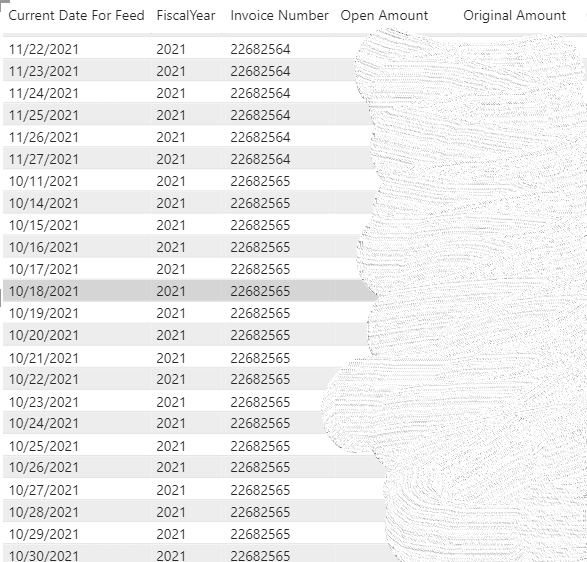
I have a table table looking like this. Due to data sensitivity, I've blurred out the actual amount for the last two columns. 

Capture.PNG


As you can see, under the "Invoice Number" column, there are a lot of duplicate values. What I want to do is filtering out the table using this column. Technically, for every invoice number that are duplicates of each other, only maintain the one that has the earliest "Current Date for Feed" and delete out the later dates according to the "Current Date for Feed". For example, those rows with the Invoice Number being 22682564, we are only keeping the one with the earliest date under "Current Date for Feed", which is 11/22/2021 and delete the other rows with the same Invoice Number. 

I would prefer using calculation/Dax function rather than Power Query for this specific Power BI file since the database linked to get all of these data are huge, which are already slowing down the file performance. But if there's no other way than using Power Query then please feel free to still share your solution.

Would really appreciate if you guys can help me out with this. 

Thanks in advance!


1 ACCEPTED SOLUTION
Greg_Deckler
Community Champion
Community Champion

@Anonymous So, there are a number of approaches. You could create a table visual with Invoice Number and then put Current Date for Feed and use a default Earliest or Max aggregation. Then you could write measures like:


Open Amount Measure = 
  VAR __Date = MIN('Table'[Current Date For Feed])
  VAR __Invoice = MAX('Table'[Invoice Number])
  VAR __Table = FILTER('Table',[Current Date For Feed] = __Date && [Invoice Number] = __Invoice)
RETURN
  MAXX(__Table,[Open Amount])

and 

Original Amount Measure = 
  VAR __Date = MIN('Table'[Current Date For Feed])
  VAR __Invoice = MAX('Table'[Invoice Number])
  VAR __Table = FILTER('Table',[Current Date For Feed] = __Date && [Invoice Number] = __Invoice)
RETURN
  MAXX(__Table,[Original Amount])


You could also create a new DAX calculated table using SUMMARIZE by Invoice Number and FiscalYear with a MIN of your Current Date for Feed and then a kind of similar calculation for ADDCOLUMNS to add in your Open Amount and Original Amount.


In Power Query you could do a Group By by those same two columns with a MIN for your Current Date for Feed and I think you would preserve all rows for your other two columns. I'd have to play with it.


Finally, the "right" way to do it would be to get your database folks to create you a view that summarizes the data the way you want and then your data loads would be much faster (not importing a bunch of useless rows).


Let me know what route you are thinking.


Follow on LinkedIn
@ me in replies or I'll lose your thread!!!
Instead of a Kudo, please vote for this idea
Become an expert!: Enterprise DNA
External Tools: MSHGQM
YouTube Channel!: Microsoft Hates Greg
Latest book!:
DAX For Humans

DAX is easy, CALCULATE makes DAX hard...

View solution in original post

2 REPLIES 2
Greg_Deckler
Community Champion
Community Champion

@Anonymous So, there are a number of approaches. You could create a table visual with Invoice Number and then put Current Date for Feed and use a default Earliest or Max aggregation. Then you could write measures like:


Open Amount Measure = 
  VAR __Date = MIN('Table'[Current Date For Feed])
  VAR __Invoice = MAX('Table'[Invoice Number])
  VAR __Table = FILTER('Table',[Current Date For Feed] = __Date && [Invoice Number] = __Invoice)
RETURN
  MAXX(__Table,[Open Amount])

and 

Original Amount Measure = 
  VAR __Date = MIN('Table'[Current Date For Feed])
  VAR __Invoice = MAX('Table'[Invoice Number])
  VAR __Table = FILTER('Table',[Current Date For Feed] = __Date && [Invoice Number] = __Invoice)
RETURN
  MAXX(__Table,[Original Amount])


You could also create a new DAX calculated table using SUMMARIZE by Invoice Number and FiscalYear with a MIN of your Current Date for Feed and then a kind of similar calculation for ADDCOLUMNS to add in your Open Amount and Original Amount.


In Power Query you could do a Group By by those same two columns with a MIN for your Current Date for Feed and I think you would preserve all rows for your other two columns. I'd have to play with it.


Finally, the "right" way to do it would be to get your database folks to create you a view that summarizes the data the way you want and then your data loads would be much faster (not importing a bunch of useless rows).


Let me know what route you are thinking.


Follow on LinkedIn
@ me in replies or I'll lose your thread!!!
Instead of a Kudo, please vote for this idea
Become an expert!: Enterprise DNA
External Tools: MSHGQM
YouTube Channel!: Microsoft Hates Greg
Latest book!:
DAX For Humans

DAX is easy, CALCULATE makes DAX hard...
Anonymous
Not applicable

@Greg_Deckler Thanks for your help! I ended up doing the table visual and then manage to do measurement from measurement for other needed visual.

Helpful resources

Announcements
New to Fabric survey Carousel

New to Fabric Survey

If you have recently started exploring Fabric, we'd love to hear how it's going. Your feedback can help with product improvements.

Power BI DataViz World Championships carousel

Power BI DataViz World Championships - June 2026

A new Power BI DataViz World Championship is coming this June! Don't miss out on submitting your entry.

Join our Fabric User Panel

Join our Fabric User Panel

Share feedback directly with Fabric product managers, participate in targeted research studies and influence the Fabric roadmap.

March Power BI Update Carousel

Power BI Community Update - March 2026

Check out the March 2026 Power BI update to learn about new features.