Learn from the best! Meet the four finalists headed to the FINALS of the Power BI Dataviz World Championships! Register now
Hi,
I have a fairly standard Date Table in my Model
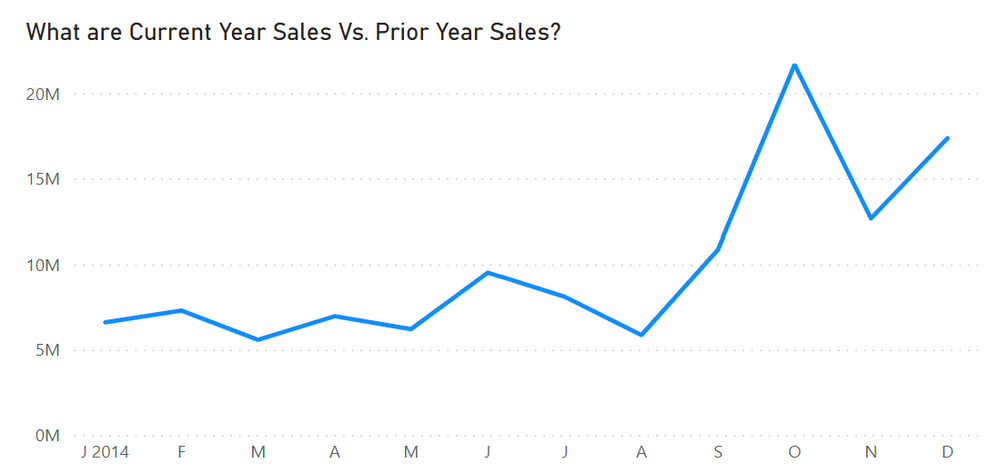
The one item a bit unconventional is a calculated column that returns a single character for the Month Name unless the month is Jan then return single character and Year like this J2023
All well and good, everything in the Calc Column look correct.
The problem is when I try to use the Abbreviated Name as the X Axis it is in the wrong order
I tried sorting by the Date Column and the DateKey column, but I get the message, "Cannot sort becuase there can be more than one value..."
What can I do to get the xaxis to show in the correct order?
Here's the DAX for my Calc Column
Solved! Go to Solution.
Hi @UncleLewis
If you have a [MonthNo] column in 'DateTable', try sorting by that.
Thanks grantsamborn,
That solved it - good to go.
Thanks,
-w
Hi @UncleLewis
If you have a [MonthNo] column in 'DateTable', try sorting by that.
If you have recently started exploring Fabric, we'd love to hear how it's going. Your feedback can help with product improvements.
A new Power BI DataViz World Championship is coming this June! Don't miss out on submitting your entry.
Share feedback directly with Fabric product managers, participate in targeted research studies and influence the Fabric roadmap.
| User | Count |
|---|---|
| 57 | |
| 33 | |
| 33 | |
| 19 | |
| 18 |
| User | Count |
|---|---|
| 67 | |
| 67 | |
| 45 | |
| 30 | |
| 26 |