Join us at FabCon Atlanta from March 16 - 20, 2026, for the ultimate Fabric, Power BI, AI and SQL community-led event. Save $200 with code FABCOMM.
Register now!Vote for your favorite vizzies from the Power BI Dataviz World Championship submissions. Vote now!
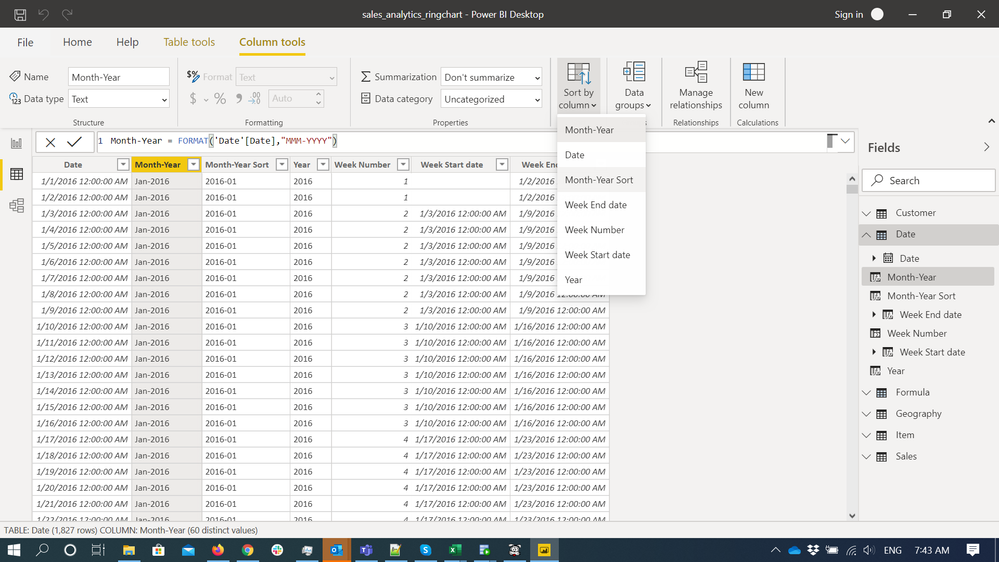
i created sort table and created relationship. but how i can hide sort column in my table visual ?
Solved! Go to Solution.
@Anonymous , You need to mark the sort column for column. You do not need it visual.
refer: https://docs.microsoft.com/en-us/power-bi/desktop-sort-by-column
@Anonymous
@amitchandak provided the solution.Basically, select a column you want to use in a visual, sort by a column (the sort column do not need to be in the visual).
Paul Zheng _ Community Support Team
@Anonymous , You need to mark the sort column for column. You do not need it visual.
refer: https://docs.microsoft.com/en-us/power-bi/desktop-sort-by-column
Vote for your favorite vizzies from the Power BI World Championship submissions!
If you love stickers, then you will definitely want to check out our Community Sticker Challenge!
Check out the January 2026 Power BI update to learn about new features.
| User | Count |
|---|---|
| 64 | |
| 53 | |
| 42 | |
| 20 | |
| 17 |
| User | Count |
|---|---|
| 124 | |
| 105 | |
| 44 | |
| 32 | |
| 24 |