
cancel
Showing results for 
Search instead for 
Did you mean: 

Learn from the best! Meet the four finalists headed to the FINALS of the Power BI Dataviz World Championships! Register now

Reply
Anonymous
Not applicable

Snowflake datasource import via sql code

Hello Power BI Community,


I am trying to import data into Power BI from a Snowflake database.

I am not able to provide my SQL statements to fetch the required data . Whereas for SQL Server datasource , we have an option to provide the sql statements using import-> advanced.  Any solutions where I can run the sql query on the snowflake datasource to get the data?


Thanks !

4 REPLIES 4
v-henryk-mstf
Community Support
Community Support

Hi @Anonymous ,


According to your requirements, you can refer to the following blog.

v-henryk-mstf_0-1619492000623.png


If the problem is still not resolved, please provide detailed error information and let me know immediately. Looking forward to your reply.


Best Regards,
Henry


If this post helps, then please consider Accept it as the solution to help the other members find it more quickly.

Anonymous
Not applicable

Hi @v-henryk-mstf ,


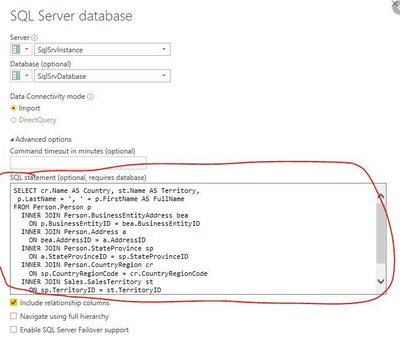
Thanks for your comments, I am currently looking to write a query on the Snow flake data source. I think PowerBI doesn't that feature yet. We are not okay to have the Virtual server/ modify the Snowflake settings. If there any other way we could achieve this , It would be great. 


Please find the screenshot attached for reference.

Muralimurugaian_0-1619494883786.png

I am expecting some thing like this on Snowflake, we can write custom scripts to get the required data from table, instead of doing any transformations on PowerBI.  Please let me know if you need any further info. on this. 


Thanks!

Hi @Anonymous ,


Currently, this function is not supported for the latest version of Powerbi Desktop. I think for Snowflake datasource, we can write custom scripts to get the required data from table. This kind of idea is great, you can post your idea here: Ideas - Microsoft Power BI Community


Hope to realize this function in PowerBI Desktop as soon as possible.


Best Regards,
Henry


If this post helps, then please consider Accept it as the solution to help the other members find it more quickly.

amitchandak
Super User
Super User

@Anonymous , What I have checked in past this option was not there for snowflake.

You can log an idea -https://ideas.powerbi.com/ideas/

Share with Power BI Enthusiasts: Full Power BI Video (20 Hours) YouTube
Microsoft Fabric Series 60+ Videos YouTube
Microsoft Fabric Hindi End to End YouTube

Helpful resources

Announcements
New to Fabric survey Carousel

New to Fabric Survey

If you have recently started exploring Fabric, we'd love to hear how it's going. Your feedback can help with product improvements.

Power BI DataViz World Championships carousel

Power BI DataViz World Championships - June 2026

A new Power BI DataViz World Championship is coming this June! Don't miss out on submitting your entry.

Join our Fabric User Panel

Join our Fabric User Panel

Share feedback directly with Fabric product managers, participate in targeted research studies and influence the Fabric roadmap.

March Power BI Update Carousel

Power BI Community Update - March 2026

Check out the March 2026 Power BI update to learn about new features.