cancel
Showing results for 
Search instead for 
Did you mean: 

The Power BI Data Visualization World Championships is back! Get ahead of the game and start preparing now! Learn more

Reply
WJ876400
Helper IV
Helper IV

Slpit numbers from text

Hi


How do I split the number from the end of this text and have the value as a number. 


text.PNG


Thank you for any help

1 ACCEPTED SOLUTION

@WJ876400 


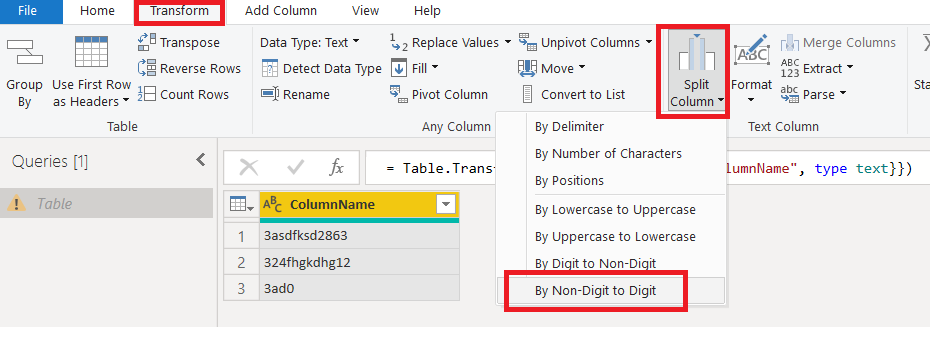
Using Power Query, you can try this


Select Column>>>Go to TRANSFORM Tab>>Split Column>>BY Non digit to digit


split.png

View solution in original post

5 REPLIES 5
Anonymous
Not applicable

Hi,

This might not be the best of the solutions, but it should work.

Number = 
VAR v_OnePos = SEARCH( "1", Data[Column], 1, 999 )
VAR v_TwoPos = SEARCH( "2", Data[Column], 1, 999 )
VAR v_ThreePos = SEARCH( "3", Data[Column], 1, 999 )
VAR v_FourPos = SEARCH( "4", Data[Column], 1, 999 )
VAR v_FivePos = SEARCH( "5", Data[Column], 1, 999 )
VAR v_SixPos = SEARCH( "6", Data[Column], 1, 999 )
VAR v_SevenPos = SEARCH( "7", Data[Column], 1, 999 )
VAR v_EightPos = SEARCH( "8", Data[Column], 1, 999 )
VAR v_NinePos = SEARCH( "9", Data[Column], 1, 999 )

VAR v_minOneandFour = MIN( MIN( v_OnePos, v_TwoPos ), MIN( v_ThreePos, v_FourPos ) )
VAR v_minFiveandEight = MIN( MIN( v_FivePos, v_SixPos ), MIN( v_SevenPos, v_EightPos ) )
VAR v_MinNine = MIN( MIN( v_minFiveandEight, v_minOneandFour ), v_NinePos )
RETURN
INT( IF( v_MinNine <> 999, RIGHT( Data[Column], (LEN( Data[Column] ) - v_MinNine) + 1  ), "0" ) )

result.PNG


Thanks.

Please accept this as a solution if it satisfies the requirement. Appreciate your Kudos. 🙂

Hi @Anonymous 


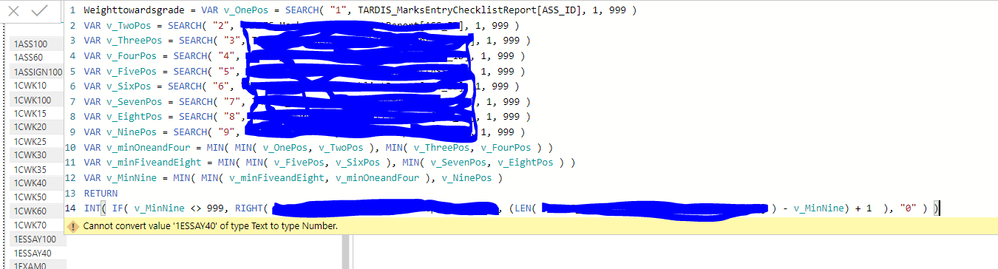
Thankyou for the response. I tried that but got an error which is below


text2.PNG

@WJ876400 


Using Power Query, you can try this


Select Column>>>Go to TRANSFORM Tab>>Split Column>>BY Non digit to digit


split.png

Anonymous
Not applicable

Hi @WJ876400 ,

While writting this logic, I assumed that the Numbers would appear only at the end of the string.

Is that correct?


Thanks.

Hi @Anonymous 


Sorry there is a number at the front but i have solved the issue now thank you

Helpful resources

Announcements
November Power BI Update Carousel

Power BI Monthly Update - November 2025

Check out the November 2025 Power BI update to learn about new features.

Fabric Data Days Carousel

Fabric Data Days

Advance your Data & AI career with 50 days of live learning, contests, hands-on challenges, study groups & certifications and more!

FabCon Atlanta 2026 carousel

FabCon Atlanta 2026

Join us at FabCon Atlanta, March 16-20, for the ultimate Fabric, Power BI, AI and SQL community-led event. Save $200 with code FABCOMM.

Top Kudoed Authors