Join us at FabCon Atlanta from March 16 - 20, 2026, for the ultimate Fabric, Power BI, AI and SQL community-led event. Save $200 with code FABCOMM.
Register now!The Power BI Data Visualization World Championships is back! Get ahead of the game and start preparing now! Learn more
Hi!
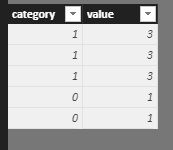
If I have a table like this:
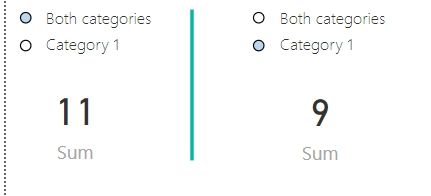
How is it possible to create slicer (or preferably ChicletSlicer) in which I could choose from two alternatives. Alternative one would show values from both categories and alternative two would show values from only category 1,
Like this (these are two states of the report):
Great thanks for your help in advance!
-tnmaki
Solved! Go to Solution.
@Anonymous,
Add a separate table for Slicer and use measure below.
Measure =
IF (
SELECTEDVALUE ( Table2[Column1] ) = "Category 1",
CALCULATE ( SUM ( Table1[value] ), Table1[category] = 1 ),
SUM ( Table1[value] )
)
@Anonymous,
Add a separate table for Slicer and use measure below.
Measure =
IF (
SELECTEDVALUE ( Table2[Column1] ) = "Category 1",
CALCULATE ( SUM ( Table1[value] ), Table1[category] = 1 ),
SUM ( Table1[value] )
)
Thanks, Sam!
I guess that would do it!
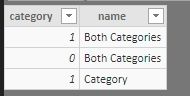
I ended up doing a separate table like this and using name field in the slicer:
The Power BI Data Visualization World Championships is back! Get ahead of the game and start preparing now!
| User | Count |
|---|---|
| 41 | |
| 38 | |
| 36 | |
| 30 | |
| 28 |
| User | Count |
|---|---|
| 128 | |
| 88 | |
| 79 | |
| 67 | |
| 62 |