cancel
Showing results for 
Search instead for 
Did you mean: 

The Power BI Data Visualization World Championships is back! Get ahead of the game and start preparing now! Learn more

Reply
Anonymous
Not applicable

Slicer with date

Hello,


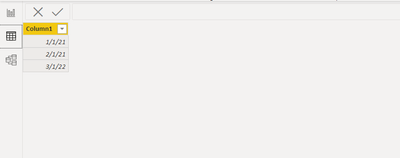
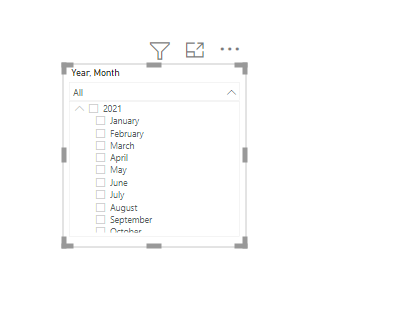
I would like to ask a question. I have a problem when I'm using a slicer with the date it is showing all months and in the table, I have only three months.

Robinho_0-1632226586506.pngRobinho_1-1632226610590.png

I would like to have in slicer only months which are in the table not all of them. 


Thank you for your help. 

1 ACCEPTED SOLUTION

Hi  @Anonymous ,


Because you are using "time intelligence",it will automatically create a hidden date table,details is as shown below:

vkellymsft_0-1632468598181.png

One way to solve this problem is to create 2 calculated columns as below:

Year = YEAR('Table'[Date])
Month = FORMAT('Table'[Date],"MMMM")

Then put the 2 columns in the fields of slicer, and you will see:

vkellymsft_1-1632468792226.png

You could check my sample attached.


Best Regards,
Kelly

Did I answer your question? Mark my reply as a solution!

View solution in original post

3 REPLIES 3
amitchandak
Super User
Super User

@Anonymous , Try to restrict by measure

Create a measure

countrows(Table)


Anc in visual level filter check this is not blank

Share with Power BI Enthusiasts: Full Power BI Video (20 Hours) YouTube
Microsoft Fabric Series 60+ Videos YouTube
Microsoft Fabric Hindi End to End YouTube
Anonymous
Not applicable

Hello @amitchandak ,


I tried it not sure if correct but I don't think so if it is working.

Please can you send here the procedure on how to do it?


Thank you very much.

Hi  @Anonymous ,


Because you are using "time intelligence",it will automatically create a hidden date table,details is as shown below:

vkellymsft_0-1632468598181.png

One way to solve this problem is to create 2 calculated columns as below:

Year = YEAR('Table'[Date])
Month = FORMAT('Table'[Date],"MMMM")

Then put the 2 columns in the fields of slicer, and you will see:

vkellymsft_1-1632468792226.png

You could check my sample attached.


Best Regards,
Kelly

Did I answer your question? Mark my reply as a solution!

Helpful resources

Announcements
Power BI DataViz World Championships

Power BI Dataviz World Championships

The Power BI Data Visualization World Championships is back! Get ahead of the game and start preparing now!

December 2025 Power BI Update Carousel

Power BI Monthly Update - December 2025

Check out the December 2025 Power BI Holiday Recap!

FabCon Atlanta 2026 carousel

FabCon Atlanta 2026

Join us at FabCon Atlanta, March 16-20, for the ultimate Fabric, Power BI, AI and SQL community-led event. Save $200 with code FABCOMM.