Join us at FabCon Atlanta from March 16 - 20, 2026, for the ultimate Fabric, Power BI, AI and SQL community-led event. Save $200 with code FABCOMM.
Register now!Vote for your favorite vizzies from the Power BI Dataviz World Championship submissions. Vote now!
Hello,
I need to have a slicer with options : X and Y.
I have a table like this :
Name | Transport | Network |
A | Toto | 1 |
B | Tata | 1 |
C | Toto | 3 |
X : if transport = Toto
Y : if Network = 1
But, if I use IF loop I have this :
Name | Transport | Network | Slicer |
A | Toto | 1 | X,Y |
B | Tata | 1 | Y |
C | Toto | 3 | X |
So, I can't use that in slicer. I would like only two choices and for A crossjoin in order to display A,B or B,C according to my filter.
Do you have any idea to do that ?
Thanks in advance
Solved! Go to Solution.
Hi @PBIMorgan01 ,
Please try the way below.
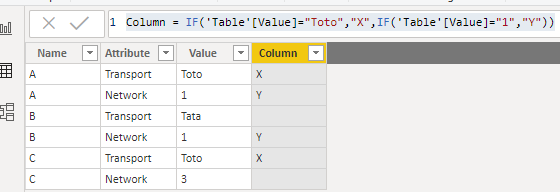
Firstly unpivot Transport and Network columns in Query Editor.
Then create the calculated column like below.
Column = IF('Table'[Value]="Toto","X",IF('Table'[Value]="1","Y"))
Then you could use column as a slicer.
Best Regards,
Cherry
Hi @PBIMorgan01 ,
Have you solved the problem?
If you have solved, please always accept the replies making sense as solution to your question so that people who may have the same question can get the solution directly.
If you still need help, please feel free to ask.
Best Regards,
Cherry
Hi @PBIMorgan01 ,
Have you solved the problem?
If you have solved, please always accept the replies making sense as solution to your question so that people who may have the same question can get the solution directly.
If you still need help, please feel free to ask.
Best Regards,
Cherry
Hi @PBIMorgan01 ,
Please try the way below.
Firstly unpivot Transport and Network columns in Query Editor.
Then create the calculated column like below.
Column = IF('Table'[Value]="Toto","X",IF('Table'[Value]="1","Y"))
Then you could use column as a slicer.
Best Regards,
Cherry
Vote for your favorite vizzies from the Power BI World Championship submissions!
If you love stickers, then you will definitely want to check out our Community Sticker Challenge!
Check out the January 2026 Power BI update to learn about new features.
| User | Count |
|---|---|
| 63 | |
| 51 | |
| 41 | |
| 23 | |
| 18 |
| User | Count |
|---|---|
| 134 | |
| 111 | |
| 50 | |
| 31 | |
| 29 |