FabCon is coming to Atlanta
Join us at FabCon Atlanta from March 16 - 20, 2026, for the ultimate Fabric, Power BI, AI and SQL community-led event. Save $200 with code FABCOMM.
Register now!- Power BI forums
- Get Help with Power BI
- Desktop
- Service
- Report Server
- Power Query
- Mobile Apps
- Developer
- DAX Commands and Tips
- Custom Visuals Development Discussion
- Health and Life Sciences
- Power BI Spanish forums
- Translated Spanish Desktop
- Training and Consulting
- Instructor Led Training
- Dashboard in a Day for Women, by Women
- Galleries
- Data Stories Gallery
- Themes Gallery
- Contests Gallery
- Quick Measures Gallery
- Notebook Gallery
- Translytical Task Flow Gallery
- TMDL Gallery
- R Script Showcase
- Webinars and Video Gallery
- Ideas
- Custom Visuals Ideas (read-only)
- Issues
- Issues
- Events
- Upcoming Events
Join the Fabric FabCon Global Hackathon—running virtually through Nov 3. Open to all skill levels. $10,000 in prizes! Register now.
- Power BI forums
- Forums
- Get Help with Power BI
- Desktop
- Re: Slicer: selected values on top in the list
- Subscribe to RSS Feed
- Mark Topic as New
- Mark Topic as Read
- Float this Topic for Current User
- Bookmark
- Subscribe
- Printer Friendly Page

- Mark as New
- Bookmark
- Subscribe
- Mute
- Subscribe to RSS Feed
- Permalink
- Report Inappropriate Content
Slicer: selected values on top in the list
I have a slicer showing values in a list, multiple values can be selected. Since the list is very long it is hard to find out how to undo selection: a user has to scroll through the list and see what is selected. Is it possible to show selected values in the top of the list?
Solved! Go to Solution.


- Mark as New
- Bookmark
- Subscribe
- Mute
- Subscribe to RSS Feed
- Permalink
- Report Inappropriate Content
Hi @Anonymous,
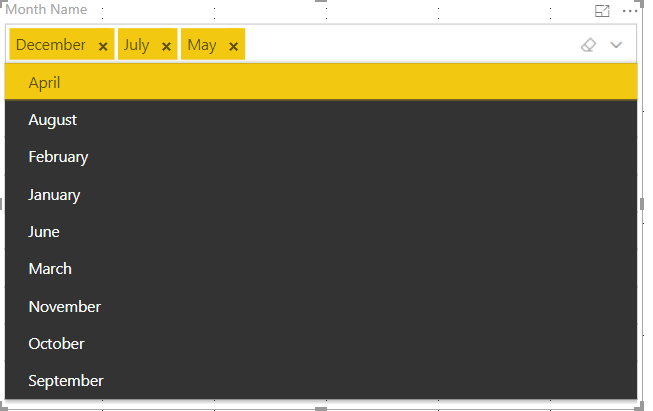
Based on my research, I suggest you to use this customer visual "Smart filter by OKVIz"
Result:
Reference:https://appsource.microsoft.com/en-us/product/power-bi-visuals/WA104380859?src=office&tab=Overview
Regards,
Daniel He
If this post helps, then please consider Accept it as the solution to help the other members find it more quickly.


- Mark as New
- Bookmark
- Subscribe
- Mute
- Subscribe to RSS Feed
- Permalink
- Report Inappropriate Content
Hi,
Thank you for the tip. However, the visual has issues, or better say behavior differences, when published. I have the Smart filter up top and it overlaps several other slicers below it. Since the dropdown view is expanded up to its UI widget size in the report, i have the filter sized to be tall and overlapping several other UI elements below (slicers, etc.) and I sent it to back of the front-to-back order. This works in Power Bi Desktop and dropdown when expanded is opaque and rendered over other UI widgets. In Dashboard view however, the drop down view seems to follow front-back order and the other UI elements are rendered on top of the expanded dropdown view. Sending it to front is not an option as then you can't select any of the slicers below
Is there any way to make it work as expected in the published dashboard or is it really a deficiency of the implemented visualization and can't be changed?
- Mark as New
- Bookmark
- Subscribe
- Mute
- Subscribe to RSS Feed
- Permalink
- Report Inappropriate Content
Actually found out the official slicer already supports a drop down view with selections highlighted up top.


- Mark as New
- Bookmark
- Subscribe
- Mute
- Subscribe to RSS Feed
- Permalink
- Report Inappropriate Content
You can vote for this idea here:
https://ideas.powerbi.com/ideas/idea/?ideaid=008e0de3-1809-4f6f-be99-676a34bd116b
- Mark as New
- Bookmark
- Subscribe
- Mute
- Subscribe to RSS Feed
- Permalink
- Report Inappropriate Content
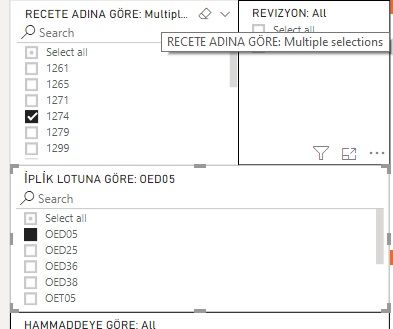
I have same problem. My slicer contains lots of vertical list values and i need whole selected values keep always on top of list. As you can see multiple selected values on RECETE ADINA GÖRE: are hidden in under the frame and user can't find and unselect values.
- Mark as New
- Bookmark
- Subscribe
- Mute
- Subscribe to RSS Feed
- Permalink
- Report Inappropriate Content
Hi @Anonymous,
Based on my research, I suggest you to use this customer visual "Smart filter by OKVIz"
Result:
Reference:https://appsource.microsoft.com/en-us/product/power-bi-visuals/WA104380859?src=office&tab=Overview
Regards,
Daniel He
If this post helps, then please consider Accept it as the solution to help the other members find it more quickly.
- Mark as New
- Bookmark
- Subscribe
- Mute
- Subscribe to RSS Feed
- Permalink
- Report Inappropriate Content
This is the not exact solution for my same problem. My slicer contains lots of vertical list values and i need whole selected values keep always on top of list. As you can see multiple selected values on RECETE ADINA GÖRE: are hidden in under the frame and user can't find and unselect values.

- Mark as New
- Bookmark
- Subscribe
- Mute
- Subscribe to RSS Feed
- Permalink
- Report Inappropriate Content
Hi,
Thank you for the tip. However, the visual has issues, or better say behavior differences, when published. I have the Smart filter up top and it overlaps several other slicers below it. Since the dropdown view is expanded up to its UI widget size in the report, i have the filter sized to be tall and overlapping several other UI elements below (slicers, etc.) and I sent it to back of the front-to-back order. This works in Power Bi Desktop and dropdown when expanded is opaque and rendered over other UI widgets. In Dashboard view however, the drop down view seems to follow front-back order and the other UI elements are rendered on top of the expanded dropdown view. Sending it to front is not an option as then you can't select any of the slicers below
Is there any way to make it work as expected in the published dashboard or is it really a deficiency of the implemented visualization and can't be changed?
- Mark as New
- Bookmark
- Subscribe
- Mute
- Subscribe to RSS Feed
- Permalink
- Report Inappropriate Content
Actually found out the official slicer already supports a drop down view with selections highlighted up top.
- Mark as New
- Bookmark
- Subscribe
- Mute
- Subscribe to RSS Feed
- Permalink
- Report Inappropriate Content
Hi @Peter_ , could you explain how to do what you're describing using the native Power BI slicer dropdown? Thanks!


- Mark as New
- Bookmark
- Subscribe
- Mute
- Subscribe to RSS Feed
- Permalink
- Report Inappropriate Content
- Mark as New
- Bookmark
- Subscribe
- Mute
- Subscribe to RSS Feed
- Permalink
- Report Inappropriate Content

- Mark as New
- Bookmark
- Subscribe
- Mute
- Subscribe to RSS Feed
- Permalink
- Report Inappropriate Content
Hope this helps you!! 
https://powerpivotpro.com/2017/03/latest-best-way-catchcaptureinspect-slicer-selections/
- Mark as New
- Bookmark
- Subscribe
- Mute
- Subscribe to RSS Feed
- Permalink
- Report Inappropriate Content
Hi @kiranvijay. Thanks, but this solution only shows the selected values. I want to be able to deselected them and not to scroll through the list and then find the values that I need to deselect.
But with your solution I do can display them and that also benefits the user so he/she knows on what values the report the visuals are based. So thanks!
Helpful resources

Power BI Monthly Update - September 2025
Check out the September 2025 Power BI update to learn about new features.

FabCon Atlanta 2026
Join us at FabCon Atlanta, March 16-20, for the ultimate Fabric, Power BI, AI and SQL community-led event. Save $200 with code FABCOMM.


