This time we’re going bigger than ever. Fabric, Power BI, SQL, AI and more. We're covering it all. You won't want to miss it.
Learn moreJoin the FabCon + SQLCon recap series. Up next: Power BI, Real-Time Intelligence, IQ and AI, and Data Factory take center stage. All sessions are available on-demand after the live show. Register now
Hello,
I want to create a slicer with several pre-defined options to select from.
The options should return data from today, the last 7 days, the last 30 days, the last 90 days.
It seems that the data from today displayed correctly, but the rest of the options are not.
Here is what I did:
slicer item =
SWITCH (
TRUE (),
[Date] = TODAY (), "Today",
DATEDIFF (
[Date],
TODAY (),
DAY
) <= 7
&& [Date] <= TODAY (), "Last Week",
DATEDIFF (
[Date],
TODAY (),
DAY
) <= 30
&& [Date]
< TODAY (), "Last Month",
DATEDIFF (
[Date],
TODAY (),
DAY
) <= 90
&& [Date]
< TODAY (), "Last 3 Months"
)
The last 7 days return with the correct data but not including today. (I want to include also today)
The last 30 + 90 return partly data which doesn't include the current month.
Can someone suggest to me what I'm doing wrong?
Thanks in advance.
Solved! Go to Solution.
Hi, @edant ;
Because the conditional statement of switch takes the first condition [Date] = TODAY (), "Today" first, if your date meets today, then it can only return a result today instead of "Last Week";
Maybe you can try the following methods:
1.enter table.
2.create a flag measure.
flag =
SWITCH (
MAX ( 'slicer'[slicer] ),
"Today", IF ( MAX ( 'Table'[date] ) = TODAY (), 1 ),
"Last Week",
IF (
DATEDIFF ( MAX ( 'Table'[date] ), TODAY (), DAY ) <= 7
&& MAX ( 'Table'[date] ) <= TODAY (),
1
),
"Last Month",
IF (
DATEDIFF ( MAX ( 'Table'[date] ), TODAY (), DAY ) <= 30
&& MAX ( 'Table'[date] ) < TODAY (),
1
),
"Last 3 Months",
IF (
DATEDIFF ( MAX ( 'Table'[date] ), TODAY (), DAY ) <= 90
&& MAX ( 'Table'[date] ) < TODAY (),
1
)
)
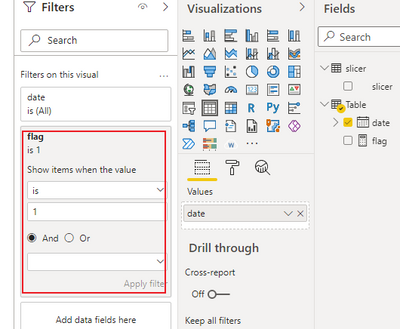
3.apply it into filter.
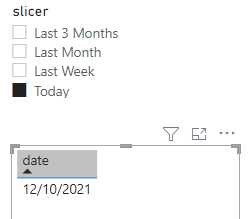
The final output is shown below:
If it does not meet your needs, It would be great if there is a sample file without any sesentive information here.
It makes it easier to give you a solution.
Best Regards,
Community Support Team_ Yalan Wu
If this post helps, then please consider Accept it as the solution to help the other members find it more quickly.
Hi, @edant ;
Because the conditional statement of switch takes the first condition [Date] = TODAY (), "Today" first, if your date meets today, then it can only return a result today instead of "Last Week";
Maybe you can try the following methods:
1.enter table.
2.create a flag measure.
flag =
SWITCH (
MAX ( 'slicer'[slicer] ),
"Today", IF ( MAX ( 'Table'[date] ) = TODAY (), 1 ),
"Last Week",
IF (
DATEDIFF ( MAX ( 'Table'[date] ), TODAY (), DAY ) <= 7
&& MAX ( 'Table'[date] ) <= TODAY (),
1
),
"Last Month",
IF (
DATEDIFF ( MAX ( 'Table'[date] ), TODAY (), DAY ) <= 30
&& MAX ( 'Table'[date] ) < TODAY (),
1
),
"Last 3 Months",
IF (
DATEDIFF ( MAX ( 'Table'[date] ), TODAY (), DAY ) <= 90
&& MAX ( 'Table'[date] ) < TODAY (),
1
)
)
3.apply it into filter.
The final output is shown below:
If it does not meet your needs, It would be great if there is a sample file without any sesentive information here.
It makes it easier to give you a solution.
Best Regards,
Community Support Team_ Yalan Wu
If this post helps, then please consider Accept it as the solution to help the other members find it more quickly.
Thank you for your help, it worked like a charm 🙂
Check out the April 2026 Power BI update to learn about new features.
If you have recently started exploring Fabric, we'd love to hear how it's going. Your feedback can help with product improvements.
A new Power BI DataViz World Championship is coming this June! Don't miss out on submitting your entry.
| User | Count |
|---|---|
| 40 | |
| 39 | |
| 31 | |
| 22 | |
| 15 |
| User | Count |
|---|---|
| 76 | |
| 61 | |
| 34 | |
| 30 | |
| 25 |