Join us at FabCon Atlanta from March 16 - 20, 2026, for the ultimate Fabric, Power BI, AI and SQL community-led event. Save $200 with code FABCOMM.
Register now!Get Fabric Certified for FREE during Fabric Data Days. Don't miss your chance! Request now
In the following scenario, does anyone know what changes I need to make to allow the slicer to interact as intended?
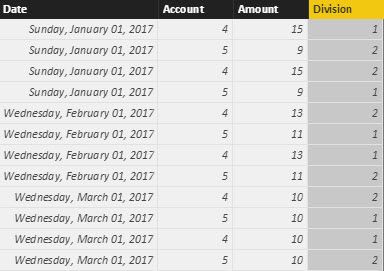
Here's an example table. I want to display a sum of year to date amounts, filtered to account 4, with a slicer allowing the user to toggle between divisions 1 & 2:
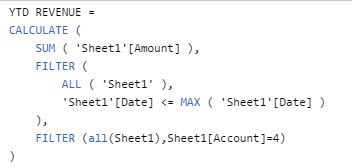
My measure formula is as follows, and it calculates in total properly and responds to date slicing without issue.
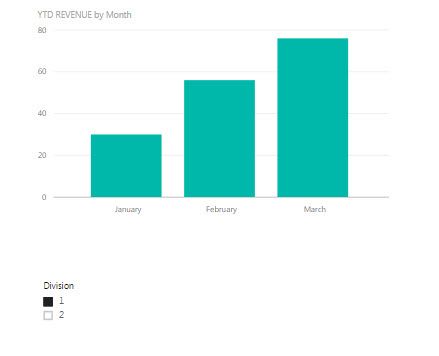
my problem is that it won't react to a slicer by division. Any selection in the slicer is ignored.
I assume the issue is with my YTD REVENUE measure details, but I'm uncertain exactly what.
Solved! Go to Solution.
Hi, try with this:
YTDRevenue =
CALCULATE (
SUM ( Sheet1[Amount] ),
FILTER (
ALLEXCEPT ( Sheet1, Sheet1[Division] ),
Sheet1[Date] <= MAX ( Sheet1[Date] )
&& Sheet1[Account] = 4
)
)
Thanks for all the quick replies, Vvelarde's answer does solve my issue. Phil's answer also works for me, except when there's nothing selected on the slicer, at which point it displays incorrectly. Very much appreciated though!
Give this a crack. I had to modify some data to get difference between them
YTD Revenue = CALCULATE(SUM('Sheet1'[Amount]),
FILTER(
ALL(Sheet1),
'Sheet1'[date]<=MAX('Sheet1'[date])
&& 'Sheet1'[Division] = MAX('Sheet1'[Division])
),
FILTER(all('Sheet1'),Sheet1[Account]=4)
)
Try changing your ALL(Sheet1) to specify ALL(Sheet1[Date]) or ALL(Sheet1[Account]) for the second part.
Your measure effectively overrides the filter context of Division because your ALL argument indicates the entire table.
Hi, try with this:
YTDRevenue =
CALCULATE (
SUM ( Sheet1[Amount] ),
FILTER (
ALLEXCEPT ( Sheet1, Sheet1[Division] ),
Sheet1[Date] <= MAX ( Sheet1[Date] )
&& Sheet1[Account] = 4
)
)
Check out the November 2025 Power BI update to learn about new features.
Advance your Data & AI career with 50 days of live learning, contests, hands-on challenges, study groups & certifications and more!