


cancel
Showing results for 
Search instead for 
Did you mean: 

View all the Fabric Data Days sessions on demand. View schedule

Reply
zher007
New Member

Slicer issue where Range is too big and values are incorrect

Hello all, 

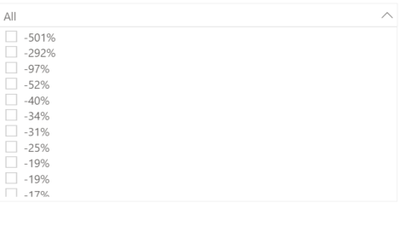
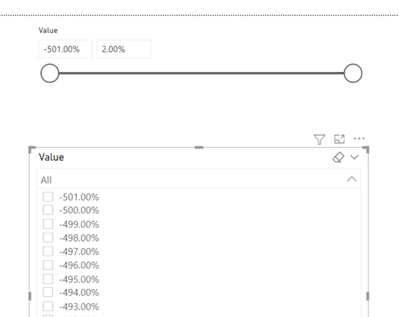
I am trying to put a slicer "between" with a range but the range is incorrect. 

zher007_0-1621428724665.png

When i put it as a list, I have the correct values which are from -501% to 2%. What should I do to get the same range in my "between" slicer? Thank you in advance for your help.

zher007_2-1621428802091.png


2 REPLIES 2
Fowmy
Super User
Super User

@zher007 

Please re-check your data and the formatting. I tested and it word fine for me. I basically created a table with your number range as Percentage format as follows:

Fowmy_0-1621430468068.png


Did I answer your question? Mark my post as a solution! and hit thumbs up


Subscribe and learn Power BI from these videos

Website LinkedIn PBI User Group

Unfortunately it does not work

zher007_0-1622454843052.png
I have another example of the same reaction in my dashboard.

Here is again the same slicer when you show it as a list and as a "between":

zher007_1-1622455043958.png

zher007_2-1622455281029.png


I have the feeling it sums all my percentage (here 1064%) and it creates a range based on this sum.


Helpful resources

Announcements
November Power BI Update Carousel

Power BI Monthly Update - November 2025

Check out the November 2025 Power BI update to learn about new features.

Fabric Data Days Carousel

Fabric Data Days

Advance your Data & AI career with 50 days of live learning, contests, hands-on challenges, study groups & certifications and more!

FabCon Atlanta 2026 carousel

FabCon Atlanta 2026

Join us at FabCon Atlanta, March 16-20, for the ultimate Fabric, Power BI, AI and SQL community-led event. Save $200 with code FABCOMM.

Top Solution Authors
Top Kudoed Authors