cancel
Showing results for 
Search instead for 
Did you mean: 

Get Fabric Certified for FREE during Fabric Data Days. Don't miss your chance! Request now

Reply
TabathaN
Advocate III
Advocate III

Slicer drop down stays open

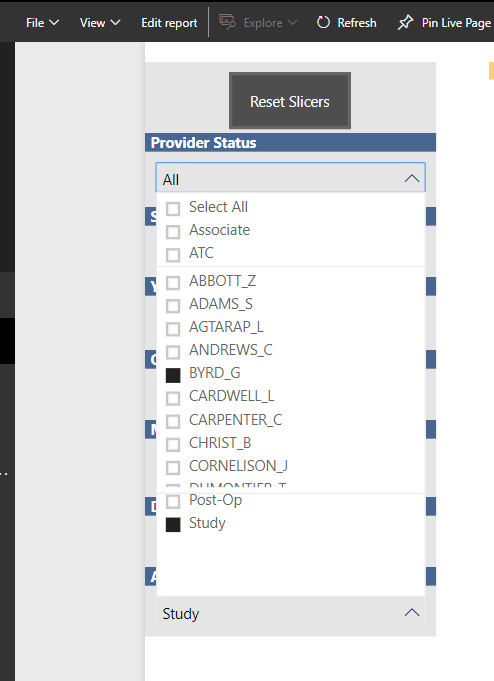
I don't know if this is a setting I need to change or a bug but I have many drop-down slicers on a page and after I click on one and click on another, the first drop down stays open. If I want it to go away I have to manually close it or click in a blank space on the page. This happens to me in both desktop and service. Is there a way to fix this so that when you click on the next slicer the first one automatically closes like it does in other applications? It's driving me bananas!


Photo shows me clicking on three difference slicers and each one stays open over the previous

slicer.png

2 ACCEPTED SOLUTIONS
Anonymous
Not applicable

@TabathaN,

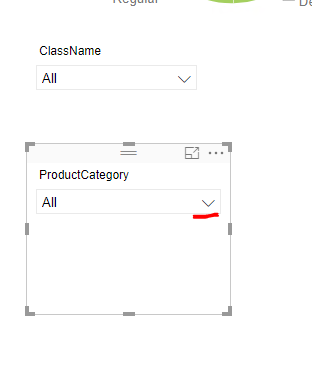
After you select values in the first slicer, do you click on the second slicer or directly click on the dropdown icon of the second slicer?
0.PNG

If you directly click on the whole second slicer, the first dropdown will close. However, if you directly click on  the dropdown icon of the second slicer, the first dropdown will not close.

Regards,
Lydia

View solution in original post

Anonymous
Not applicable

@TabathaN,

I have confirmed this issue with PG and this behavior is by design.

Regards,
Lydia

View solution in original post

5 REPLIES 5
Anonymous
Not applicable

@TabathaN,

After you select values in the first slicer, do you click on the second slicer or directly click on the dropdown icon of the second slicer?
0.PNG

If you directly click on the whole second slicer, the first dropdown will close. However, if you directly click on  the dropdown icon of the second slicer, the first dropdown will not close.

Regards,
Lydia

@Anonymous

Is it intentionally designed like that or is this a bug? 

It doesn't make sense to have to click twice every time - once to close out old slicer then once to open new.

Anonymous
Not applicable

@TabathaN,

I have confirmed this issue with PG and this behavior is by design.

Regards,
Lydia

Anonymous
Not applicable

Confirmed or not, its bad design! 

Anonymous
Not applicable

@TabathaN,

I will consult it internally and post back once I get any updates.

Regards,
Lydia

Helpful resources

Announcements
November Power BI Update Carousel

Power BI Monthly Update - November 2025

Check out the November 2025 Power BI update to learn about new features.

Fabric Data Days Carousel

Fabric Data Days

Advance your Data & AI career with 50 days of live learning, contests, hands-on challenges, study groups & certifications and more!

FabCon Atlanta 2026 carousel

FabCon Atlanta 2026

Join us at FabCon Atlanta, March 16-20, for the ultimate Fabric, Power BI, AI and SQL community-led event. Save $200 with code FABCOMM.

Top Solution Authors
Top Kudoed Authors