cancel
Showing results for 
Search instead for 
Did you mean: 

The Power BI Data Visualization World Championships is back! Get ahead of the game and start preparing now! Learn more

Reply
MariaRusso
New Member

Slicer and Relationships

Hi,

So I have 3 different tables that has the same columns but represent different data based on each quarter
Q1 2021, Q2 2021 and Q3 2021.

What I am trying to do is create a slicer that can be picked and generate the data for each quarter.
For example one column in all 3 tables is Fund Name.
I want to create a slicer that can have a drop down on the Fund Name, and then the 3 pie charts I have that represent each quarter to filter out that Fund Name.
As of right now, I have 3 slicers and 3 graphs and when I pick one fund name from the slicer, I have to manually do it for the other 2 slicers instead of producing just one slicer.

If that makes sense. 
I understand it has something to do with the relationships between the tables but when I manage a relationship and try to connect columns together it does not produce the correct output.
Thanks!

1 ACCEPTED SOLUTION
Anonymous
Not applicable

Hi @MariaRusso 

Here I have two ways to achieve your goal.

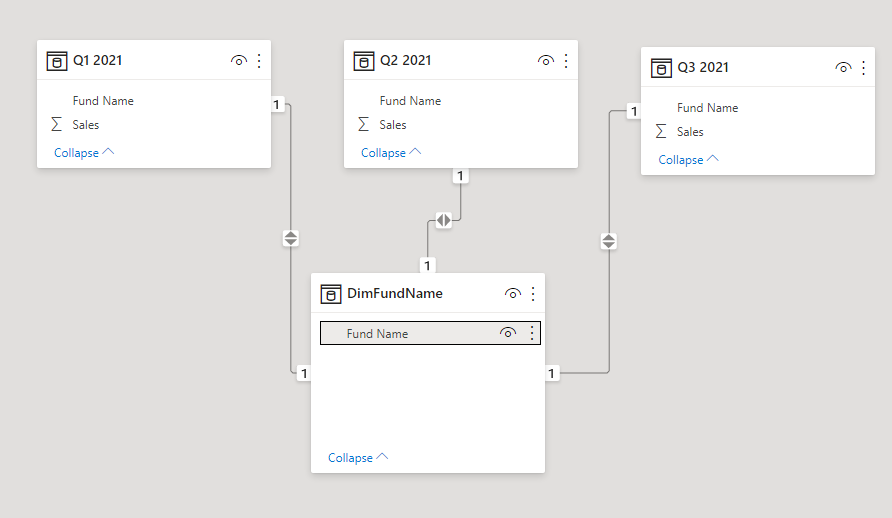
1. Create a "DimFundName" table and relate this table with "Q1 2021", "Q2 2021" and "Q3 2021" tables. Then filter visuals by FundName Slicer based on "DimFundName" table.

1.png

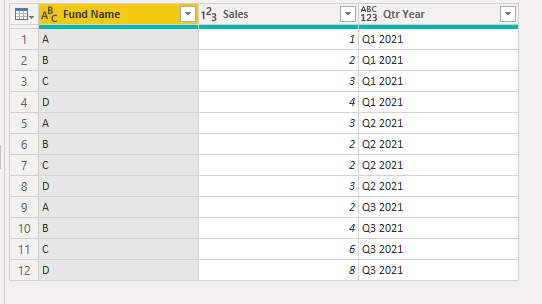
2. If "Q1 2021", "Q2 2021" and "Q3 2021" tables have the same format, add a cutom column to show Quarter and Year then try Append function to combine these tables as one. Then filter your visuals by this Fund Name Column.

3.png

For reference: Append queries

You can download my sample to learn more details.


Best Regards,
Rico Zhou


If this post helps, then please consider Accept it as the solution to help the other members find it more quickly.

View solution in original post

4 REPLIES 4
Anonymous
Not applicable

Hi @MariaRusso 

Here I have two ways to achieve your goal.

1. Create a "DimFundName" table and relate this table with "Q1 2021", "Q2 2021" and "Q3 2021" tables. Then filter visuals by FundName Slicer based on "DimFundName" table.

1.png

2. If "Q1 2021", "Q2 2021" and "Q3 2021" tables have the same format, add a cutom column to show Quarter and Year then try Append function to combine these tables as one. Then filter your visuals by this Fund Name Column.

3.png

For reference: Append queries

You can download my sample to learn more details.


Best Regards,
Rico Zhou


If this post helps, then please consider Accept it as the solution to help the other members find it more quickly.

HotChilli
Super User
Super User

"same columns but represent different data" Is there a reason that you are not combining the data into one table if they all have the same columns?


amitchandak
Super User
Super User

@MariaRusso , Not very clear. Hope you have common tables and Qtr and fund name ?


Can you share sample data and sample output in table format?


You need to be star Schema in https://www.sqlbi.com/articles/the-importance-of-star-schemas-in-power-bi/

Share with Power BI Enthusiasts: Full Power BI Video (20 Hours) YouTube
Microsoft Fabric Series 60+ Videos YouTube
Microsoft Fabric Hindi End to End YouTube

I have 3 tables imported into Power BI via Excel
All tables consist of columns named Client Name, Account Inception, Market Value, Client Inception, Fund Family, Fund Name, Group.
I do not have any other tables.

Helpful resources

Announcements
Power BI DataViz World Championships

Power BI Dataviz World Championships

The Power BI Data Visualization World Championships is back! Get ahead of the game and start preparing now!

November Power BI Update Carousel

Power BI Monthly Update - November 2025

Check out the November 2025 Power BI update to learn about new features.

FabCon Atlanta 2026 carousel

FabCon Atlanta 2026

Join us at FabCon Atlanta, March 16-20, for the ultimate Fabric, Power BI, AI and SQL community-led event. Save $200 with code FABCOMM.