Get certified for free when you join Fabric Data Days 2026 and dive into Fabric, Power BI, SQL, AI, and other essential data skills.
Join nowTry your skills in the Power BI Dataviz World Championship! Round one ends June 26. Join now
Hi,
I would like my slicer to change color if one value is filtered.
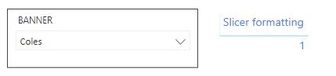
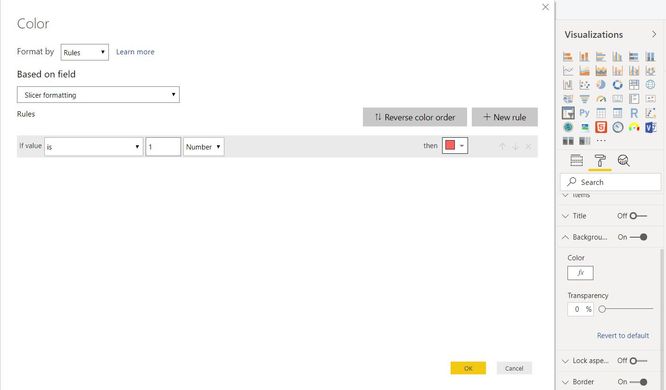
Below is what I've done so far but the slicer is not changing color...
Slicer formatting = IF( HASONEFILTER( 'Query Answers'[Banner] ) , 1, BLANK() )
As you can see above my Slicer Formatting measure has value 1 which is supposed to change the background of my slicer to Red, but nothing is happenning...
Is there something I'm doing wrong?
Thanks in advance,
Rob
Solved! Go to Solution.
Hi @Anonymous ,
To create measures as below and set conditional formatting based on Slicer formatting color.
Slicer formatting = IF( HASONEFILTER( 'Query Answers'[Banner] ) , 2, 0 )
Slicer formatting color = IF( [Slicer formatting]=2 , "#FF2657", BLANK() )
For more details, please check the pbix as attached.
This does not seem to work for Date Slicers with Relative Dates mode.
I have tried with a bunch of different ways, and the card I use to test changes color, but the Date Slicer never does
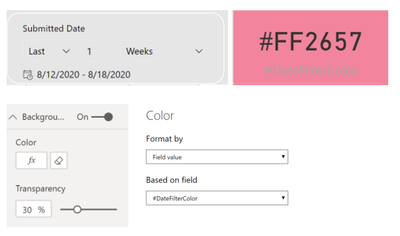
I am using the following measure in the Date Slicer Background conditional formatting.
#DateFilterColor =
IF(
ISFILTERED('USA AEIOU'[SubmittedDate]),
"#FF2657",
"#FFFFFF00"
)
Thoughts?
Hi @Anonymous ,
We can set condiftional formamting in backgroud pane like the picture as below.
Or you should add the banner column to the table visual as well to set condiftional formatting as the way you used before.
Hi @v-frfei-msft ,
Thanks for your time.
However, I am trying to add the Conditional Formatting in background pane to a Slicer Visual, not a table.
Can you please try that for me and let me know if it works on your side?
Cheers,
Robin
Hi @Anonymous ,
To create measures as below and set conditional formatting based on Slicer formatting color.
Slicer formatting = IF( HASONEFILTER( 'Query Answers'[Banner] ) , 2, 0 )
Slicer formatting color = IF( [Slicer formatting]=2 , "#FF2657", BLANK() )
For more details, please check the pbix as attached.
Don't miss out on Data Days, June 15 through August 7. Learn Fabric, Power BI, SQL, AI and more.
Check out the May 2026 Power BI update to learn about new features.
| User | Count |
|---|---|
| 24 | |
| 22 | |
| 22 | |
| 20 | |
| 12 |
| User | Count |
|---|---|
| 68 | |
| 56 | |
| 42 | |
| 39 | |
| 30 |