Join us at FabCon Atlanta from March 16 - 20, 2026, for the ultimate Fabric, Power BI, AI and SQL community-led event. Save $200 with code FABCOMM.
Register now!The Power BI Data Visualization World Championships is back! It's time to submit your entry. Live now!
Hi All,
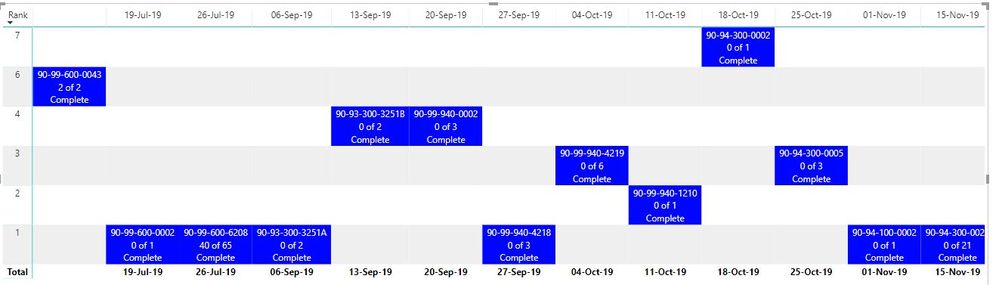
I've got a Skyline report (matrix visualisation) that currently stacks like this:
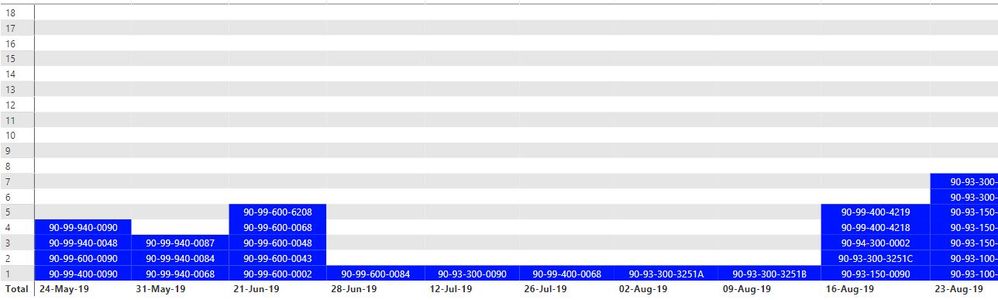
and I need it to stack like this:
Please refer to stacking only, I realise content is different, the below picture is from a much older version of the above file. See attached file below:
There are 2 measures and 2 calculated columns required to generate the above matrix. I'm guessing there is an error in the DAX that's causing the sorting issue but I can't locate it.
Would appreciate any help.
Solved! Go to Solution.
Make the relationship inactive between 'Skyline' and 'Skyline Rank'.
The Power BI Data Visualization World Championships is back! It's time to submit your entry.
Check out the January 2026 Power BI update to learn about new features.
| User | Count |
|---|---|
| 56 | |
| 40 | |
| 38 | |
| 21 | |
| 20 |
| User | Count |
|---|---|
| 141 | |
| 105 | |
| 63 | |
| 36 | |
| 35 |