FabCon is coming to Atlanta
Join us at FabCon Atlanta from March 16 - 20, 2026, for the ultimate Fabric, Power BI, AI and SQL community-led event. Save $200 with code FABCOMM.
Register now!- Power BI forums
- Get Help with Power BI
- Desktop
- Service
- Report Server
- Power Query
- Mobile Apps
- Developer
- DAX Commands and Tips
- Custom Visuals Development Discussion
- Health and Life Sciences
- Power BI Spanish forums
- Translated Spanish Desktop
- Training and Consulting
- Instructor Led Training
- Dashboard in a Day for Women, by Women
- Galleries
- Data Stories Gallery
- Themes Gallery
- Contests Gallery
- QuickViz Gallery
- Quick Measures Gallery
- Visual Calculations Gallery
- Notebook Gallery
- Translytical Task Flow Gallery
- TMDL Gallery
- R Script Showcase
- Webinars and Video Gallery
- Ideas
- Custom Visuals Ideas (read-only)
- Issues
- Issues
- Events
- Upcoming Events
The Power BI Data Visualization World Championships is back! Get ahead of the game and start preparing now! Learn more
- Power BI forums
- Forums
- Get Help with Power BI
- Desktop
- Re: Simple multiplication with quick measure?
- Subscribe to RSS Feed
- Mark Topic as New
- Mark Topic as Read
- Float this Topic for Current User
- Bookmark
- Subscribe
- Printer Friendly Page

- Mark as New
- Bookmark
- Subscribe
- Mute
- Subscribe to RSS Feed
- Permalink
- Report Inappropriate Content
Simple multiplication with quick measure?
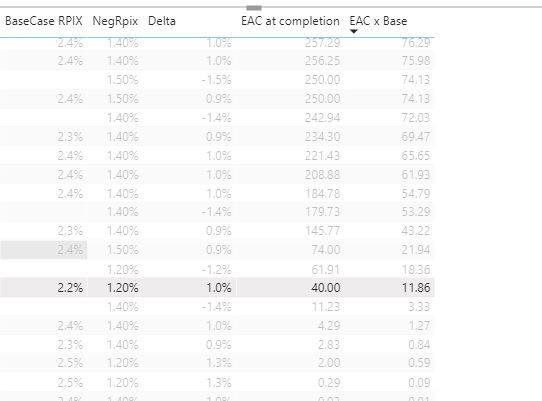
Hi, I am going crazy?! 3 secs in Excel, 2 hrs in PowerBI......
I am simply trying to multiply 1 column by a percentage value from another column, using the quick measure button.... I have tried using MAX and Sumx etc..... This should be like instant, what I am missing/doing wrong?




- Mark as New
- Bookmark
- Subscribe
- Mute
- Subscribe to RSS Feed
- Permalink
- Report Inappropriate Content
Hi @Anonymous
We are all here to help you, so please don't be too anxious.
What is the relationship between the two tables?

Best Regards
Maggie
- Mark as New
- Bookmark
- Subscribe
- Mute
- Subscribe to RSS Feed
- Permalink
- Report Inappropriate Content
HI, I am a Dax M language type of person, but am able to steal and amend a few calcs here and there......This seems very complicated.....However, I do not a have grasp as an MS Access user of uniqueness and row level joins etc...... I am guessing/assuming that the column data is not tight enough, so are the rows mis-joining and not aligning properly, so rogue values are being grouped intra row? Do I need to create a calculated column and concat a load of col values to force a stronger "perfect" unique join and then apply the calc? I know thats not Dax'style or purist, as I am just looking for a dirty workaround that works that I can understand as a none programmer....? 😞...... I also get confused as to whether its better to create new tables at transfomration stage and rejoin them than apply measures after the event...... i.e. receive data, break it down into logical chunks, then glue it back together using keys etc.....(a bit like I am suggesting above?)....
- Mark as New
- Bookmark
- Subscribe
- Mute
- Subscribe to RSS Feed
- Permalink
- Report Inappropriate Content
Hi @Anonymous
Firstly learn some basic techniques:
https://docs.microsoft.com/en-us/power-bi/transform-model/desktop-create-and-manage-relationships
https://docs.microsoft.com/en-us/power-bi/transform-model/desktop-quickstart-learn-dax-basics
https://docs.microsoft.com/en-us/dax/dax-overview
Later i would create a simple example to help you understand your problem.
Best Regards
Maggie


- Mark as New
- Bookmark
- Subscribe
- Mute
- Subscribe to RSS Feed
- Permalink
- Report Inappropriate Content
Hi @Anonymous ,
If those tables are related, use the SUMX function.
Did I answer your question? Mark my post as a solution!
Proud to be a Super User!
- Mark as New
- Bookmark
- Subscribe
- Mute
- Subscribe to RSS Feed
- Permalink
- Report Inappropriate Content
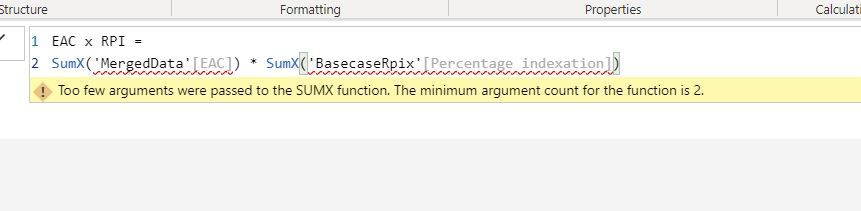
Hi, I just hit a wall with this? I though max was the usual one too.....


- Mark as New
- Bookmark
- Subscribe
- Mute
- Subscribe to RSS Feed
- Permalink
- Report Inappropriate Content
@Anonymous , You need have common group by or dimension where you can group this data and multiply
Like
Sumx(summarize(Dimension,Dimension[Dim],"_1",sum(MergeData[EAC]) , "_2",sum(BasecaseRpiX[Percent Indextaion])),[_1]*[_2])
Refer, how I have taken advantage order dim to take date diff
- Mark as New
- Bookmark
- Subscribe
- Mute
- Subscribe to RSS Feed
- Permalink
- Report Inappropriate Content
@Anonymous ,
SUMX(TABLE, COLUMN X COLUMN)
Did I answer your question? Mark my post as a solution!
Proud to be a Super User!
Helpful resources

Power BI Dataviz World Championships
The Power BI Data Visualization World Championships is back! Get ahead of the game and start preparing now!

Power BI Monthly Update - December 2025
Check out the December 2025 Power BI Holiday Recap!

FabCon Atlanta 2026
Join us at FabCon Atlanta, March 16-20, for the ultimate Fabric, Power BI, AI and SQL community-led event. Save $200 with code FABCOMM.

| User | Count |
|---|---|
| 39 | |
| 37 | |
| 33 | |
| 32 | |
| 29 |


| User | Count |
|---|---|
| 133 | |
| 88 | |
| 85 | |
| 68 | |
| 64 |


