cancel
Showing results for 
Search instead for 
Did you mean: 

The Power BI Data Visualization World Championships is back! Get ahead of the game and start preparing now! Learn more

Reply
Anonymous
Not applicable

Simple calculation

Hi, all.


I wonder how to make a measure value in this case.

I want to count the rowss of tablet A with filter about A,B,C.
I want to calculate by applying a filter for the state of B and the version of C.
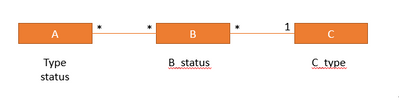
The three table Relations are as follows.

HUAM_0-1644801457184.png

I tried likt this but no work

#test =
CALCULATE(COUNTROWS('A'),
   'A'[A_type] = "A_type" &&
   'A'[A_status] = "A_status" &&
   'B'[B_status] = "B_status" &&
   'C'[C_type = "C_type")
 
I think it isn't work beacause of many to many realtion.
How to calculation in this case?
 
Thank you
1 ACCEPTED SOLUTION
v-yalanwu-msft
Community Support
Community Support

Hi, @Anonymous ;

I noticed your last post, is it similar to this one, based on the data from the previous post, I created the following formula:

diff = DATEDIFF(MAX('Table'[coupon_usedate]),MAX('Table2'[lastlinkdate]),DAY)
count = COUNTX(FILTER( 'Table2',[diff]<=30&&[diff]>=0),[lastlinkdate])

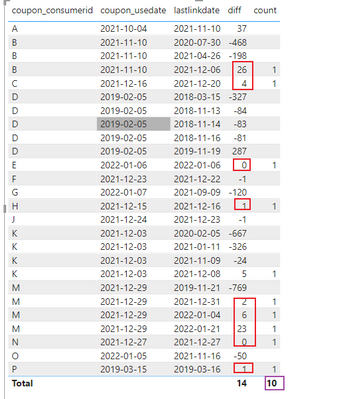
 The final output is shown below:

vyalanwumsft_0-1645079645567.png

If not right ,could you share a simple file and share the result what you want to output?


Best Regards,
Community Support Team_ Yalan Wu
If this post helps, then please consider Accept it as the solution to help the other members find it more quickly.

View solution in original post

2 REPLIES 2
v-yalanwu-msft
Community Support
Community Support

Hi, @Anonymous ;

I noticed your last post, is it similar to this one, based on the data from the previous post, I created the following formula:

diff = DATEDIFF(MAX('Table'[coupon_usedate]),MAX('Table2'[lastlinkdate]),DAY)
count = COUNTX(FILTER( 'Table2',[diff]<=30&&[diff]>=0),[lastlinkdate])

 The final output is shown below:

vyalanwumsft_0-1645079645567.png

If not right ,could you share a simple file and share the result what you want to output?


Best Regards,
Community Support Team_ Yalan Wu
If this post helps, then please consider Accept it as the solution to help the other members find it more quickly.

Ashish_Mathur
Super User
Super User

Hi,

You should not have many to many relationships at all.  You should use/create a bridge table instead.  Share some data to work with along with a description of your question and show the expected result.


Regards,
Ashish Mathur
http://www.ashishmathur.com
https://www.linkedin.com/in/excelenthusiasts/

Helpful resources

Announcements
Power BI DataViz World Championships

Power BI Dataviz World Championships

The Power BI Data Visualization World Championships is back! Get ahead of the game and start preparing now!

December 2025 Power BI Update Carousel

Power BI Monthly Update - December 2025

Check out the December 2025 Power BI Holiday Recap!

FabCon Atlanta 2026 carousel

FabCon Atlanta 2026

Join us at FabCon Atlanta, March 16-20, for the ultimate Fabric, Power BI, AI and SQL community-led event. Save $200 with code FABCOMM.