A new Data Days event is coming soon!
This time we’re going bigger than ever. Fabric, Power BI, SQL, AI and more. We're covering it all. You won't want to miss it.
Learn more- Power BI forums
- Get Help with Power BI
- Desktop
- Service
- Report Server
- Power Query
- Mobile Apps
- Developer
- DAX Commands and Tips
- Custom Visuals Development Discussion
- Health and Life Sciences
- Power BI Spanish forums
- Translated Spanish Desktop
- Training and Consulting
- Instructor Led Training
- Dashboard in a Day for Women, by Women
- Galleries
- Data Stories Gallery
- Themes Gallery
- Contests Gallery
- QuickViz Gallery
- Quick Measures Gallery
- Visual Calculations Gallery
- Notebook Gallery
- Translytical Task Flow Gallery
- TMDL Gallery
- R Script Showcase
- Webinars and Video Gallery
- Ideas
- Custom Visuals Ideas (read-only)
- Issues
- Issues
- Events
- Upcoming Events
Did you hear? There's a new SQL AI Developer certification (DP-800). Start preparing now and be one of the first to get certified. Register now
- Power BI forums
- Forums
- Get Help with Power BI
- Desktop
- Re: Simple TOPN
- Subscribe to RSS Feed
- Mark Topic as New
- Mark Topic as Read
- Float this Topic for Current User
- Bookmark
- Subscribe
- Printer Friendly Page


- Mark as New
- Bookmark
- Subscribe
- Mute
- Subscribe to RSS Feed
- Permalink
- Report Inappropriate Content
Simple TOPN
Confused.
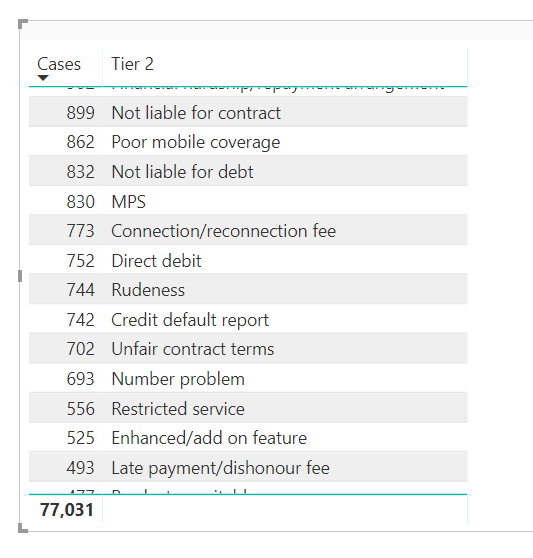
Here is my simple as data set.
Table name = complaints
Columns: Tier2, Cases
I just want to be able to filter the table by top5 cases by Tier2 category.
Any solutions?
Thanks
Solved! Go to Solution.


- Mark as New
- Bookmark
- Subscribe
- Mute
- Subscribe to RSS Feed
- Permalink
- Report Inappropriate Content
FilteredTable = TOPN(
5,
complaints,
complaints[cases],
DESC
)

- Mark as New
- Bookmark
- Subscribe
- Mute
- Subscribe to RSS Feed
- Permalink
- Report Inappropriate Content
Hi @johnmelbourne
You can use Rank as a measure like below.
Rank Cases by  Tier2=
RANKX(
    CALCULATETABLE(
        VALUES( complaints[Tier2] ),
        ALLSELECTED()
    ),
    CALCULATE(
        SUM( complaints[Cases] )
    ),,
    DESC
)
Or Column
Rank Cases by Tier2 =
RANKX(
    VALUES( complaints[Tier2] ),
    CALCULATE( SUM( complaints[Cases] ) ),,,
    Dense
)
Regards,
Mariusz
If this post helps, then please consider Accept it as the solution to help the other members find it more quickly.
- Mark as New
- Bookmark
- Subscribe
- Mute
- Subscribe to RSS Feed
- Permalink
- Report Inappropriate Content
Hi @johnmelbourne
You can use Rank as a measure like below.
Rank Cases by  Tier2=
RANKX(
    CALCULATETABLE(
        VALUES( complaints[Tier2] ),
        ALLSELECTED()
    ),
    CALCULATE(
        SUM( complaints[Cases] )
    ),,
    DESC
)
Or Column
Rank Cases by Tier2 =
RANKX(
    VALUES( complaints[Tier2] ),
    CALCULATE( SUM( complaints[Cases] ) ),,,
    Dense
)
Regards,
Mariusz
If this post helps, then please consider Accept it as the solution to help the other members find it more quickly.
- Mark as New
- Bookmark
- Subscribe
- Mute
- Subscribe to RSS Feed
- Permalink
- Report Inappropriate Content
Hi @Mariusz
I thought the TOPN to filter the table would be easy, but I am still struggling.
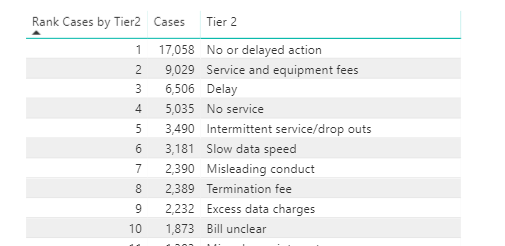
Here is my visualisation table using your rankx formula (which works great!). How would I use a TopN to reduce this table to say a top 5, or even better, a dynamic N using a variable? / slider?
Thanks
John
- Mark as New
- Bookmark
- Subscribe
- Mute
- Subscribe to RSS Feed
- Permalink
- Report Inappropriate Content
Hi @johnmelbourne
Please see the below.
Top N Sales =
VAR n = MAX( 'Top N Selection'[Select Top N] ) -- Unrelated Table with one column and values for top n selection, example (1, 5, 10, 15)
VAR tbl = TOPN(
    n,
    ALLSELECTED( 'Product'[Brand] ), -- replace with complaints[Tier2]
    [Sales], --replace with CALCULATE( SUM( complaints[Cases] ) )
    DESC
)
RETURN
CALCULATE(
    [Sales], --replace with SUM( complaints[Cases] )
    KEEPFILTERS( tbl )
)
Regards,
Mariusz
If this post helps, then please consider Accept it as the solution to help the other members find it more quickly.
- Mark as New
- Bookmark
- Subscribe
- Mute
- Subscribe to RSS Feed
- Permalink
- Report Inappropriate Content
Thank you @Mariusz for the additional procedure. Love to learn. Your solutions were perfect. My TOPN approach kept on throwing an error saying multiple columns. Then you provioded your solution and I also read this article which explained why TOPN is useless by itself. https://www.dutchdatadude.com/power-bi-pro-tip-confusion-about-topn-versus-rankx/
Your contribution was perfect. Thanks @Mariusz
- Mark as New
- Bookmark
- Subscribe
- Mute
- Subscribe to RSS Feed
- Permalink
- Report Inappropriate Content
FilteredTable = TOPN(
5,
complaints,
complaints[cases],
DESC
)
- Mark as New
- Bookmark
- Subscribe
- Mute
- Subscribe to RSS Feed
- Permalink
- Report Inappropriate Content
This article helped, in that TOPN is useless by itself.
https://www.dutchdatadude.com/power-bi-pro-tip-confusion-about-topn-versus-rankx/
- Mark as New
- Bookmark
- Subscribe
- Mute
- Subscribe to RSS Feed
- Permalink
- Report Inappropriate Content

Helpful resources

Power BI Monthly Update - April 2026
Check out the April 2026 Power BI update to learn about new features.

Data Days 2026 coming soon!
Sign up to receive a private message when registration opens and key events begin.

New to Fabric Survey
If you have recently started exploring Fabric, we'd love to hear how it's going. Your feedback can help with product improvements.

Power BI DataViz World Championships - June 2026
A new Power BI DataViz World Championship is coming this June! Don't miss out on submitting your entry.

| User | Count |
|---|---|
| 35 | |
| 32 | |
| 27 | |
| 23 | |
| 16 |


| User | Count |
|---|---|
| 65 | |
| 50 | |
| 30 | |
| 25 | |
| 24 |


