cancel
Showing results for 
Search instead for 
Did you mean: 

We've captured the moments from FabCon & SQLCon that everyone is talking about, and we are bringing them to the community, live and on-demand. Starts on April 14th. Register now

Reply
nmck86
Post Patron
Post Patron

Simple AVG function

I am using a simple average calculation and it seems when a month there are no values it is excluding that month from the avg all together... is there a way to use the average function and it take every single month into account and divide by that number even if that month is blank and has no values?


AVERAGEX(SUMMARIZE(VALUES('Calendar'[Month]),[Month],"ABCD",[CALC_FIELD]),[ABCD])
4 REPLIES 4
Anonymous
Not applicable

Here's how I tackled this:


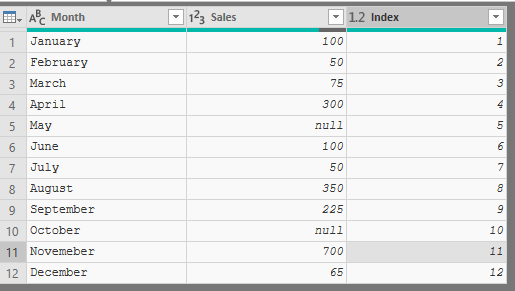
1. Add an index column to your table, usually a Calendar Table ( super easy with power query)

Power Query Table.png

Create simple measure for Total Sales:

Total Sales = sum ( 'Avg Dont Skip'[Sales] )

Create a cummulative Sales and Cumulateive Rows measures

Cumu Sales =
CALCULATE (
    [Total Sales],
    FILTER (
        ALL ( 'Avg Dont Skip' ),
        SUM ( 'Avg Dont Skip'[Index] ) >= 'Avg Dont Skip'[Index]
    )
)

Cumu Rows =
CALCULATE (
    COUNTROWS (
        FILTER (
            ALL ( 'Avg Dont Skip' ),
            'Avg Dont Skip'[Index] <= SUM ( 'Avg Dont Skip'[Index] )
        )
    )
)

so we have our numerator and denominator, then just divide from there:

Avg Sales = DIVIDE([Cumu Sales] , [Cumu Rows] )

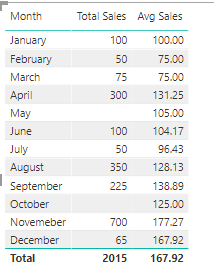
Then the final table:

Final Table.png

OwenAuger
Super User
Super User

@nmck86

One way to ensure that blanks are treated as zeros for the purpose of the average calculation is to add zero to the expression being averaged.


At the same time, I would simplify your formula slightly to something like this:


=
AVERAGEX (
    VALUES ( 'Calendar'[Month] ),
    [CALC_FIELD] + 0
)

Regards,
Owen


Owen Auger
Did I answer your question? Mark my post as a solution!
Blog
LinkedIn

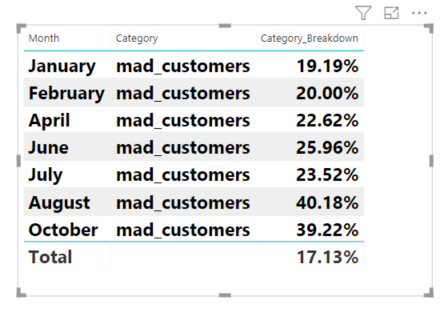
Here is a file you can look at. The structure is slightly different. https://drive.google.com/open?id=1siXptcM3FGuvQ3VH4qbC3aBdgFUa0Dgl Can you take a look at this and see if you can get the category breakdown to actually show as an average?

Also, the easiest way to see this is to add a month filter and you will notice that not in all months will we have values... however, I still want the average to be over the 10 month timespan even if we do not have results so in the sample below the average would be 19.07.


2018-12-10_13-46-42 sample.png

Helpful resources

Announcements
New to Fabric survey Carousel

New to Fabric Survey

If you have recently started exploring Fabric, we'd love to hear how it's going. Your feedback can help with product improvements.

Power BI DataViz World Championships carousel

Power BI DataViz World Championships - June 2026

A new Power BI DataViz World Championship is coming this June! Don't miss out on submitting your entry.

Join our Fabric User Panel

Join our Fabric User Panel

Share feedback directly with Fabric product managers, participate in targeted research studies and influence the Fabric roadmap.

March Power BI Update Carousel

Power BI Community Update - March 2026

Check out the March 2026 Power BI update to learn about new features.