Join us at FabCon Atlanta from March 16 - 20, 2026, for the ultimate Fabric, Power BI, AI and SQL community-led event. Save $200 with code FABCOMM.
Register now!Learn from the best! Meet the four finalists headed to the FINALS of the Power BI Dataviz World Championships! Register now
Hi,
I have a relative simple requirement, but I'm struggling with the implementation, so can use some help.
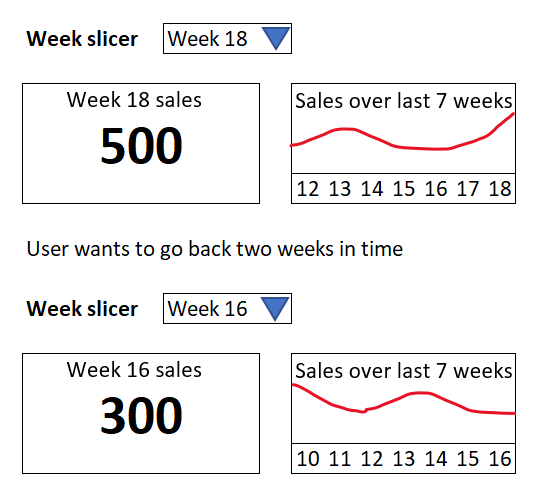
I have data with 20 weeks of sales data. In my report I want to have 1 slicer where I can select a week (ie. week 18).
Next to that I would like to show a card with the sales for that week. So far so good.
But then I would like to add a line graph with the last 7 weeks of sales. This doesn't work because of the slicer filtering on week 18.
I have tried to disable the interactions between the slicer and the line graph. But then I can't show the last 7 weeks relative to the selected week anymore.
I have also tried to work with a relative filter on the visual to only look at data in the last 7 weeks, but this is 'relative to today', not to the week a user selected in the slicer.
So unsure what else I can try to fix this.
In short: the x axis of the line graph needs to be wider than the slicer value (it's value + the six weeks before that).
Like the simple example below:
I would appreciate help on suggestions how to implement this.
Solved! Go to Solution.
@Anonymous , When You select one date/week and need more than that, you need an independent date/week table
//Date1 is independent Date table, Date is joined with Table
new measure =
var _max = maxx(allselected(Date1),Date1[Week Rank])
var _min = _max -7
return
calculate( sum(Table[Value]), filter('Date', 'Date'[Week Rank] >=_min && 'Date'[Week Rank] <=_max))
Week rank is column in both date tables- rank on YYYYWW
new columns
Week Start date = 'Date'[Date]+-1*WEEKDAY('Date'[Date],2)+1
Week End date = 'Date'[Date]+ 7-1*WEEKDAY('Date'[Date],2)
Week Rank = RANKX(all('Date'),'Date'[Week Start date],,ASC,Dense)
OR
Week Rank = RANKX(all('Date'),'Date'[Year Week],,ASC,Dense) //YYYYWW format
Need of an Independent Date Table:https://www.youtube.com/watch?v=44fGGmg9fHI
@Anonymous , When You select one date/week and need more than that, you need an independent date/week table
//Date1 is independent Date table, Date is joined with Table
new measure =
var _max = maxx(allselected(Date1),Date1[Week Rank])
var _min = _max -7
return
calculate( sum(Table[Value]), filter('Date', 'Date'[Week Rank] >=_min && 'Date'[Week Rank] <=_max))
Week rank is column in both date tables- rank on YYYYWW
new columns
Week Start date = 'Date'[Date]+-1*WEEKDAY('Date'[Date],2)+1
Week End date = 'Date'[Date]+ 7-1*WEEKDAY('Date'[Date],2)
Week Rank = RANKX(all('Date'),'Date'[Week Start date],,ASC,Dense)
OR
Week Rank = RANKX(all('Date'),'Date'[Year Week],,ASC,Dense) //YYYYWW format
Need of an Independent Date Table:https://www.youtube.com/watch?v=44fGGmg9fHI
Share feedback directly with Fabric product managers, participate in targeted research studies and influence the Fabric roadmap.
Check out the February 2026 Power BI update to learn about new features.
| User | Count |
|---|---|
| 52 | |
| 50 | |
| 34 | |
| 15 | |
| 14 |
| User | Count |
|---|---|
| 92 | |
| 77 | |
| 41 | |
| 26 | |
| 25 |