cancel
Showing results for 
Search instead for 
Did you mean: 

A new Data Days event is coming soon! This time we’re going bigger than ever. Fabric, Power BI, SQL, AI and more. Don't miss out.

Reply
Sylvine_Wyz
Helper IV
Helper IV

Signet with segment

Hello Everybody, 

I need your help please.

I would like to create a signet on a segment (dropdown list).

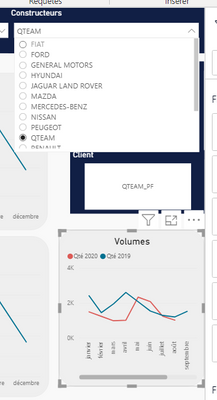
In fact, when i select a choice in the dopdown list, i would like to appear a graph in the page according to the choice.

Or, to appear a new tab in the report.

I arrive to make a signet in a button but not in a segment. That it's not possible ?

Sylvine_Wyz_0-1599808839175.png


Thanks in advance. 


Have a nice day

1 ACCEPTED SOLUTION

@Sylvine_Wyz, this is possible using the button and bookmarks. But I doubt you can use the cutter's value there.

The other one I can think of is the conditional drill.

https://powerbi.microsoft.com/en-us/blog/power-bi-desktop-may-2020-feature-summary/#_Cond_dest_drill

Share with Power BI Enthusiasts: Full Power BI Video (20 Hours) YouTube
Microsoft Fabric Series 60+ Videos YouTube
Microsoft Fabric Hindi End to End YouTube

View solution in original post

4 REPLIES 4
amitchandak
Super User
Super User

@Sylvine_Wyz , The information you have provided is not making the problem clear to me. Can you please explain with an example.

Appreciate your Kudos.


Share with Power BI Enthusiasts: Full Power BI Video (20 Hours) YouTube
Microsoft Fabric Series 60+ Videos YouTube
Microsoft Fabric Hindi End to End YouTube

In fact, i want when i select Qteam in the list, a graph appear in the page. But if i select Ford in the list, the grap disappear.

If this solution is not possible. i want to appear a new tab in my report if il select Qteam and if i select Ford, the new tab disappear. 

Sylvine_Wyz_0-1599810322627.png 

Sylvine_Wyz_2-1599810361259.png


@Sylvine_Wyz, this is possible using the button and bookmarks. But I doubt you can use the cutter's value there.

The other one I can think of is the conditional drill.

https://powerbi.microsoft.com/en-us/blog/power-bi-desktop-may-2020-feature-summary/#_Cond_dest_drill

Share with Power BI Enthusiasts: Full Power BI Video (20 Hours) YouTube
Microsoft Fabric Series 60+ Videos YouTube
Microsoft Fabric Hindi End to End YouTube

Top ! I succeed !

Thanks very much ! @amitchandak

Helpful resources

Announcements
May Power BI Update Carousel

Power BI Monthly Update - May 2026

Check out the May 2026 Power BI update to learn about new features.

Fabric SQL PBI Data Days

Data Days 2026 coming soon!

Sign up to receive a private message when registration opens and key events begin.

New to Fabric survey Carousel

New to Fabric Survey

If you have recently started exploring Fabric, we'd love to hear how it's going. Your feedback can help with product improvements.

Power BI DataViz World Championships carousel

Power BI DataViz World Championships - June 2026

A new Power BI DataViz World Championship is coming this June! Don't miss out on submitting your entry.