Join us at FabCon Atlanta from March 16 - 20, 2026, for the ultimate Fabric, Power BI, AI and SQL community-led event. Save $200 with code FABCOMM.
Register now!Vote for your favorite vizzies from the Power BI Dataviz World Championship submissions. Vote now!
I know how to do this in SQL, but I want to see if DAX provides a better solution. I have 2 tables, one contains accounts (ACCT) and the direction of the "sign" of that account, either -1 or 1. The other contains accounts and their actual and budget amounts (TRANS). The tables are related on the account column. I simply want to take the Actual and Budget amount columns in the TRANS table and flip the sign based on the ACCT table. Something like TRANS(ActualAmount) * ACCT(Sign). Seems like such a simple thing, but I can't figure it out.
Solved! Go to Solution.
I have created a sample workbook you can download here
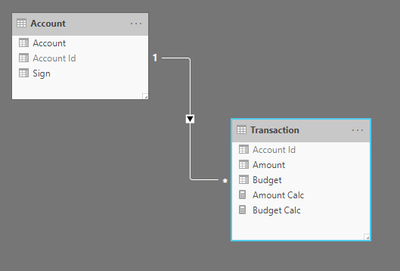
If you have a model that looks something like this.
Then you need calculations that look similar to the below:
Essentially you iterate over the account sign, this in turn will project a filter down to the transaction table to the related transaction. Then you can perform the required multiplication.
Amount Calc =
CALCULATE (
SUMX (
VALUES ( 'Account'[Sign] ),
CALCULATE ( MAX ( 'Account'[Sign] ) * SUM ( 'Transaction'[Amount] ) )
)
)
Budget Calc =
CALCULATE (
SUMX (
VALUES ( 'Account'[Sign] ),
CALCULATE ( MAX ( 'Account'[Sign] ) * SUM ( 'Transaction'[Budget] ) )
)
)
I have created a sample workbook you can download here
If you have a model that looks something like this.
Then you need calculations that look similar to the below:
Essentially you iterate over the account sign, this in turn will project a filter down to the transaction table to the related transaction. Then you can perform the required multiplication.
Amount Calc =
CALCULATE (
SUMX (
VALUES ( 'Account'[Sign] ),
CALCULATE ( MAX ( 'Account'[Sign] ) * SUM ( 'Transaction'[Amount] ) )
)
)
Budget Calc =
CALCULATE (
SUMX (
VALUES ( 'Account'[Sign] ),
CALCULATE ( MAX ( 'Account'[Sign] ) * SUM ( 'Transaction'[Budget] ) )
)
)
Perfect, thank you!
Vote for your favorite vizzies from the Power BI World Championship submissions!
If you love stickers, then you will definitely want to check out our Community Sticker Challenge!
Check out the January 2026 Power BI update to learn about new features.
| User | Count |
|---|---|
| 58 | |
| 53 | |
| 43 | |
| 17 | |
| 16 |
| User | Count |
|---|---|
| 123 | |
| 108 | |
| 44 | |
| 32 | |
| 24 |