Join us in Barcelona for FabCon and SQLCon, September 28 - October 1, 2026.
This is best Fabric, Power BI, SQL and AI community event. How do we know? The last event sold out! Save €200 with code FABCMTY200.
Register now- Power BI forums
- Get Help with Power BI
- Desktop
- Service
- Report Server
- Power Query
- Mobile Apps
- Developer
- DAX Commands and Tips
- Custom Visuals Development Discussion
- Health and Life Sciences
- Power BI Spanish forums
- Translated Spanish Desktop
- Training and Consulting
- Instructor Led Training
- Dashboard in a Day for Women, by Women
- Galleries
- Data Stories Gallery
- Themes Gallery
- Contests Gallery
- QuickViz Gallery
- Quick Measures Gallery
- Visual Calculations Gallery
- Fabric Apps Gallery
- Notebook Gallery
- Translytical Task Flow Gallery
- TMDL Gallery
- R Script Showcase
- Webinars and Video Gallery
- Ideas
- Custom Visuals Ideas (read-only)
- Issues
- Issues
- Events
- Upcoming Events
The Fabric community is upgrading! Read all of the details including the timeline and what you can expect. Learn more
- Power BI forums
- Forums
- Get Help with Power BI
- Desktop
- Re: Showing zero values?
- Subscribe to RSS Feed
- Mark Topic as New
- Mark Topic as Read
- Float this Topic for Current User
- Bookmark
- Subscribe
- Printer Friendly Page


- Mark as New
- Bookmark
- Subscribe
- Mute
- Subscribe to RSS Feed
- Permalink
- Report Inappropriate Content
Showing zero values?
Hi!
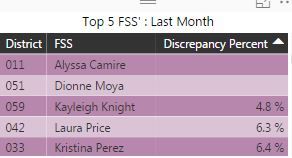
So I have this chart (left)
And I want it to show 0% for the blank values.
The measure formula is:
Discrepancy Percent =
CALCULATE (
DISTINCTCOUNT('! NEW DISCREPANCY REPORT Last Month'[Discrepancy Bis IDs])/DISTINCTCOUNT('! NEW ALL 401 OPEN Last Month'[Submission Bis IDs]))
and I tried adding +0 on the end but ended up with this (right)

How do I fix this?
Solved! Go to Solution.
- Mark as New
- Bookmark
- Subscribe
- Mute
- Subscribe to RSS Feed
- Permalink
- Report Inappropriate Content
Thanks, Charlie! I figured out the issue was with one of my tables with the FSS and District fields. I used your formula after correcting and it worked! Thanks!!

- Mark as New
- Bookmark
- Subscribe
- Mute
- Subscribe to RSS Feed
- Permalink
- Report Inappropriate Content
Instead of using the "/" operator to divide, try using DAX's DIVIDE(numerator, denominator, 0) in your existing formula. This will give you an actual zero-value instead of BLANK() if the denominator is zero.
For more information:
- Mark as New
- Bookmark
- Subscribe
- Mute
- Subscribe to RSS Feed
- Permalink
- Report Inappropriate Content
This didn't work either. I used:
Discrepancy Percent =
DIVIDE(
DISTINCTCOUNT('! NEW DISCREPANCY REPORT Last Month'[Discrepancy Bis IDs]),DISTINCTCOUNT('! NEW ALL 401 OPEN Last Month'[Submission Bis IDs]),0)
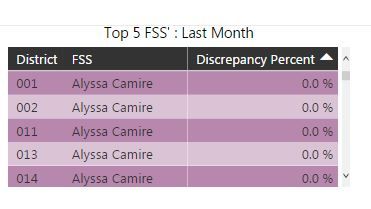
but it still shows as blank:
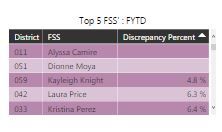
For District 11, for example, ALyssa has 0 discrepancies and 16 submissions. Should be 0/16. And should show as 0% on the report.


- Mark as New
- Bookmark
- Subscribe
- Mute
- Subscribe to RSS Feed
- Permalink
- Report Inappropriate Content
Could you please create two measures to test the result?
measure 1 = DISTINCTCOUNT('! NEW DISCREPANCY REPORT Last Month'[Discrepancy Bis IDs])
measure 2 = DISTINCTCOUNT('! NEW ALL 401 OPEN Last Month'[Submission Bis IDs])
Regards,
Charlie Liao
- Mark as New
- Bookmark
- Subscribe
- Mute
- Subscribe to RSS Feed
- Permalink
- Report Inappropriate Content
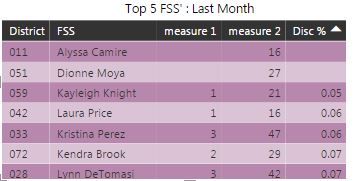
Hi Charlie,
I get the same thing using this. Here is what it looks like with the measures and disc % set to Disc % = DIVIDE([measure 1],[measure 2],0)
- Mark as New
- Bookmark
- Subscribe
- Mute
- Subscribe to RSS Feed
- Permalink
- Report Inappropriate Content
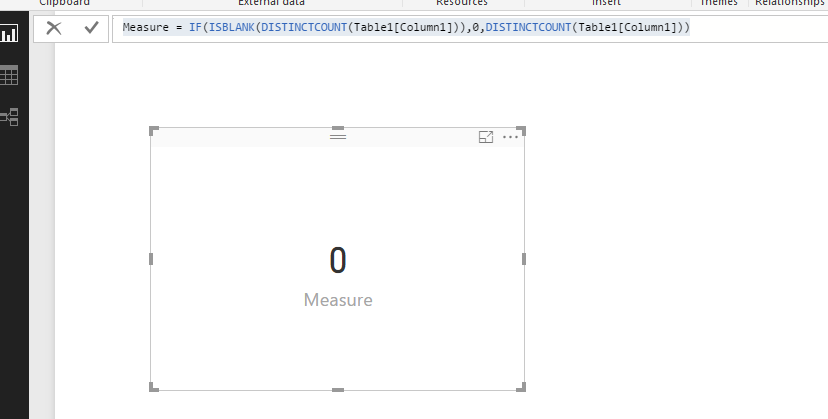
I have tested it on my local, we can use ISBLANK function to display 0 if the value is blank.
Measure = IF(ISBLANK(DISTINCTCOUNT(Table1[Column1])),0,DISTINCTCOUNT(Table1[Column1]))
You can use the DAX below for you first measure.
measure 1 = IF(ISBLANK(DISTINCTCOUNT('! NEW DISCREPANCY REPORT Last Month'[Discrepancy Bis IDs])),0,DISTINCTCOUNT('! NEW DISCREPANCY REPORT Last Month'[Discrepancy Bis IDs]))
If the issue persists, please provide us some sample data, so that we can make further analysis.
Regards,
Charlie Liao
- Mark as New
- Bookmark
- Subscribe
- Mute
- Subscribe to RSS Feed
- Permalink
- Report Inappropriate Content
Thanks, Charlie! I figured out the issue was with one of my tables with the FSS and District fields. I used your formula after correcting and it worked! Thanks!!


- Mark as New
- Bookmark
- Subscribe
- Mute
- Subscribe to RSS Feed
- Permalink
- Report Inappropriate Content
maybe do a check to see if its blank first? but i am not sure if that creates the same issue
test =
IF (
ISBLANK (
CALCULATE (
DISTINCTCOUNT ( '! NEW DISCREPANCY REPORT Last Month'[Discrepancy Bis IDs] )
/ DISTINCTCOUNT ( '! NEW ALL 401 OPEN Last Month'[Submission Bis IDs] )
)
),
0,
CALCULATE (
DISTINCTCOUNT ( '! NEW DISCREPANCY REPORT Last Month'[Discrepancy Bis IDs] )
/ DISTINCTCOUNT ( '! NEW ALL 401 OPEN Last Month'[Submission Bis IDs] )
)
)
If I took the time to answer your question and I came up with a solution, please mark my post as a solution and /or give kudos freely for the effort 🙂 Thank you!
Proud to be a Super User!
- Mark as New
- Bookmark
- Subscribe
- Mute
- Subscribe to RSS Feed
- Permalink
- Report Inappropriate Content
Hi,
Yes, it created the same issue.
Technically, those blank records are "0%" values.
ANy idea how to resolve?
Helpful resources

FabCon & SQLCon – Barcelona 2026
Join us in Barcelona for FabCon and SQLCon, the Fabric, Power BI, SQL, and AI community event. Save €200 with code FABCMTY200.

Power BI DataViz World Championships - June 2026
A new Power BI DataViz World Championship is coming this June! Don't miss out on submitting your entry.

| User | Count |
|---|---|
| 24 | |
| 22 | |
| 20 | |
| 18 | |
| 14 |


| User | Count |
|---|---|
| 29 | |
| 22 | |
| 22 | |
| 20 | |
| 20 |


