Join us at FabCon Atlanta from March 16 - 20, 2026, for the ultimate Fabric, Power BI, AI and SQL community-led event. Save $200 with code FABCOMM.
Register now!The Power BI Data Visualization World Championships is back! It's time to submit your entry. Live now!
Hello everyone,
I have a measure to calculate the sum of expenses from previous moth which is the following one:
Expenses Last Month= calculate(sum(Gastos[Value]);filter(ALL('Calendar'[Year]);'Calendar'[Year]=[MaxYear]);filter(ALL('Calendar'[Nr Month]);'Calendar'[Nr Month]=[MaxMonth]);ALL('Calendar'[Month]))
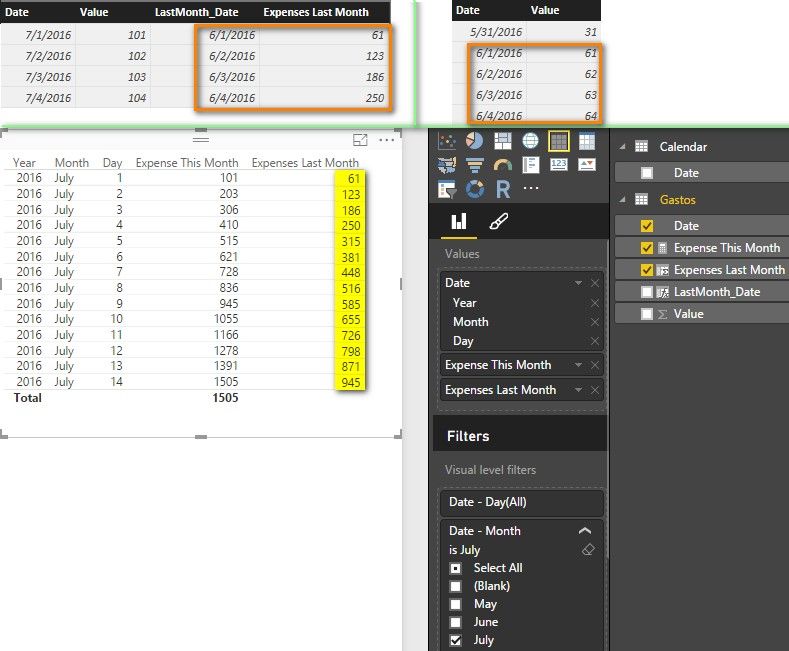
I want to show on the table, sum values last month to current day last month and with that formula, it showing the sum of all the days last month ( 30, but it is suposed to sum just to day 14 ) !
anyone have an idea?
Thanks
Solved! Go to Solution.
I create two columns in the “Gastos” table with following formulas. Please confirm if it is what you want.
LastMonth_Date = DATEADD( 'Calendar'[Date] , -1, MONTH )
Expenses Last Month =
CALCULATE (
SUM ( Gastos[Value] ),
DATESBETWEEN (
Gastos[Date],
STARTOFMONTH ( Gastos[LastMonth_Date] ),
Gastos[LastMonth_Date]
)
)
Best Regards,
Herbert
I create two columns in the “Gastos” table with following formulas. Please confirm if it is what you want.
LastMonth_Date = DATEADD( 'Calendar'[Date] , -1, MONTH )
Expenses Last Month =
CALCULATE (
SUM ( Gastos[Value] ),
DATESBETWEEN (
Gastos[Date],
STARTOFMONTH ( Gastos[LastMonth_Date] ),
Gastos[LastMonth_Date]
)
)
Best Regards,
Herbert
The Power BI Data Visualization World Championships is back! It's time to submit your entry.
Check out the January 2026 Power BI update to learn about new features.
| User | Count |
|---|---|
| 61 | |
| 48 | |
| 35 | |
| 25 | |
| 23 |
| User | Count |
|---|---|
| 134 | |
| 110 | |
| 59 | |
| 39 | |
| 32 |