Join us at FabCon Atlanta from March 16 - 20, 2026, for the ultimate Fabric, Power BI, AI and SQL community-led event. Save $200 with code FABCOMM.
Register now!The Power BI Data Visualization World Championships is back! Get ahead of the game and start preparing now! Learn more
Hello everyone,
I have a measure to calculate the sum of expenses from previous moth which is the following one:
Expenses Last Month= calculate(sum(Gastos[Value]);filter(ALL('Calendar'[Year]);'Calendar'[Year]=[MaxYear]);filter(ALL('Calendar'[Nr Month]);'Calendar'[Nr Month]=[MaxMonth]);ALL('Calendar'[Month]))
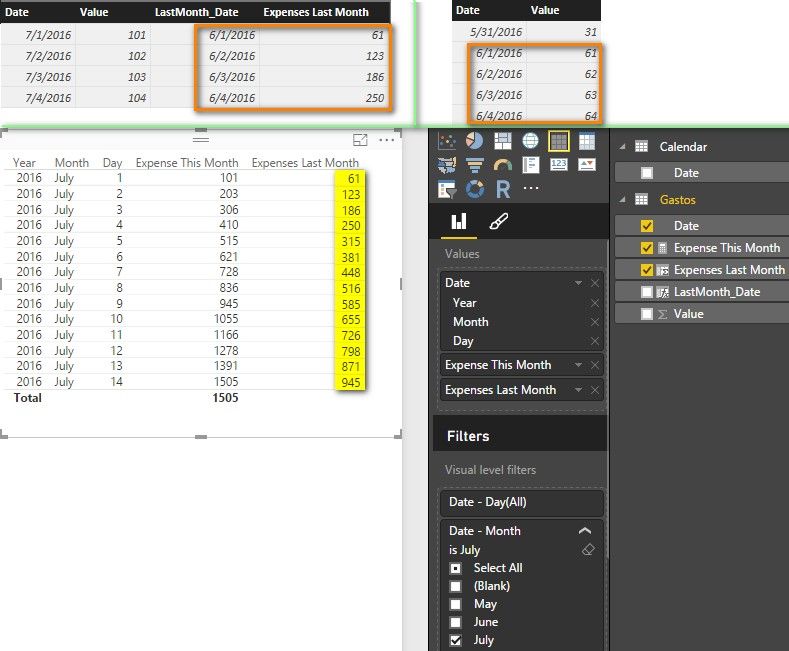
I want to show on the table, sum values last month to current day last month and with that formula, it showing the sum of all the days last month ( 30, but it is suposed to sum just to day 14 ) !
anyone have an idea?
Thanks
Solved! Go to Solution.
I create two columns in the “Gastos” table with following formulas. Please confirm if it is what you want.
LastMonth_Date = DATEADD( 'Calendar'[Date] , -1, MONTH )
Expenses Last Month =
CALCULATE (
SUM ( Gastos[Value] ),
DATESBETWEEN (
Gastos[Date],
STARTOFMONTH ( Gastos[LastMonth_Date] ),
Gastos[LastMonth_Date]
)
)
Best Regards,
Herbert
I create two columns in the “Gastos” table with following formulas. Please confirm if it is what you want.
LastMonth_Date = DATEADD( 'Calendar'[Date] , -1, MONTH )
Expenses Last Month =
CALCULATE (
SUM ( Gastos[Value] ),
DATESBETWEEN (
Gastos[Date],
STARTOFMONTH ( Gastos[LastMonth_Date] ),
Gastos[LastMonth_Date]
)
)
Best Regards,
Herbert
The Power BI Data Visualization World Championships is back! Get ahead of the game and start preparing now!
| User | Count |
|---|---|
| 40 | |
| 37 | |
| 35 | |
| 34 | |
| 28 |
| User | Count |
|---|---|
| 136 | |
| 99 | |
| 73 | |
| 66 | |
| 65 |