cancel
Showing results for 
Search instead for 
Did you mean: 

View all the Fabric Data Days sessions on demand. View schedule

Reply
Mrooney
Frequent Visitor

Showing % utilization of a resource

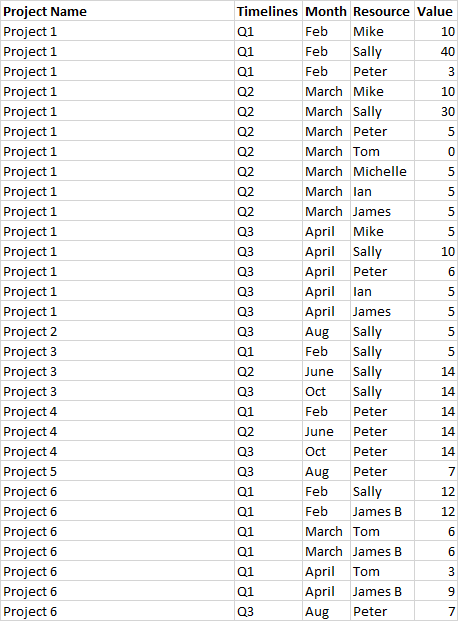
Hi, I've a fixed Excel template which is populated as per the below.

Once imported into Power BI I'm trying to show utilization per enigneer for each month/quarter (or whatever period is filtered.) If we say we want to set a limit of 80% utilization in a month, meaning no one would go over 128hrs - based on there being 160hrs in a month on average.


The way the sheet is split up doesn't help as a resource may have some hours under Project 1 for February and then some more under Project 3 for Feb also. So working out the total hours assigned per month and then the utilization percentage figure is provining a real pain to sort...


Anyone got any guidance? I've read a few posts on here but it seems really complex - hopefully showing my data below will help:(The vlaue columns is the amount of hours)


Example.png 


Thanks!

3 REPLIES 3
v-caliao-msft
Microsoft Employee
Microsoft Employee

Hi @Mrooney,


If you want to calculated the total hours for each month or quarter, then you can use ALLEXCEPT function, it removes all context filters in the table except filters that have been applied to the specified columns. The sample DAX for you reference
MonthTotal=CALCULATE(SUM(Table[Value]),ALLEXCEPT(Table,Table[Resource],Table[Month]))


Reference
https://msdn.microsoft.com/en-us/library/ee634795.aspx


Regards,

Charlie Liao

MFelix
Super User
Super User

Hi @Mrooney,

As I can understand you want to find the percentage per month / resource in the visuals you can chose the option quick calc on the value instead of the sum or count, this gives the option to calculate over total, grand total,...

If you have every values time / resource on your visual it gives what you want, you then can add a trend line wuth fixed value 80%and see who is off.

Regards
MFelix

Regards

Miguel Félix


Did I answer your question? Mark my post as a solution!

Proud to be a Super User!

Check out my blog: Power BI em Português


Sean
Community Champion
Community Champion

@MrooneyCan you copy and paste the data from the image - ignore any warning you may get - click post again! Smiley Happy

Helpful resources

Announcements
November Power BI Update Carousel

Power BI Monthly Update - November 2025

Check out the November 2025 Power BI update to learn about new features.

Fabric Data Days Carousel

Fabric Data Days

Advance your Data & AI career with 50 days of live learning, contests, hands-on challenges, study groups & certifications and more!

FabCon Atlanta 2026 carousel

FabCon Atlanta 2026

Join us at FabCon Atlanta, March 16-20, for the ultimate Fabric, Power BI, AI and SQL community-led event. Save $200 with code FABCOMM.

Top Solution Authors
Top Kudoed Authors