FabCon is coming to Atlanta
Join us at FabCon Atlanta from March 16 - 20, 2026, for the ultimate Fabric, Power BI, AI and SQL community-led event. Save $200 with code FABCOMM.
Register now!- Power BI forums
- Get Help with Power BI
- Desktop
- Service
- Report Server
- Power Query
- Mobile Apps
- Developer
- DAX Commands and Tips
- Custom Visuals Development Discussion
- Health and Life Sciences
- Power BI Spanish forums
- Translated Spanish Desktop
- Training and Consulting
- Instructor Led Training
- Dashboard in a Day for Women, by Women
- Galleries
- Data Stories Gallery
- Themes Gallery
- Contests Gallery
- QuickViz Gallery
- Quick Measures Gallery
- Visual Calculations Gallery
- Notebook Gallery
- Translytical Task Flow Gallery
- TMDL Gallery
- R Script Showcase
- Webinars and Video Gallery
- Ideas
- Custom Visuals Ideas (read-only)
- Issues
- Issues
- Events
- Upcoming Events
The Power BI Data Visualization World Championships is back! Get ahead of the game and start preparing now! Learn more
- Power BI forums
- Forums
- Get Help with Power BI
- Desktop
- Re: Showing the most updated status of the custome...
- Subscribe to RSS Feed
- Mark Topic as New
- Mark Topic as Read
- Float this Topic for Current User
- Bookmark
- Subscribe
- Printer Friendly Page


- Mark as New
- Bookmark
- Subscribe
- Mute
- Subscribe to RSS Feed
- Permalink
- Report Inappropriate Content
Showing the most updated status of the customer
Happy Friday
I have a question regarding showing the last status from the table.
I have the table below with CLient Name, CUID Number (unique entity number), Status and Date.
The column date is the Starting Date but also the End Date from the prev status.
| Client Name | CID | Country | Status | Date | CUID | Last Status |
| Customer A | 1001487 | Ireland | PREFILL DATA STAGE | 10/31/2022 21:58 | 1001487IE01 | PREFILL DATA STAGE |
| Customer A | 1001487 | Jordan | PREFILL DATA STAGE | 10/31/2022 21:58 | 1001487JO01 | PREFILL DATA STAGE |
| Customer A | 1001487 | United Arab Emirates | PREFILL DATA STAGE | 10/31/2022 21:58 | 1001487AE01 | PREFILL DATA STAGE |
| Customer A | 1001487 | Australia | PREFILL DATA STAGE | 10/31/2022 21:58 | 1001487AU01 | PREFILL DATA STAGE |
| Customer B | 1001243 | Costa Rica | PREFILL DATA STAGE | 9/1/2022 12:30 | 1001243CR01 | |
| Customer B | 1001243 | Costa Rica | CLIENT REVIEW | 9/15/2022 14:37 | 1001243CR01 | CLIENT REVIEW |
| Customer C | 1001243 | China | PREFILL DATA STAGE | 9/1/2022 12:30 | 1001243CN01 | |
| Customer C | 1001243 | China | CLIENT REVIEW | 9/15/2022 14:37 | 1001243CN01 | CLIENT REVIEW |
| CUSTOMER D | 1001848 | Austria | PREFILL DATA STAGE | 10/18/2022 23:50 | 1001848AT02 | PREFILL DATA STAGE |
| CUSTOMER E | 1001848 | Germany | PREFILL DATA STAGE | 10/18/2022 23:50 | 1001848DE02 | PREFILL DATA STAGE |
| CUSTOMER F | 1000248 | France | CLIENT REVIEW | 2/15/2022 17:14 | 1000248FR01 | |
| CUSTOMER F | 1000248 | France | UNDER ADP REVIEW | 3/1/2022 14:07 | 1000248FR01 | |
| CUSTOMER F | 1000248 | France | ADP WORKSHOP IN PROGRESS | 3/1/2022 14:21 | 1000248FR01 | |
| CUSTOMER F | 1000248 | France | CLIENT SIGNOFF IN PROGRESS | 3/1/2022 14:22 | 1000248FR01 | |
| CUSTOMER F | 1000248 | France | CLIENT SIGNED OFF | 3/1/2022 14:23 | 1000248FR01 | CLIENT SIGNED OFF |
What I am trying to achieve is to show how many CUIDs are in Every Status using the last status. (see last column highlighted in red)
In this small table
6 CUIDs are Prefill Data Stage
2 CUIDS are Client Review
1 CUID is CLient Signed off
Thanks,
Solved! Go to Solution.


- Mark as New
- Bookmark
- Subscribe
- Mute
- Subscribe to RSS Feed
- Permalink
- Report Inappropriate Content
Sorry, I noticed an error in my first post and deleted it.
Here is a solution for you...
Calculated column for last status...
calculatedLastStatus =
var _table =
SELECTCOLUMNS(
    'Table',
    "_client", 'Table'[Client Name],
    "_cuid", 'Table'[CUID],
    "_date", 'Table'[Date],
    "_status", 'Table'[Status]
)
var _maxDate =
MAXX(FILTER(_table, [_client] = 'Table'[Client Name] && [_cuid] = 'Table'[CUID]), [_date])
Return
IF(
    'Table'[Date] = _maxDate,
    MINX(
        FILTER(
            _table,
            [_client] = 'Table'[Client Name] && [_cuid] = 'Table'[CUID] && [_date] = _maxDate
        ),
        [_status]
    ),
    BLANK()
)
and count measure...
countOfLastStatus =
COUNT('Table'[calculatedLastStatus])
get the result...

Proud to be a Super User! |  |
- Mark as New
- Bookmark
- Subscribe
- Mute
- Subscribe to RSS Feed
- Permalink
- Report Inappropriate Content
remove the 'each' prior to the (x)=>
Proud to be a Super User! | |
- Mark as New
- Bookmark
- Subscribe
- Mute
- Subscribe to RSS Feed
- Permalink
- Report Inappropriate Content
Sorry, I noticed an error in my first post and deleted it.
Here is a solution for you...
Calculated column for last status...
calculatedLastStatus =
var _table =
SELECTCOLUMNS(
    'Table',
    "_client", 'Table'[Client Name],
    "_cuid", 'Table'[CUID],
    "_date", 'Table'[Date],
    "_status", 'Table'[Status]
)
var _maxDate =
MAXX(FILTER(_table, [_client] = 'Table'[Client Name] && [_cuid] = 'Table'[CUID]), [_date])
Return
IF(
    'Table'[Date] = _maxDate,
    MINX(
        FILTER(
            _table,
            [_client] = 'Table'[Client Name] && [_cuid] = 'Table'[CUID] && [_date] = _maxDate
        ),
        [_status]
    ),
    BLANK()
)
and count measure...
countOfLastStatus =
COUNT('Table'[calculatedLastStatus])
get the result...
Proud to be a Super User! | |
- Mark as New
- Bookmark
- Subscribe
- Mute
- Subscribe to RSS Feed
- Permalink
- Report Inappropriate Content
Thanks
Quick question. What about returning as customer name or CID Level?
| Client Name | CID | Country | Questionnaire | Status | Date | CUID | |
| CUSTOMER A | 13652 | Ireland | Central Employer Requirements Template | PREFILL DATA STAGE | 10/31/2022 21:58 | 1001487IE01 | Prefill Data Stage |
| CUSTOMER A | 13652 | Jordan | Central Employer Requirements Template | PREFILL DATA STAGE | 10/31/2022 21:58 | 1001487JO01 | |
| CUSTOMER A | 13652 | United Arab Emirates | Central Employer Requirements Template | PREFILL DATA STAGE | 10/31/2022 21:58 | 1001487AE01 | |
| CUSTOMER A | 13652 | Australia | Central Employer Requirements Template | PREFILL DATA STAGE | 10/31/2022 21:58 | 1001487AU01 | |
| CUSTOMER B | 13652 | Hong Kong | Central Employer Requirements Template | PREFILL DATA STAGE | 2/17/2022 16:35 | 1000382HK01 | CLIENT SIGNED OFF |
| CUSTOMER B | 36529 | Hong Kong | Central Employer Requirements Template | CLIENT REVIEW | 3/1/2022 17:46 | 1000382HK01 | |
| CUSTOMER B | 36529 | Hong Kong | Central Employer Requirements Template | UNDER ADP REVIEW | 3/4/2022 15:51 | 1000382HK01 | |
| CUSTOMER B | 36529 | Hong Kong | Central Employer Requirements Template | ADP WORKSHOP IN PROGRESS | 3/4/2022 17:11 | 1000382HK01 | |
| CUSTOMER B | 36529 | Hong Kong | Central Employer Requirements Template | CLIENT SIGNOFF IN PROGRESS | 3/4/2022 17:12 | 1000382HK01 | |
| CUSTOMER B | 36529 | Hong Kong | Central Employer Requirements Template | CLIENT SIGNED OFF | 3/7/2022 12:31 | 1000382HK01 | |
| CUSTOMER B | 36529 | Hong Kong | Central Employer Requirements Template | YET TO START | 3/8/2022 17:11 | 1000382HK01 | |
| CUSTOMER B | 36529 | Hong Kong | Central Employer Requirements Template | PREFILL DATA STAGE | 3/8/2022 17:11 | 1000382HK01 | |
| CUSTOMER B | 36529 | Hong Kong | Central Employer Requirements Template | CLIENT REVIEW | 3/9/2022 10:59 | 1000382HK01 | |
| CUSTOMER B | 36529 | Hong Kong | Central Employer Requirements Template | UNDER ADP REVIEW | 4/7/2022 10:39 | 1000382HK01 | |
| CUSTOMER B | 36529 | Hong Kong | Central Employer Requirements Template | ADP WORKSHOP IN PROGRESS | 4/7/2022 10:54 | 1000382HK01 | |
| CUSTOMER B | 36529 | Hong Kong | Central Employer Requirements Template | CLIENT SIGNOFF IN PROGRESS | 4/7/2022 10:54 | 1000382HK01 | |
| CUSTOMER B | 36529 | Hong Kong | Central Employer Requirements Template | CLIENT SIGNED OFF | 4/7/2022 16:01 | 1000382HK01 | |
| CUSTOMER B | 36529 | Hong Kong | Central Employer Requirements Template | YET TO START | 4/13/2022 16:27 | 1000382HK01 | |
| CUSTOMER B | 36529 | Hong Kong | Central Employer Requirements Template | PREFILL DATA STAGE | 4/13/2022 16:27 | 1000382HK01 | |
| CUSTOMER B | 36529 | Hong Kong | Central Employer Requirements Template | CLIENT REVIEW | 4/13/2022 16:28 | 1000382HK01 | |
| CUSTOMER B | 36529 | Hong Kong | Central Employer Requirements Template | UNDER ADP REVIEW | 4/14/2022 10:52 | 1000382HK01 | |
| CUSTOMER B | 36529 | Hong Kong | Central Employer Requirements Template | ADP WORKSHOP IN PROGRESS | 4/14/2022 11:03 | 1000382HK01 | |
| CUSTOMER B | 36529 | Hong Kong | Central Employer Requirements Template | CLIENT SIGNOFF IN PROGRESS | 4/14/2022 11:03 | 1000382HK01 | |
| CUSTOMER B | 36529 | Hong Kong | Central Employer Requirements Template | CLIENT SIGNED OFF | 4/14/2022 11:05 | 1000382HK01 |
For customer B...even with different CUIDS, the last status as Client Name or CID is CLIENT SIGNED OFF
Tried changing the CUID x CID in the formula or removing the CID part but it seems is not working 100%...any tip?
- Mark as New
- Bookmark
- Subscribe
- Mute
- Subscribe to RSS Feed
- Permalink
- Report Inappropriate Content
hi @jgeddes
Any idea why the formula is not working for me for CID level? Tried to update your formula replacing all CUID for CID but not getting the info I need. The idea would be to get the last status of the CID. (CID have different CUIDS)
thanks
- Mark as New
- Bookmark
- Subscribe
- Mute
- Subscribe to RSS Feed
- Permalink
- Report Inappropriate Content
Does,
calculatedLastStatus2 =
var _table =
SELECTCOLUMNS(
    'BPQ Status History',
    "_client", 'BPQ Status History'[Client Name],
    "_cid", 'BPQ Status History'[CID],
    "_cuid", 'BPQ Status History'[CUID],
    "_date", 'BPQ Status History'[Date],
    "_status", 'BPQ Status History'[Status]
)
var _maxDate =
MAXX(FILTER(_table, [_client] = 'BPQ Status History'[Client Name] &&/* [_cuid] = 'BPQ Status History'[CUID] &&*/ [_cid] = 'BPQ Status History'[CID]), [_date])
Return
IF(
    'BPQ Status History'[Date] = _maxDate,
    MINX(
        FILTER(
            _table,
            [_client] = 'BPQ Status History'[Client Name] && /*[_cuid] = 'BPQ Status History'[CUID]*/ [_cid] = 'BPQ Status History'[CID] && [_date] = _maxDate
        ),
        [_status]
    ),
    BLANK()
)
get you the desired result?
Proud to be a Super User! | |
- Mark as New
- Bookmark
- Subscribe
- Mute
- Subscribe to RSS Feed
- Permalink
- Report Inappropriate Content
HI @jgeddes
It seems I get same results as the CUID formula.
CUID-CalculatedLastStatus = CID-calculated LastStatus
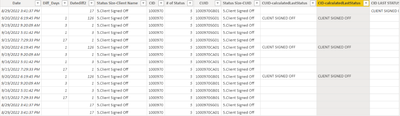
In this case, for CID (1000970) should show only once the status = Client Signed Off
Currently I am showing the status doing manual updates in the excel.
Thanks
- Mark as New
- Bookmark
- Subscribe
- Mute
- Subscribe to RSS Feed
- Permalink
- Report Inappropriate Content
Let's try a different approach.
This might be 'easier' to accomplish using Power Query.
Add the following code to your query...
Table.AddColumn( //we are going to add a column that displays the 'last status' of the CID in the row
   #"Changed Type", //this should be the name of the previous step in your query.
   "powerQueryLastStatus", //you can name the column whatever you would like
   (x)=> //start a function
   if x[Date] = List.Max(Table.SelectRows(#"Changed Type", each [CID] = x[CID])[Date]) //if the date in the current row is equal to the max date for the CID in this row
   then x[Status] //display the status in this row if the date in this row is equal to the max date for this CID
   else null, //display null if not the max date
   type text
)
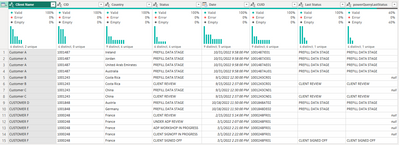
Hope this helps.
Proud to be a Super User! | |
- Mark as New
- Bookmark
- Subscribe
- Mute
- Subscribe to RSS Feed
- Permalink
- Report Inappropriate Content
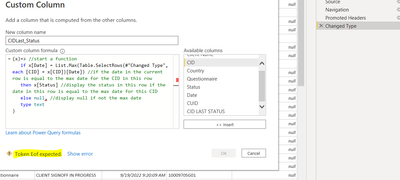
Hi Jgeddes,
I am getting an error (token Eof Expected)
Tried different things (case sensitive, etc....) but ....
- Mark as New
- Bookmark
- Subscribe
- Mute
- Subscribe to RSS Feed
- Permalink
- Report Inappropriate Content
Since the formula is being pasted into the UI dialog box you will need to delete the comma and the type text portion. The last piece of the formula should then be else null.
Proud to be a Super User! | |
- Mark as New
- Bookmark
- Subscribe
- Mute
- Subscribe to RSS Feed
- Permalink
- Report Inappropriate Content
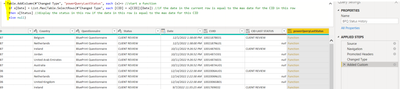
Hi jgeddes,
Tried your formula removing the type text portion and the comma and I get a "Function" link formula but not showing the result like your screenshot. Am I mising something? thanks
- Mark as New
- Bookmark
- Subscribe
- Mute
- Subscribe to RSS Feed
- Permalink
- Report Inappropriate Content
remove the 'each' prior to the (x)=>
Proud to be a Super User! | |
- Mark as New
- Bookmark
- Subscribe
- Mute
- Subscribe to RSS Feed
- Permalink
- Report Inappropriate Content
Hi @jgeddes,
I cannot see your reply in the web. I got the message but I cannot see it. Can you try to reply again?
Is this the calcualted field? It seems I am missing something..

Helpful resources

Power BI Dataviz World Championships
The Power BI Data Visualization World Championships is back! Get ahead of the game and start preparing now!

Power BI Monthly Update - December 2025
Check out the December 2025 Power BI Holiday Recap!

FabCon Atlanta 2026
Join us at FabCon Atlanta, March 16-20, for the ultimate Fabric, Power BI, AI and SQL community-led event. Save $200 with code FABCOMM.

| User | Count |
|---|---|
| 41 | |
| 39 | |
| 37 | |
| 29 | |
| 24 |


| User | Count |
|---|---|
| 119 | |
| 100 | |
| 72 | |
| 69 | |
| 65 |


