Hello,
I have a Power BI Report Builder Report I'm working on with a tablix object that shows questions and answers from a survey (I'm pulling in a Power BI dataset). My data model has two tables that looks like this:
"Question" Table
| Question | QuestionID | AnswerType |
| How much money? | Q01 | Currency |
| How's it Going? | Q02 | Multi-line Text |
"Answers" Table
| Title | Answer | AnswersQuestionID |
| Survey1 | $504 | Q01 |
| Survey1 | Great! | Q02 |
| Survey2 | $22 | Q01 |
| Survey2 | Pretty Well | Q02 |
Everything is working fine, except I'm trying to get the "Answer" column's Value property to be dynamic based on the related "answer type" column that I have. Here's my formula:
=Switch(
	Lookup(Fields!AnswersQuestionID.Value, Fields!QuestionID.Value, Fields!AnswerType.Value, "Questions") = "Multi-line Text",Fields!Answer.Value,
	Lookup(Fields!AnswersQuestionID.Value, Fields!QuestionID.Value, Fields!AnswerType.Value, "Questions") = "Yes/No",Fields!Answer.Value,
	Lookup(Fields!AnswersQuestionID.Value, Fields!QuestionID.Value, Fields!AnswerType.Value, "Questions") = "Currency",FormatCurrency(Fields!Answer.Value,2),
	Lookup(Fields!AnswersQuestionID.Value, Fields!QuestionID.Value, Fields!AnswerType.Value, "Questions") = "Whole Number",FormatNumber(Fields!Answer.Value,0)
)
When I run the report I get errors for the answers that should be plain text:
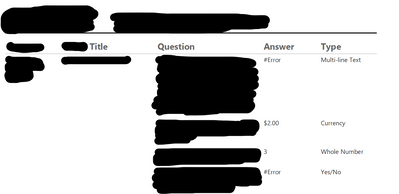
I've also tried a similar formula on the Format property without any luck. I'd think this should be possible since everything is still a string type, but I'm guessing there's some type mismatch issue going on that I'm not understanding. I also don't know how to inspect the rendered "#Error" for more debugging guidance. Any ideas?


