cancel
Showing results for 
Search instead for 
Did you mean: 

Learn from the best! Meet the four finalists headed to the FINALS of the Power BI Dataviz World Championships! Register now

Reply
SreeY
Frequent Visitor

Showing Individual Measures in separate rows.

Hi, I have a requirement to show measures in rows. Thease measure I have defined using DAX expressions, and they are independent. below is sample what my business is asking. The Actual and Target are calculated using 2 separate DAX expressions. per below example, I have total 8 separate measures (2 per each row). The Table and Matrix visuals are not helping me to show per requirement.

Appreciate your help. Thank you.


Measure NameActualTarget
Measure1810
Measure21010
Measure3105
Measure465


Thank you

Sree

2 REPLIES 2
rsbin
Community Champion
Community Champion

@SreeY ,

This is an example where you can really show some creativity. 

You can "make" your own table, using the Text Box, Shapes, and Cards.
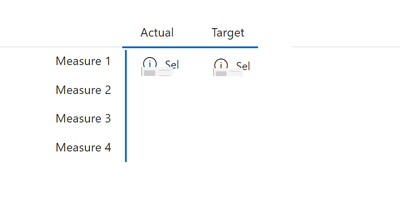
An example of what I often do is something like this:

rsbin_0-1663266472951.png

The Measures are Text Box labels.  The blue lines I use Shapes, and then insert 8 different Card Visuals - 1 for each measure (I have only shown 2 here as demo).

Hence, to the User, it looks like a table.  You can go hog wild on the formatting.

Example of my Monthly Overtime Statistics:

rsbin_1-1663266668926.png

I believe I first learned this tidbit from Reid at Havens Consulting.  Have a look at his many youtube videos.
Regards,


SreeY
Frequent Visitor

Thank you @rsbin . I will try that and let you know. Appreciated.


Helpful resources

Announcements
Join our Fabric User Panel

Join our Fabric User Panel

Share feedback directly with Fabric product managers, participate in targeted research studies and influence the Fabric roadmap.

February Power BI Update Carousel

Power BI Monthly Update - February 2026

Check out the February 2026 Power BI update to learn about new features.

FabCon Atlanta 2026 carousel

FabCon Atlanta 2026

Join us at FabCon Atlanta, March 16-20, for the ultimate Fabric, Power BI, AI and SQL community-led event. Save $200 with code FABCOMM.