Join us at FabCon Atlanta from March 16 - 20, 2026, for the ultimate Fabric, Power BI, AI and SQL community-led event. Save $200 with code FABCOMM.
Register now!The Power BI Data Visualization World Championships is back! Get ahead of the game and start preparing now! Learn more
Hi All,
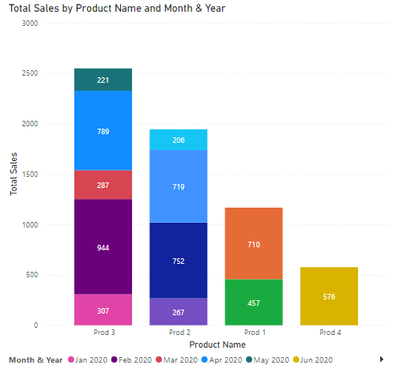
Attached is a sample file that contains Sales, product and dates tables. I have a stacked column chart which is showing total sales by-products for each month (See below)
I am trying to write a measure that will show all sales from the selected date (slicer). So when I choose Jun 20, the stacked chart will show data from Jan to Jun 20 only.
Any hints or help is much appreciated.
Many thanks
Solved! Go to Solution.
@H_insight , then you need an independent table.
With filter from that independent date table
YTD=
var _Max = maxx(allselected(Newdate), NewDate[Date])
var _min= datediff(year(_Max), 1,1)
return
CALCULATE(sum('order'[Qty]), FILTER(ALL('Date'),'Date'[Date] >=_min && 'Date'[Day of Year] <= _max) )
refer for independent table
https://www.youtube.com/watch?v=duMSovyosXE
@H_insight , In case you have date, Create YTD measure
example
YTD Sales = CALCULATE(SUM(Sales[Sales Amount]),DATESYTD('Date'[Date],"12/31"))
use date table
To get the best of the time intelligence function. Make sure you have a date calendar and it has been marked as the date in model view. Also, join it with the date column of your fact/s. Refer :radacad sqlbi My Video Series Appreciate your Kudos.
Hi @amitchandak
The above Dax will give me the YTD as a single column, but I want to show the monthly sales stacked in a column for each product. So when I select Jun 20, the stacked column will show sales form Jan-Jun 20.
@H_insight , then you need an independent table.
With filter from that independent date table
YTD=
var _Max = maxx(allselected(Newdate), NewDate[Date])
var _min= datediff(year(_Max), 1,1)
return
CALCULATE(sum('order'[Qty]), FILTER(ALL('Date'),'Date'[Date] >=_min && 'Date'[Day of Year] <= _max) )
refer for independent table
The Power BI Data Visualization World Championships is back! Get ahead of the game and start preparing now!
Check out the November 2025 Power BI update to learn about new features.
| User | Count |
|---|---|
| 59 | |
| 43 | |
| 42 | |
| 23 | |
| 17 |
| User | Count |
|---|---|
| 190 | |
| 122 | |
| 96 | |
| 66 | |
| 47 |