cancel
Showing results for 
Search instead for 
Did you mean: 

Get Fabric Certified for FREE during Fabric Data Days. Don't miss your chance! Request now

Reply
burak
Frequent Visitor

Showing 100% of total each column

Hello,


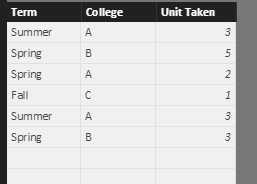
My dataset looks like this:

1.PNG


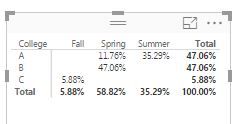
I am creating a Matrix to see % of totals. But, the problem is to not be able to calculate 100% for each column. In power BI, it looks this:

2.JPG


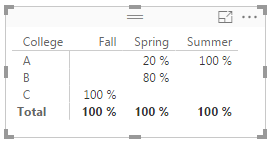
But, I would like to see the calculation like this:

3.JPG

1 ACCEPTED SOLUTION
KGrice
Memorable Member
Memorable Member

Hi @burak. You can get the desired result with the three measures below. Names can be whatever makes sense.


Sum of Units = SUM(Table1[Unit Taken])

Sum of Units All College = CALCULATE([Sum of Units], ALL(Table1[College])) 

Percent of All = DIVIDE([Sum of Units], [Sum of Units All College]) 

PercentUnits.PNG


You could also do it all in one measure, but based on your other posts, it would be good to keep these as building blocks that you can use in other places.

View solution in original post

4 REPLIES 4
KGrice
Memorable Member
Memorable Member

Hi @burak. You can get the desired result with the three measures below. Names can be whatever makes sense.


Sum of Units = SUM(Table1[Unit Taken])

Sum of Units All College = CALCULATE([Sum of Units], ALL(Table1[College])) 

Percent of All = DIVIDE([Sum of Units], [Sum of Units All College]) 

PercentUnits.PNG


You could also do it all in one measure, but based on your other posts, it would be good to keep these as building blocks that you can use in other places.

burak
Frequent Visitor

Thank you for your help. It works, but I have a little concern.


One of the colleges is filtered out in my PBI and this formula still does not show 100%. Although the table does not show the filtered college, it keeps the percentage on the background. As a result, I am getting total percentages in each column like 99%.


Is there any way to correct the formula?

KGrice
Memorable Member
Memorable Member

@burak. Change the ALL(Table1[College]) to ALLSELECTED(Table1[College]). That will count the colleges not filtered out by other things.

burak
Frequent Visitor

Great! Thank you very much.

Helpful resources

Announcements
November Power BI Update Carousel

Power BI Monthly Update - November 2025

Check out the November 2025 Power BI update to learn about new features.

Fabric Data Days Carousel

Fabric Data Days

Advance your Data & AI career with 50 days of live learning, contests, hands-on challenges, study groups & certifications and more!

FabCon Atlanta 2026 carousel

FabCon Atlanta 2026

Join us at FabCon Atlanta, March 16-20, for the ultimate Fabric, Power BI, AI and SQL community-led event. Save $200 with code FABCOMM.

Top Solution Authors
Top Kudoed Authors