This time we’re going bigger than ever. Fabric, Power BI, SQL, AI and more. We're covering it all. You won't want to miss it.
Learn moreLevel up your Power BI skills this month - build one visual each week and tell better stories with data! Get started
I have reviewed solutions from previous related post - but they didn't work for me.
Expected Outcome
Table
Financial Year Amount Last Year Amount Difference
2018-19 1000 900 100
2017-18 900 700 200
2016-17 700 400 300
the report will be slice by a category named item type. it worked without slicer but I definitely need slicer.
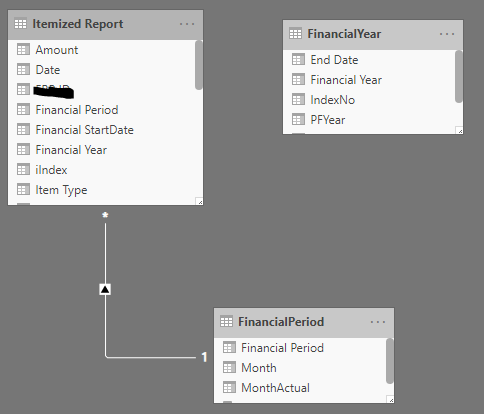
I have removed financial year relationship in the hope that this would work. calculated financial year through columns in main data report i..e itemized report
below are some of the formulas for columns added for this purpose. Please note that i want to report data by financial year i.e. Jul-Jun
Relationships
sample transactions
Solved! Go to Solution.
Hi @sjehanzeb,
You can try to use the following measure if it meets for your requirement:
Measure =
VAR currDate =
MAX ( Table[Date] )
VAR currYear =
SELECTEDVALUE ( Table[Financial Year] )
VAR _prev =
CALCULATE (
MAX ( Table[Financial Year] ),
FILTER (
ALLSELECTED ( Table ),
[Date] < currDate
&& [Financial Year] <> currYear
)
)
RETURN
CALCULATE (
SUM ( Table[Amount] ),
FILTER ( ALLSELECTED ( Table ), [Financial Year] = _prev )
)
If above not help, please share some dummy data to test.
How to Get Your Question Answered Quickly
Regards,
Xiaoxin Sheng
Hi @sjehanzeb,
You can try to use the following measure if it meets for your requirement:
Measure =
VAR currDate =
MAX ( Table[Date] )
VAR currYear =
SELECTEDVALUE ( Table[Financial Year] )
VAR _prev =
CALCULATE (
MAX ( Table[Financial Year] ),
FILTER (
ALLSELECTED ( Table ),
[Date] < currDate
&& [Financial Year] <> currYear
)
)
RETURN
CALCULATE (
SUM ( Table[Amount] ),
FILTER ( ALLSELECTED ( Table ), [Financial Year] = _prev )
)
If above not help, please share some dummy data to test.
How to Get Your Question Answered Quickly
Regards,
Xiaoxin Sheng
You are overcomplicating this.
Create a date table with your calendar year/month/date and fiscal year/month/date fields. Use dates in the other tables and create relationships between them.
THEN...calculating last year's amount is as easy as CALCULATE([Total Value], PREVIOUSYEAR(Date[Date]))
can you show some example. i did try that earlier, I could not get it to work.
Check out the April 2026 Power BI update to learn about new features.
Sign up to receive a private message when registration opens and key events begin.
If you have recently started exploring Fabric, we'd love to hear how it's going. Your feedback can help with product improvements.
| User | Count |
|---|---|
| 37 | |
| 28 | |
| 28 | |
| 19 | |
| 17 |
| User | Count |
|---|---|
| 68 | |
| 37 | |
| 32 | |
| 28 | |
| 24 |