Get Fabric or SQL Certified for Free.
Get certified for free when you join Fabric Data Days 2026 and dive into Fabric, Power BI, SQL, AI, and other essential data skills.
Join now- Power BI forums
- Get Help with Power BI
- Desktop
- Service
- Report Server
- Power Query
- Mobile Apps
- Developer
- DAX Commands and Tips
- Custom Visuals Development Discussion
- Health and Life Sciences
- Power BI Spanish forums
- Translated Spanish Desktop
- Training and Consulting
- Instructor Led Training
- Dashboard in a Day for Women, by Women
- Galleries
- Data Stories Gallery
- Themes Gallery
- Contests Gallery
- QuickViz Gallery
- Quick Measures Gallery
- Visual Calculations Gallery
- Notebook Gallery
- Translytical Task Flow Gallery
- TMDL Gallery
- R Script Showcase
- Webinars and Video Gallery
- Ideas
- Custom Visuals Ideas (read-only)
- Issues
- Issues
- Events
- Upcoming Events
Try your skills in the Power BI Dataviz World Championship! Round one ends June 26. Join now
- Power BI forums
- Forums
- Get Help with Power BI
- Desktop
- Re: Show two rows on same level
- Subscribe to RSS Feed
- Mark Topic as New
- Mark Topic as Read
- Float this Topic for Current User
- Bookmark
- Subscribe
- Printer Friendly Page

- Mark as New
- Bookmark
- Subscribe
- Mute
- Subscribe to RSS Feed
- Permalink
- Report Inappropriate Content
Show two rows on same level
Hi,
I want to show row information on the same level. I am using the Matrix but only get the drill down option.
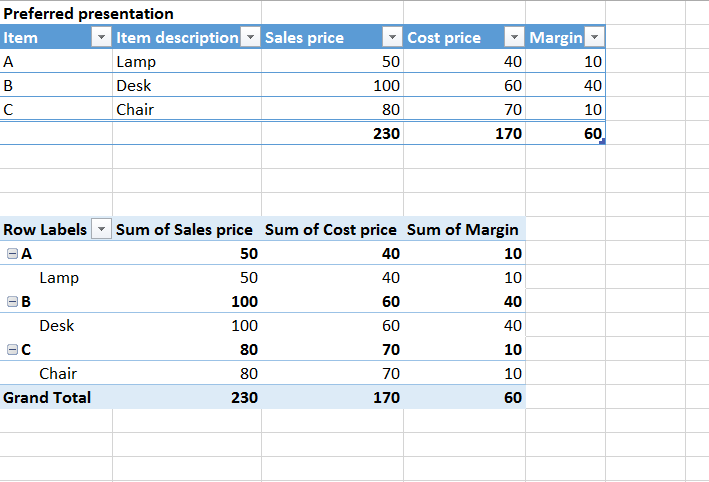
As an example, I want to display item number and item description on the same row, not duplicating the data in the column level.
The below example is from a Excel pivot table but I experience the same thing, i.e. the item description appears on the level below.
Merging cells is not an option. My question is if I could choose what rows to display next to each other.
Thanks in advance.
Anna
Solved! Go to Solution.


- Mark as New
- Bookmark
- Subscribe
- Mute
- Subscribe to RSS Feed
- Permalink
- Report Inappropriate Content
Hi @annade,
You should turn off the Stepped layout, in the image below you have how to turn it on/off, should give you expected result.

Regards,
MFelix
Regards
Miguel Félix
Did I answer your question? Mark my post as a solution!
Proud to be a Super User!
Check out my blog: Power BI em Português

- Mark as New
- Bookmark
- Subscribe
- Mute
- Subscribe to RSS Feed
- Permalink
- Report Inappropriate Content
Hello all,
After I switch off the "Stepped Layout", it's able to display in same level.
However, does anyone see below result, looks like, by default, only the first column is displayed with the "plus" sign in the left, I can only click that "plus" then the 2nd expected column shows, but only the row I clicked the "+" sign.
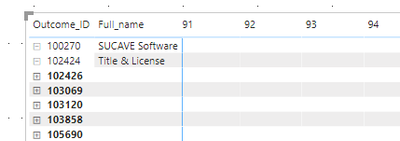
Can we ste all header columns show their value without clicking "+" one by one?
Thanks,
Xiaoqi
- Mark as New
- Bookmark
- Subscribe
- Mute
- Subscribe to RSS Feed
- Permalink
- Report Inappropriate Content
Hi @xiaoqi ,
You have two options
1s option - Rigth click on the first column and select expand all levels
2nd option - on the header of the matrix you should see 4 arrows the last one that is an arrow that expand to two it will drill down all the levels at once, be aware that if you have hierarchy also on the columns you need to select the rows or columns on the list that shows also on the header of the matrix.
Regards
Miguel Félix
Did I answer your question? Mark my post as a solution!
Proud to be a Super User!
Check out my blog: Power BI em Português- Mark as New
- Bookmark
- Subscribe
- Mute
- Subscribe to RSS Feed
- Permalink
- Report Inappropriate Content
Thanks a lot Miguel, that perfectly works, now all are expanded.
Xiaoqi


- Mark as New
- Bookmark
- Subscribe
- Mute
- Subscribe to RSS Feed
- Permalink
- Report Inappropriate Content
Hi,
If you need the drill down option, matrix is the only option. But you have switch off sub totals form the matrix values want be duplicated. However, tabular form in pivot table is still not there in the power BI.
- Mark as New
- Bookmark
- Subscribe
- Mute
- Subscribe to RSS Feed
- Permalink
- Report Inappropriate Content
Hi @annade,
You should turn off the Stepped layout, in the image below you have how to turn it on/off, should give you expected result.
Regards,
MFelix
Regards
Miguel Félix
Did I answer your question? Mark my post as a solution!
Proud to be a Super User!
Check out my blog: Power BI em Português- Mark as New
- Bookmark
- Subscribe
- Mute
- Subscribe to RSS Feed
- Permalink
- Report Inappropriate Content
Thank you this helped me!
- Mark as New
- Bookmark
- Subscribe
- Mute
- Subscribe to RSS Feed
- Permalink
- Report Inappropriate Content
Hi @annade.
Didn't mention on my post but if you choose the drill down until the last level (button with two arrows connected on the left side) it will give you a table look.
But probably you already figured it out.
Regards,
MFelix
Regards
Miguel Félix
Did I answer your question? Mark my post as a solution!
Proud to be a Super User!
Check out my blog: Power BI em Português
Helpful resources

Fabric Data Days 2026
Don't miss out on Data Days, June 15 through August 7. Learn Fabric, Power BI, SQL, AI and more.

Power BI Monthly Update - May 2026
Check out the May 2026 Power BI update to learn about new features.

Power BI DataViz World Championships - June 2026
A new Power BI DataViz World Championship is coming this June! Don't miss out on submitting your entry.

| User | Count |
|---|---|
| 24 | |
| 22 | |
| 21 | |
| 20 | |
| 14 |


| User | Count |
|---|---|
| 59 | |
| 53 | |
| 41 | |
| 31 | |
| 31 |


