Join us at FabCon Atlanta from March 16 - 20, 2026, for the ultimate Fabric, Power BI, AI and SQL community-led event. Save $200 with code FABCOMM.
Register now!The Power BI Data Visualization World Championships is back! Get ahead of the game and start preparing now! Learn more
Hi
I have a chart with all the project listed.
Each project contains tasks and status as shown below
| Project | Task | Status |
| Project 1 | Task 1 | Complete |
| Project 1 | Task 2 | Complete |
| Project 1 | Task 3 | Open |
| Project 2 | Task 1 | Complete |
| Project 2 | Task 2 | Open |
| Project 2 | Task 3 | Open |
Im trying to make a slicer that shows me all the projects that are in one specific task phase.
Example: Show me all the projects where Task 1 are complete and Task 2 are open. Result: Project 2.
Thanks for any help.
Solved! Go to Solution.
hi @Fossen
For your case, you need to set a slicer for each task, since each task has two status and the status are contradictory, so you could not use only one slicer to get it. Unless you define everything in advance and hard code them into one formula, that will be more difficult if you have many tasks.
For your case, I would suggest you try this way as below:
Step1:
Create a separate status table for each task
Step2:
Then create a measure as below:
To filter =
IF( CALCULATE(MAX('Table'[Status]),FILTER(ALLEXCEPT('Table','Table'[Project]),'Table'[Task]="Task 1")) in VALUES('Task 1 Status'[Status])
&& CALCULATE(MAX('Table'[Status]),FILTER(ALLEXCEPT('Table','Table'[Project]),'Table'[Task]="Task 2")) in VALUES('Task 2 Status'[Status])
, 1,0)
Step3:
Now drag this measure into visual level filter and set filter is 1
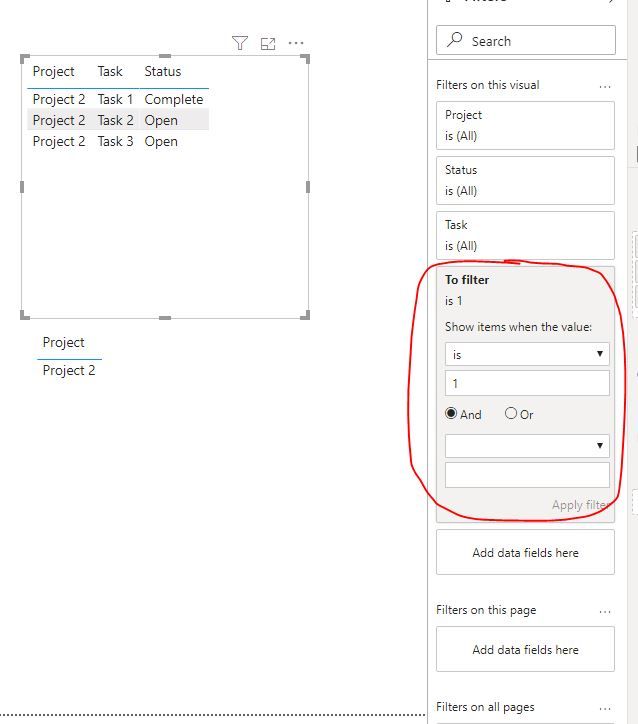
Result:
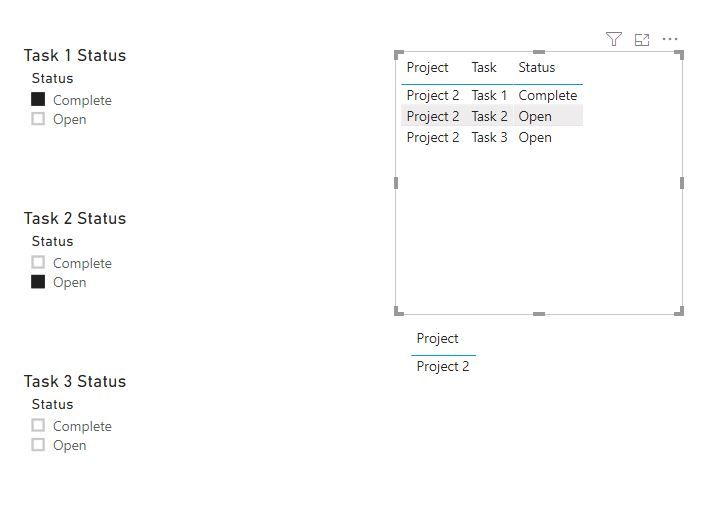
and here is sample pbix file, please try it.
Regards,
Lin
hi @Fossen
For your case, you need to set a slicer for each task, since each task has two status and the status are contradictory, so you could not use only one slicer to get it. Unless you define everything in advance and hard code them into one formula, that will be more difficult if you have many tasks.
For your case, I would suggest you try this way as below:
Step1:
Create a separate status table for each task
Step2:
Then create a measure as below:
To filter =
IF( CALCULATE(MAX('Table'[Status]),FILTER(ALLEXCEPT('Table','Table'[Project]),'Table'[Task]="Task 1")) in VALUES('Task 1 Status'[Status])
&& CALCULATE(MAX('Table'[Status]),FILTER(ALLEXCEPT('Table','Table'[Project]),'Table'[Task]="Task 2")) in VALUES('Task 2 Status'[Status])
, 1,0)
Step3:
Now drag this measure into visual level filter and set filter is 1
Result:
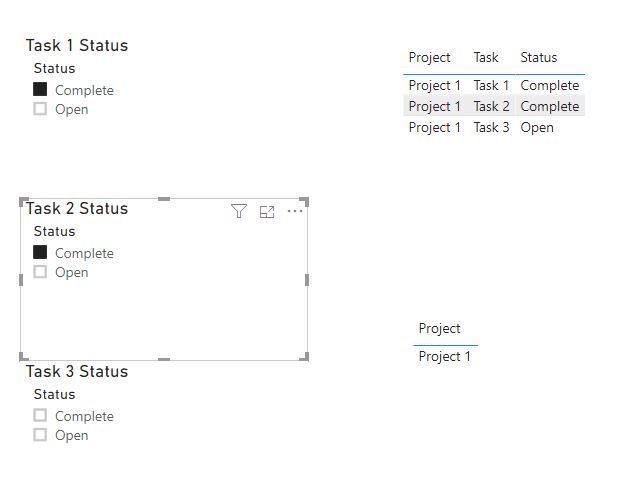
and here is sample pbix file, please try it.
Regards,
Lin
@Fossen, In this case, you need 2 separate tables for tasks and then implement in the measure, there is nothing out of the box if you want to make it dynamic.
One table will be used for completed tasks and other for opened tasks and selection from these slicers will be used in measure to see which meets the criteria.
Subscribe to the @PowerBIHowTo YT channel for an upcoming video on List and Record functions in Power Query!!
Learn Power BI and Fabric - subscribe to our YT channel - Click here: @PowerBIHowTo
If my solution proved useful, I'd be delighted to receive Kudos. When you put effort into asking a question, it's equally thoughtful to acknowledge and give Kudos to the individual who helped you solve the problem. It's a small gesture that shows appreciation and encouragement! ❤
Did I answer your question? Mark my post as a solution. Proud to be a Super User! Appreciate your Kudos 🙂
Feel free to email me with any of your BI needs.
Check out the November 2025 Power BI update to learn about new features.
Advance your Data & AI career with 50 days of live learning, contests, hands-on challenges, study groups & certifications and more!
| User | Count |
|---|---|
| 58 | |
| 43 | |
| 42 | |
| 23 | |
| 17 |
| User | Count |
|---|---|
| 190 | |
| 121 | |
| 96 | |
| 65 | |
| 46 |