Join us at FabCon Atlanta from March 16 - 20, 2026, for the ultimate Fabric, Power BI, AI and SQL community-led event. Save $200 with code FABCOMM.
Register now!The Power BI Data Visualization World Championships is back! Get ahead of the game and start preparing now! Learn more
Hello,
I am working on a dashboard in which I have a Matrix which has several measures and the totals are manipulated and fixed using the following approach:
if(COUNTROWS(values('Customer'[Country]))=1, [Measure_Impact], CALCULATE(sum ('Customer'[Impact])- [Measure_Impact_Correction]))
If I sum the total column values and the toal row values they do not match and it is ok as they are considering different metrics. What I can see in the bottom right corner of the Matrix is the sum of the total row values.
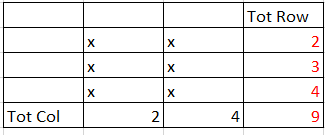
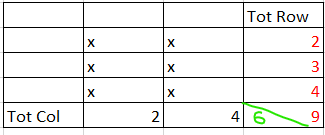
I'd like to show two different values in this cell; i.e., the sum of the values of the last row and the sum of the values of the last column. Is it possible? (Like in the picture below)
Hi @artur4 ,
Unfortunately, as far as I know so far, you can't display two values in a matrix cell at the same time, it shows the value you calculated.
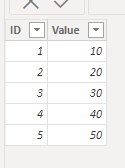
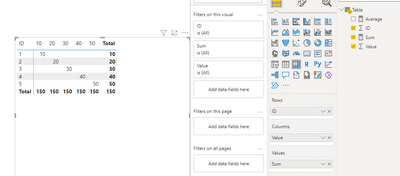
I can take a simple test:
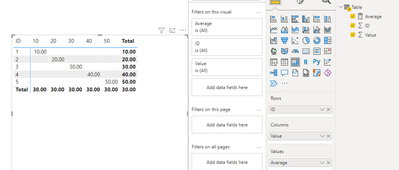
Then I create the measures:
Average = CALCULATE(AVERAGE('Table'[Value]), ALLEXCEPT('Table','Table'[ID]))Sum = CALCULATE(SUM('Table'[Value]), ALLEXCEPT('Table', 'Table'[ID]))
Hope this helps you. Here is my PBIX file.
Best Regards,
Community Support Team _Yinliw
If this post helps, then please consider Accept it as the solution to help the other members find it more quickly.
The Power BI Data Visualization World Championships is back! Get ahead of the game and start preparing now!
| User | Count |
|---|---|
| 41 | |
| 39 | |
| 37 | |
| 29 | |
| 24 |
| User | Count |
|---|---|
| 118 | |
| 98 | |
| 70 | |
| 69 | |
| 65 |