Join us at FabCon Atlanta from March 16 - 20, 2026, for the ultimate Fabric, Power BI, AI and SQL community-led event. Save $200 with code FABCOMM.
Register now!The Power BI Data Visualization World Championships is back! Get ahead of the game and start preparing now! Learn more
Hello,
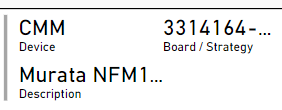
Is there a way to show more, if not all, information on a multi-row card without having to make the card bigger? For example, in the screenshot for board / strategy and description, there is a "..." to indicate more information but is there a way just to display all of it?
Thank you
Solved! Go to Solution.
Solved by using single-row cards and putting them together
Not really, no tooltips for card visuals. You can make the font smaller...
Hi @samanthamirae,
As I posted in your identical thread on the Service forum:
To my knowledge, not directly, other than maybe reducing the font size.
My question is, what behavior would you expect to make that work? I can't think of a UI/UX-friendly reason to pack a ton of into into a tiny square.
Additionally, try to keep questions in their respective forums. This is clearly a Desktop question, and double-posting generally isn't helpful.
The Power BI Data Visualization World Championships is back! Get ahead of the game and start preparing now!
Check out the November 2025 Power BI update to learn about new features.
| User | Count |
|---|---|
| 59 | |
| 43 | |
| 42 | |
| 23 | |
| 17 |
| User | Count |
|---|---|
| 190 | |
| 122 | |
| 96 | |
| 66 | |
| 47 |